
You have a website to build. You have heard great things about both Framer and Webflow. You open a dozen browser tabs, read a handful of comparison posts, and you still come away confused because most of them read like they were written by someone who has never actually used either tool.
This guide is different. It is built on hands-on experience with both platforms and reflects where each one stands right now, in 2026, not two years ago. Both Framer and Webflow are genuinely impressive no-code website builders.
Both will let you ship a beautiful site without writing a single line of code. But they are designed for very different users, and picking the wrong one will cost you time, money, and a lot of frustration.
By the end of this post, you will know exactly which platform fits your project, your workflow, and your budget.
Framer vs. Webflow: Quick Comparison
| Feature | Framer | Webflow |
|---|---|---|
| Best For | Designers, startups, landing pages, marketing teams | Agencies, enterprises, content-heavy and e-commerce sites |
| Learning Curve | Low to moderate (Figma-like feel) | Moderate to steep (visual CSS/HTML logic) |
| Starting Price (Paid) | $10/month (Basic) | $14/month (Basic Site Plan) + Workspace plan |
| CMS Capability | Good for smaller projects and marketing sites | Excellent for large, complex, content-driven sites |
| E-commerce | Via third-party (Shopify, LemonSqueezy) | Native, full-featured e-commerce |
| Animations | Smooth, motion-first, Framer Motion built in | Snappy and powerful (GSAP-powered interactions) |
| SEO Tools | Solid for most sites; simpler controls | Advanced and granular; better for large-scale SEO |
| AI Features | Native AI layout generation, copy assist | AI integrations; less native depth than Framer |
| Client Handoff | Free editor seats for Pro Experts; smooth transfer | Requires client paid Workspace; less seamless |
| Performance | Very fast; lightweight pages | Excellent; auto asset compression, JS/CSS minification |
| Team Collaboration | Included in plans (up to 10 seats on Pro) | Separate Workspace plan required; adds to the monthly cost |
| Ideal User | Designer, solo founder, marketing team | Developer, agency, growing business |
What Are Framer and Webflow, Really?
Before getting into the details, it helps to understand what each platform was actually built to do, because that context shapes every decision they have made since.
Framer
Framer started in 2014 as a prototyping tool for designers. For several years, it was primarily used to create interactive mockups rather than finished websites. That changed around 2022, when Framer pivoted hard into becoming a full website builder. The bet paid off.
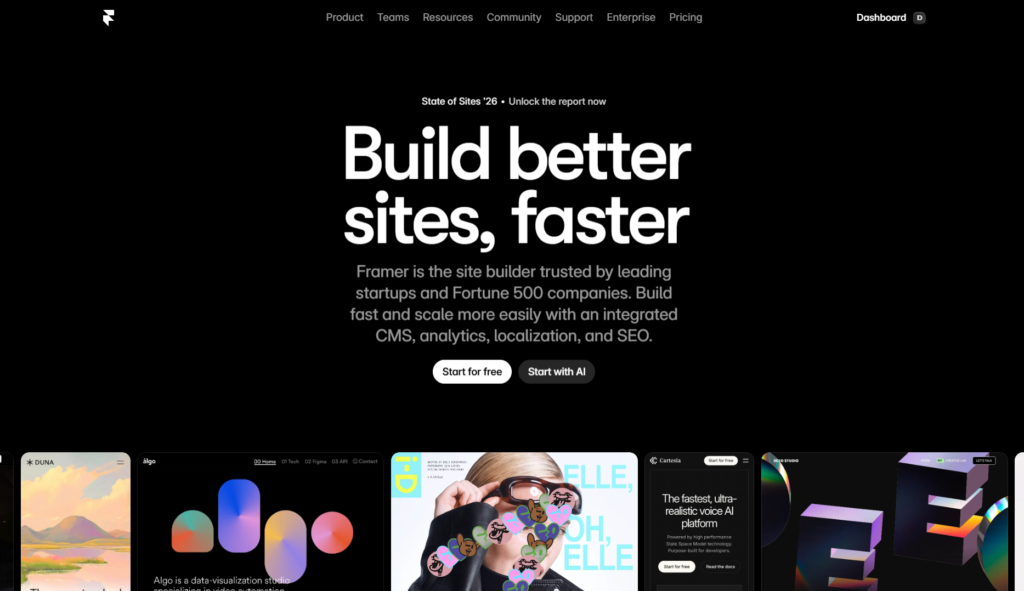
In August 2025, Framer raised $100 million in Series D funding at a $2 billion valuation, and the platform now reports over 500,000 monthly active users. It hosts hundreds of thousands of live websites, with that number climbing fast.
Framer is headquartered in Amsterdam with offices in San Francisco and Barcelona. Its DNA is still firmly designer-first, and that shows in every part of the product.
The core identity difference: Framer feels like using Figma. Webflow feels like writing CSS and HTML visually. Neither description is a complaint; they just describe two different approaches to building websites.
Webflow
Webflow launched in 2013 as a visual web design and development platform. The founding idea was simple but bold: give designers the power to build production-ready websites without handing off files to a developer.
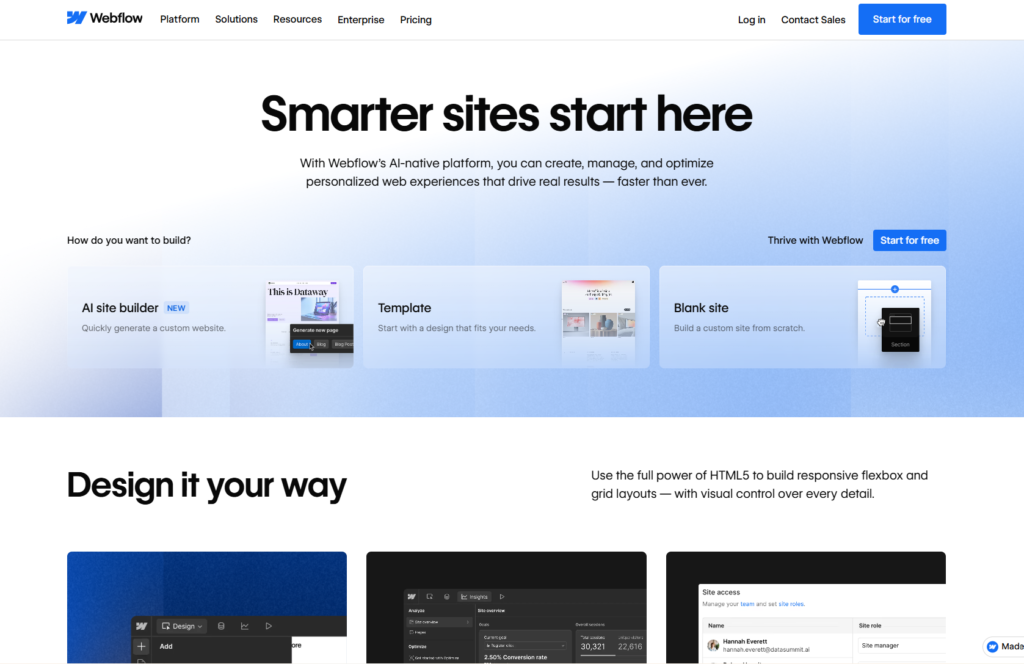
Over the years, it grew into something much bigger. Today, Webflow powers over 720,000 live websites and holds approximately 1.2% of the global CMS market share. With a team of over 1,000 employees, Webflow operates at an enterprise scale, and its platform reflects that. It gives you access to a visual designer, a headless CMS, full hosting infrastructure, e-commerce tools, and a deep library of integrations, all under one roof.
Design Freedom and Ease of Use
This is probably the most talked-about difference between the two platforms, and for good reason. Where you start in the design process shapes your entire experience.
Framer: Design-First, Fast to Launch
Framer’s canvas is freeform and intuitive. If you have spent any time in Figma or Sketch, you will feel at home within the first hour. You drag elements onto the canvas, resize them freely, stack components, and publish, all without needing to understand CSS box model logic or class inheritance.
The tool is built around speed. Framer’s philosophy is that you should be able to go from idea to published page as quickly as possible. Built-in templates are polished and modern, and the component system is clean enough that you can reuse elements across pages without running into structural friction.
Framer’s AI layout generation tools, which shipped natively in 2025 and have been refined throughout 2026, let you describe a section and watch it appear on the canvas, which is genuinely useful for rapid iteration.
Framer is the right tool when you want a high-quality visual result without spending days learning platform-specific logic. A skilled designer can realistically go from blank canvas to published site in a single day for a landing page or portfolio project.
Webflow: More Control, More Structure Required
Webflow’s interface is built on real CSS principles. Every element lives inside a box, every box has margins and padding and display properties, and every style change you make is applied through a class system. This is not a weakness; it is, in fact, one of Webflow’s greatest strengths. The sites you build in Webflow are structurally clean, highly maintainable, and easy to hand off to a developer for custom work.
But it does mean the learning curve is significantly steeper. New users consistently report spending two to four weeks before they feel genuinely comfortable in Webflow’s editor. The payoff, however, is real. Once you understand how Webflow thinks, you can build almost anything visually, including complex grid layouts, intricate component libraries, and highly customized CMS-driven templates that scale across hundreds of pages.
Webflow also introduced its own AI features for layout suggestions and design assistance, though community feedback in 2026 consistently notes that Framer’s native AI tools feel more tightly integrated into the actual design workflow at this point.
Verdict: Framer wins for ease of use and speed-to-publish. Webflow wins for structural control and long-term maintainability on complex projects.
CMS Capabilities: Where the Gap Is Most Obvious
If you are building a content-heavy site, a blog with hundreds of posts, a case study library, a job board, or any site where dynamic content is central, this category matters more than almost any other.
Webflow CMS: The Mature, Scalable Choice
Webflow’s CMS is genuinely impressive. You can create custom content collections with multiple field types, link collections to each other relationally, build template pages that automatically pull in CMS data, and manage thousands of items with bulk editing tools. The CMS plan supports up to 2,000 CMS items, the Business plan goes up to 10,000, and enterprise plans can go far higher.
What makes Webflow CMS powerful for SEO-focused teams is the template-level metadata management. When you set up a collection, every new item automatically inherits the correct meta title structure, meta description template, and Open Graph settings. You do not have to manually configure SEO settings for each new blog post. That kind of automation matters enormously when you are managing a site with hundreds of content pages.
For teams running serious content operations, Webflow also supports the Editor mode, which lets non-technical content writers update CMS content directly without touching the Webflow Designer. This workflow is clean, reliable, and well-understood across agencies and marketing teams.
Framer CMS: Solid, But Scoped
Framer’s CMS has improved significantly over the past two years. It supports collections, custom fields, and dynamic page generation, which is enough for most marketing sites, startup blogs, and small business content hubs. For teams that publish a few pieces of content per week and maintain a manageable number of pages, Framer’s CMS handles the workload without issue.
The honest limitation shows up at scale. For content-heavy sites with thousands of pages, multiple interlinked content types, and sophisticated filtering or dynamic categorization needs, Webflow CMS is notably more capable. As one widely cited 2026 analysis from Design Revision put it, the gap is closing, but Webflow remains the stronger choice for CMS-driven websites in 2026.
Verdict: Webflow wins clearly on CMS depth and scalability. Framer’s CMS is good enough for most marketing and startup sites, but Webflow is the right tool for serious content operations.
Animations and Interactions
Both platforms support animations, but they approach the problem differently, and the difference in feel is noticeable.
Framer: Motion Is in Its DNA
Framer was built by people who cared deeply about motion. Framer Motion, the open-source React animation library, shares its lineage with the platform itself. Animations in Framer are smooth, physics-based, and easy to implement without touching code. You can set up scroll-triggered animations, hover transitions, entrance effects, and page transitions through a visual interface that feels natural rather than technical.
For marketing sites and portfolios where motion design is central to the brand impression, Framer’s animation tooling is genuinely best-in-class among no-code tools. The results often rival what a developer would build by hand.
Webflow: Powerful, Precise, and GSAP-Backed
Webflow’s Interactions panel gives you precise control over timeline-based animations powered by GSAP, which is one of the most respected animation libraries in web development. The interactions are snappy, performant, and highly customizable. You can trigger animations based on scroll position, mouse movement, page load, and element state.
The tradeoff is that building complex interactions in Webflow takes more setup time than in Framer. The control you get is deeper, but the path to get there is longer. Webflow is particularly strong for precise, developer-grade animation control where exact timing and sequencing matter at a technical level.
Verdict: For most designers and marketing teams, Framer’s animation tools are faster to use and produce visually impressive results. Webflow gives more precise control for complex, multi-step interaction sequences. If motion design is a core priority and speed matters, Framer wins. If technical precision and animation architecture matter more, Webflow is the better fit.
SEO Capabilities: What You Need to Know
Search engine optimization is one of the most practical considerations when choosing a website builder, and the difference between Framer and Webflow in this area is real.
Webflow SEO: Deep, Granular, Enterprise-Grade
Webflow has one of the most robust SEO toolsets available in any no-code platform. You get full control over meta titles and descriptions, canonical tags, Open Graph settings, robot.txt customization, XML sitemaps, 301 redirects, schema markup via custom code blocks, and automatic image alt text management. For large sites where every page matters to organic search performance, Webflow’s SEO controls give you the infrastructure to compete at a high level.
According to an analysis by Omnius published in September 2025, when evaluated across hosting quality, indexing control, schema markup depth, CMS structure, localization support, and redirect management, Webflow offers more flexibility, scalability, and enterprise-grade SEO infrastructure than Framer. This assessment still holds in 2026. Webflow also automatically compresses assets and minifies CSS and JavaScript without requiring any plugins, which supports faster page loads and better Core Web Vitals scores.
It is worth noting that 301 redirects are only available on Webflow’s Pro plan ($30/month) and above. If redirects are part of your SEO strategy, that is a cost consideration to factor in from the start.
Framer SEO: More Than Enough for Most Sites
Framer covers all the SEO basics. You can set meta titles, meta descriptions, canonical tags, indexing controls, Open Graph settings, sitemaps, and redirects through a straightforward built-in interface. The platform’s pages are notably lightweight and fast-loading, which directly supports Core Web Vitals performance.
Where Framer falls short is at scale. Template-level meta management for large CMS collections is less robust than what Webflow offers. Schema markup requires custom code. Localization and hreflang implementation, critical for multilingual or international sites, is more limited.
For a focused marketing site, a startup’s primary site, or a portfolio, Framer’s SEO tools are entirely adequate. For a growing media publication, an e-commerce brand with thousands of product pages, or any site where organic search is the primary growth engine, Webflow’s depth is worth the added complexity.
Both platforms meet Google’s Core Web Vitals targets for 2026, which require LCP below 2.5 seconds, INP below 200ms, and CLS below 0.1, when images are properly optimized and render-blocking resources are managed.
Verdict: Webflow wins on SEO depth and scalability. Framer is solid for smaller sites and marketing teams where a focused keyword set covers most needs.
Pricing Breakdown: What You Actually Pay?
Pricing is where a lot of comparison posts fail readers by being vague. Here is a precise, honest look at what each platform actually costs in 2026.
Framer Pricing
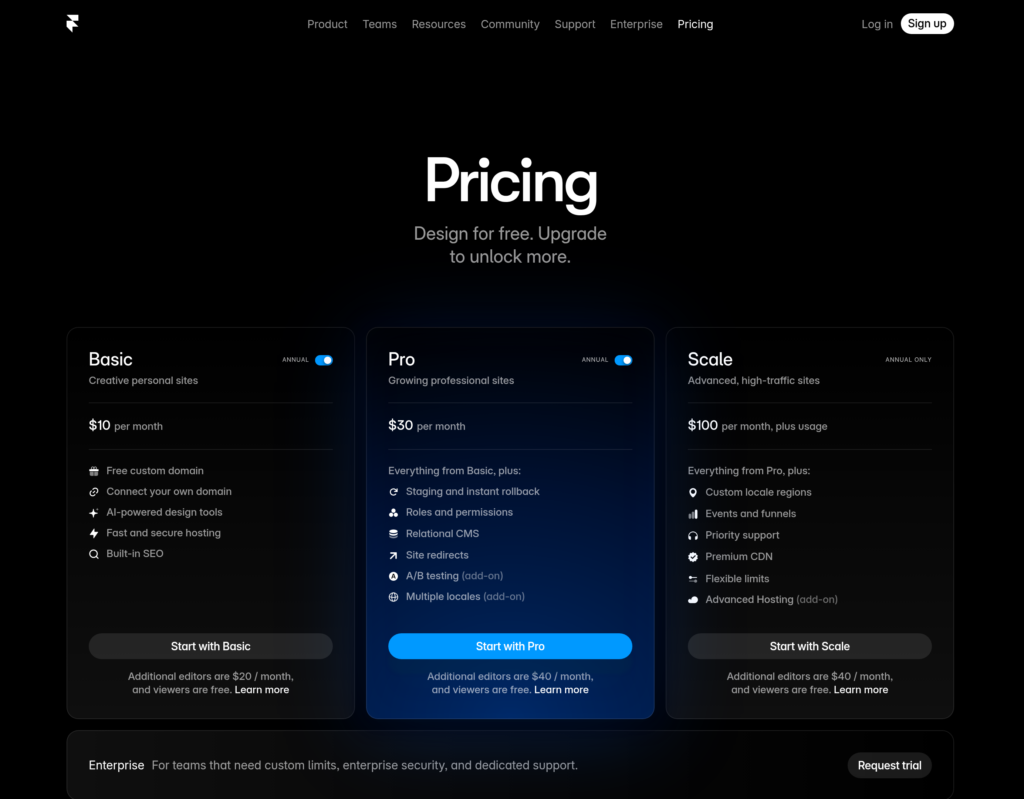
Framer’s pricing is refreshingly simple. Every paid plan includes hosting, and team collaboration seats are bundled in, so the sticker price is much closer to your actual monthly cost.
- Free Plan: One project, Framer subdomain, limited pages. Good for testing.
- Basic ($10/month, billed annually): Custom domain, unlimited pages, 2 editor seats, basic CMS.
- Pro ($30/month, billed annually): 10 editor seats, staging environments, password protection, more CMS items.
- Enterprise: Custom pricing, advanced security, SLA, dedicated support.
Framer also offers Purchasing Power Parity pricing for users outside the United States, which means substantially lower rates in countries like India, Brazil, and Southeast Asia. Webflow does not offer this.
Webflow Pricing
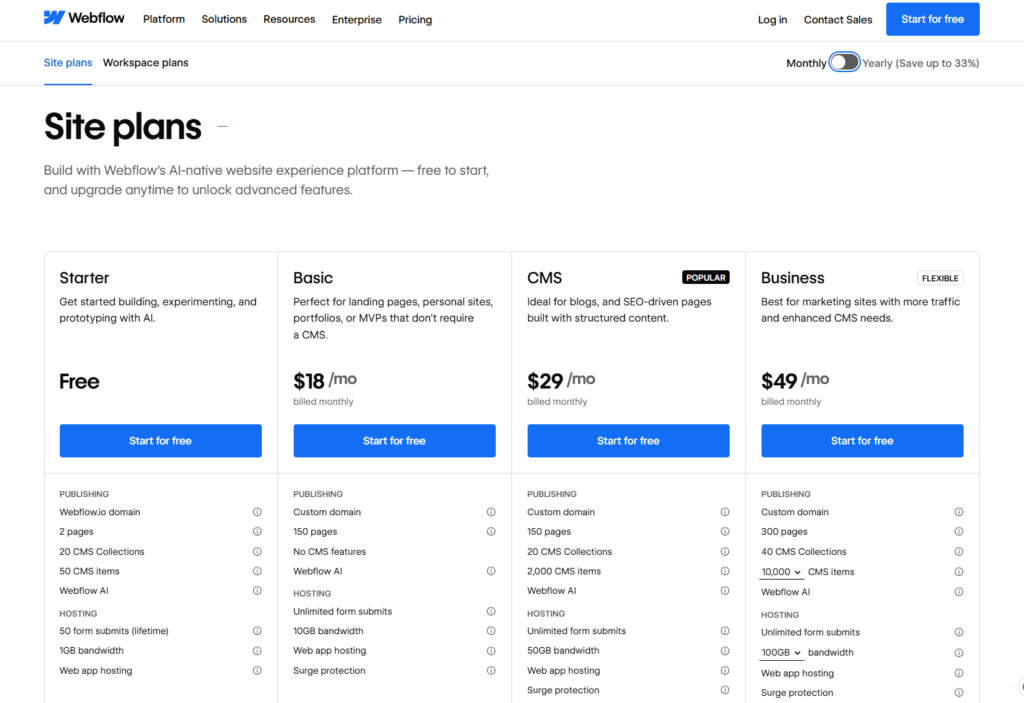
Webflow separates what you pay to build (Workspace plans) from what you pay to host (Site plans). This matters a lot for teams and agencies.
Site Plans:
- Basic ($14/month): Custom domain, no CMS.
- CMS ($23/month): Up to 2,000 CMS items, 3 content editors.
- Business ($39/month): Up to 10,000 CMS items, 10 content editors.
- Enterprise: Custom pricing, SOC2 compliance, advanced security, dedicated support.
Workspace Plans (required for team collaboration):
- Solo users can manage with a free Workspace.
- Teams need a paid Workspace plan, which starts around $19/month and adds per-seat costs.
- For an agency managing five client CMS sites, factoring in both the Workspace plan and the individual Site plans, total monthly costs typically run $160 to $200.
The Real Cost Comparison
For a solo user with one site, Framer saves you roughly $144 per year compared to Webflow’s CMS plan. For a team of three people, Framer’s bundled editor seats keep costs predictable; Webflow’s dual-plan structure adds $40 to $100 per month on top of hosting.
At the agency scale, the costs converge. Webflow’s client billing feature, which lets agencies transfer hosting costs directly to clients, and its shared component libraries often justify a similar price point for professional operations.
Verdict: Framer is more affordable for solo users, small teams, and freelancers. Webflow’s higher price reflects greater feature depth, and for agencies managing multiple large client sites, the cost difference shrinks considerably.
E-commerce: A Clear Winner
If you need to sell products online, this category makes the decision straightforward.
Webflow has full native e-commerce. You get product management, inventory tracking, custom checkout flows, payment processing, order management, abandoned cart recovery, and discount code functionality, all built into the platform. The e-commerce plans add a transactional fee on top of the hosting cost, but the native integration is clean and capable for most direct-to-consumer brands.
Framer does not have native e-commerce. You can integrate with Shopify to sync products, display shopping carts, and process payments, or use tools like LemonSqueezy for digital product sales. These integrations work, but they involve third-party tools and additional setup. The experience is functional for simple use cases, like a buy button for a single digital product or a Shopify-powered storefront embedded into a marketing site, but it is not comparable to what Webflow offers natively.
Verdict: Webflow wins this category without question. If e-commerce is a core part of your site, choose Webflow.
AI Features: The 2026 Landscape
AI has moved from a novelty to a practical part of both platforms’ feature sets, but the depth and integration vary.
Framer shipped native AI tools that are baked directly into the editor. You can describe a layout, a section, or a component in plain language and watch Framer generate it on the canvas. Copy assistance is available inline, which speeds up the content drafting process without leaving the design environment. The AI feature set reflects Framer’s broader philosophy: reduce friction between idea and shipped product. Community feedback from early 2026 consistently rates Framer’s AI tools as more intuitive and workflow-integrated than Webflow’s.
Webflow also supports AI-assisted layout suggestions and has integrated AI into portions of its workflow, but its approach has been more measured and less front-and-center in the product experience. Webflow’s custom code capabilities mean that teams can embed external LLM APIs, connect to AI tools via third-party integrations, and build AI-powered features into their sites, but the native in-editor AI tooling has not matched Framer’s depth as of early 2026.
For teams where AI-assisted design iteration is a meaningful part of daily workflow, Framer currently holds the advantage.
Verdict: Framer leads on native AI integration in 2026. Webflow is a stronger platform for building AI-powered web experiences through custom code and integrations.
Collaboration and Client Handoff
Anyone who has handed off a finished website to a client knows that this part of the process can either be smooth or a complete mess, depending on the platform.
Framer: Client-Friendly by Design
If you are a freelancer or agency building sites for clients, Framer has one feature that stands out clearly. When you become a Framer Pro Expert, you can join client projects as a project editor at no additional cost. The client does not need their own paid plan to collaborate with you during the build.
Framer also supports a Project Transfer feature. When you complete a site, you can transfer it to a client cleanly without any downtime. The client takes ownership, and the handoff is seamless. This is a practical, real-world advantage that solo designers and small agencies benefit from on every client project.
Team collaboration in Framer works in real-time, and the multiplayer experience feels close to what you get in modern design tools like Figma. Editor seats are bundled into plans, so you are not surprised by per-seat charges when a content writer needs access.
Webflow: Capable, But Adds Client Cost
Webflow’s collaboration model is powerful at agency scale, but it adds friction for smaller operations. For a client to edit their own site content, they either need their own paid Workspace plan or you need to manage the site under your agency Workspace indefinitely. There is no clean, zero-cost handoff option for clients comparable to what Framer offers.
At the agency level, Webflow’s client billing feature, which lets you pass hosting costs directly to clients through the Webflow billing system, is genuinely useful and reduces administrative overhead. Shared component libraries across client projects are also a real productivity advantage for teams building multiple sites with consistent design systems.
Verdict: Framer offers a simpler, more cost-effective client handoff experience. Webflow’s collaboration tools are more powerful at an agency scale but come with additional cost and complexity for clients.
Performance: Page Speed and Core Web Vitals
Site performance has a direct impact on both user experience and search engine rankings, so it deserves a focused look.
Both Framer and Webflow are capable of meeting Google’s Core Web Vitals benchmarks for 2026, which target LCP under 2.5 seconds, INP under 200ms, and CLS under 0.1. The structural performance of either platform is not inherently limiting, but there are real differences in how each handles it by default.
Webflow automatically compresses assets, minifies CSS and JavaScript, and serves content through a global CDN. This happens without any additional configuration, which means most Webflow sites perform well out of the box. A 2025 audit by the Gemeos agency, which evaluated 50 sites built on each platform, found that Webflow sites consistently scored well on mobile PageSpeed Insights, partly because Webflow does not insert unnecessary analytics scripts by default.
Framer’s pages are extremely lightweight and fast. The platform’s modern React-based architecture means pages load quickly, and the hosting infrastructure is solid. One area to watch: Framer inserts some analytics scripts by default, which can increase the initial page weight if not managed. Turning off or replacing these scripts is straightforward, but it is something to be aware of.
For most sites on either platform, performance will not be the deciding factor. Both are fast. Both meet Core Web Vitals targets with proper image optimization and basic best practices in place.
Verdict: Performance is a draw at the site level. Both platforms deliver fast, well-optimized output when used correctly.
Framer vs. Webflow: The Ecosystem and Templates
The template marketplace and third-party ecosystem around a platform affect how quickly you can get started and how much help you can find when things get complicated.
Webflow’s template marketplace is large and well-established. There are hundreds of paid and free templates across nearly every industry and use case, and a significant portion of them are built by professional designers and agencies.
Webflow University, the platform’s official learning resource, is one of the best educational resources in the no-code space, covering everything from beginner fundamentals to advanced CMS architecture and JavaScript integration. The broader Webflow community across Reddit, YouTube, and professional Slack groups is large, active, and genuinely helpful.
Framer’s template ecosystem has grown quickly since its pivot to a full website builder. The quality of Framer templates skews toward modern, visually striking marketing and SaaS designs, which reflects the platform’s core user base. Community resources and tutorials are growing, though they have not yet reached the depth of Webflow’s educational content library.
For developers who want to extend either platform with custom code, both support HTML, CSS, and JavaScript embeds. Framer also supports custom React components, which is a notable advantage for teams that already work in React and want to build complex interactive UI elements without leaving the platform.
Verdict: Webflow wins on ecosystem maturity, educational resources, and community size. Framer’s template quality is strong for its target use cases, and its React component support is a real differentiator for technical teams.
Framer vs. Webflow: Who Should Use Which?
By this point in the comparison, the right choice for most users is becoming clearer. Here is a practical summary based on real-world use cases.
Choose Framer If:
- You are a designer who wants to build and publish sites without learning how CSS layout systems work in depth.
- You want to ship a polished landing page, startup site, portfolio, or marketing campaign quickly.
- You are a solo founder or a small marketing team that needs a beautiful site without a long ramp-up period.
- You value speed of iteration over structural depth. You want modern, motion-rich designs with minimal setup.
- You are a freelancer who builds sites for clients and wants a clean, cost-free handoff experience.
- You care about AI-assisted design tools being part of your day-to-day workflow. Your content needs are manageable, meaning a few dozen to a few hundred pages rather than thousands.
Choose Webflow If:
- You are building a content-heavy site where the CMS needs to handle thousands of pages, multiple content types, and relational linking.
- You are an agency building long-term websites for corporate or enterprise clients who expect deep customization and system-level control. E-commerce is a core function of the site.
- You need enterprise-grade SEO infrastructure, including structured data, advanced redirects, and localization support.
- You want the largest available ecosystem of integrations, templates, and developer resources.
- You are comfortable investing time in learning a more complex platform in exchange for greater long-term flexibility.
- You manage multiple client sites and need client billing, shared libraries, and team workspace features.
Final Verdict: Framer vs. Webflow
Both Framer and Webflow are genuinely excellent platforms. Neither one is objectively better; they are optimized for different outcomes, and the right answer depends entirely on what you are trying to build.
Framer is the faster, more intuitive, and more design-forward tool. For startups, designers, solo founders, marketing teams, and freelancers who want to ship beautiful websites quickly without a steep learning curve, Framer is the smarter choice in 2026. Its AI tools are well integrated, its client handoff experience is smooth, its pricing is straightforward, and the results look great without requiring deep platform expertise.
Webflow is the more powerful, more scalable, and more structurally rigorous tool. For agencies, enterprise teams, developers, and businesses where the website is a core growth engine rather than a design deliverable, Webflow provides the infrastructure to support that growth. Its CMS depth, SEO controls, native e-commerce, and mature ecosystem make it the right foundation for sites that need to scale, handle large volumes of content, or perform at a technical level that demands precise control.
If you are still on the fence, use this one question to decide: Is your website primarily a design and brand statement, or is it primarily a content and growth machine? If it is the former, choose Framer. If it is the latter, choose Webflow. That single distinction maps more accurately to the actual strengths of each platform than any feature-by-feature checklist.
Frequently Asked Questions: Framer vs. Webflow
Is Framer better than Webflow?
It depends on your use case. Framer is better for designers, startups, and marketing teams that prioritize speed, design quality, and ease of use. Webflow is better for content-heavy sites, agencies, e-commerce builds, and projects that require deep CMS and SEO infrastructure.
Is Framer cheaper than Webflow?
Yes, in most comparisons. Framer’s Basic plan starts at $10/month and includes hosting and editor seats. Webflow’s equivalent setup typically costs more once you factor in both the Site plan and the Workspace plan for team collaboration.
Can Framer replace Webflow?
For many use cases, yes. Framer has closed the gap significantly since 2022 and now handles most marketing and startup website needs effectively. Where Webflow still holds a clear advantage is in large-scale CMS-driven sites, native e-commerce, and enterprise SEO workflows.
Which is better for SEO: Framer or Webflow?
Webflow offers more granular and scalable SEO controls, making it the stronger choice for sites where organic search is a primary growth channel. Framer’s SEO tools are solid for most marketing sites and perform well on Core Web Vitals, but they do not match Webflow’s depth at scale.
Does Framer have e-commerce?
Not natively. Framer supports integrations with Shopify and LemonSqueezy for e-commerce functionality, but it does not have a built-in e-commerce system. Webflow has full native e-commerce.
Which platform is easier to learn?
Framer is significantly easier to learn, especially for designers already familiar with Figma. Webflow has a steeper learning curve because it is built on visual CSS logic, but it offers more structural control once mastered.
