
If you have been shopping for a faster way to design and launch a website, you have probably seen Framer and Relume mentioned in the same breath. They both use AI, they both promise to shrink the time between idea and finished page, and designers talk about them constantly. That makes a head-to-head comparison feel natural.
Here is the catch: they are not direct competitors. Framer is a complete website builder that lets you design, host, and publish a live site. Relume is an AI-powered planning and component tool that generates sitemaps, wireframes, and layouts, then exports them to other platforms such as Figma, Webflow, and React. Relume cannot publish a website on its own.
So the real question is not “which one wins?” It is “which one fits the way you work?” Choose Framer if you want one tool that takes you from design to a live, hosted website. Choose Relume if you already build in Figma or Webflow and want to speed up planning and layout work. Many professionals will find that the answer depends on their role, their stack, and how much of the build they want to control.
This guide explains what each tool does, where they overlap, how pricing compares, and which one makes sense for freelancers, agencies, startups, and small businesses.
Framer vs. Relume: Quick Comparison
| Category | Framer | Relume |
|---|---|---|
| What it is | A full website builder with built-in hosting | An AI sitemap, wireframe, and component library tool |
| Can it publish a live site? | Yes | No, you export to another platform |
| Hosting included | Yes | No |
| Best for | Designers, startups, marketing teams, portfolios | Agencies and designers who work in Webflow, Figma, or React |
| AI features | Generates pages and layouts inside the editor | Generates sitemaps, wireframes, copy, and style guides |
| Component library | Yes, plus a marketplace of community templates and components | 1,000+ components for Figma, Webflow, and React |
| CMS | Yes, built in | No, you use the CMS of your destination platform |
| Export options | No code export | Figma, Webflow, React |
| Learning curve | Moderate | Low to moderate, but you still need another tool to finish |
| Free plan | Yes | Yes, limited to one project and one page |
| Typical paid cost | Roughly $10 to $30 per month per site | Roughly $26 to $32 per month per user and up, depending on plan and billing |
What Is Framer?

Framer is a visual website builder with a design-tool feel. If you have used Figma, the canvas, frames, and stacks will seem familiar. You design pages, add interactions and animations, connect a CMS, and publish to a live site from the same workspace. Hosting, SSL, and a global delivery network are handled for you.
Three features set Framer apart. The first is design control, especially for animation, scroll effects, and interactive components. The second is its built-in set of marketing tools, including a CMS, localization, redirects, and A/B testing. The third is flexibility for developers, since you can add custom code and React components when the visual tools are not enough.
Framer also includes AI generation. Describe the site you want, and the tool produces a first draft you can edit in the canvas. It is a faster way to get past a blank page, though the output still needs your judgment, your brand, and your copy.
What Is Relume?
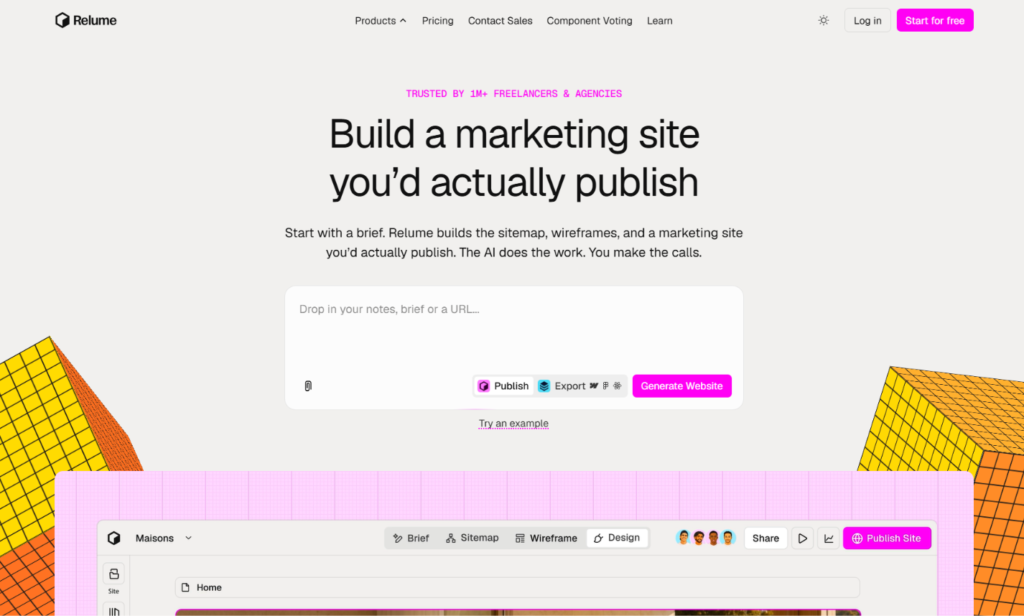
Relume began as a component library for Webflow and has grown into a broader AI-assisted design workflow. You describe your business, and the tool generates a sitemap, then wireframes for each page, built from a large library of pre-designed sections. You can also generate copy, build a style guide with colors and typography, and swap components until the layout looks right.
The library includes more than 1,000 components for Figma, Webflow, and React. Once you are happy with the structure, you export it to the platform where you will finish the job. Relume has also added ways to connect with AI coding tools, including a library connection for AI code editors and an option to send a design system to Claude.
The important point is what Relume does not do. It does not host your site, provide a CMS, process forms, or publish pages. It is a planning and production accelerator that sits in front of other tools.
The Core Difference: Builder vs. Accelerator
This single distinction explains almost every other difference in this article.
Think of building a house. Framer is the construction site: you design the structure, build it, and move in. Relume is a very fast architect’s studio: it produces floor plans and room layouts in minutes, but someone still has to build the house somewhere else.
That is why comparing them directly can mislead. A freelancer who needs a live website this week can use Framer alone. A Webflow agency that spends days on wireframes might use Relume to cut that time and still finish everything in Webflow. And some teams will use Relume to plan a project, then build it in Figma and Webflow, never touching Framer at all.
Workflow Comparison
A typical Framer workflow
- Start from a template, an AI-generated draft, or a blank canvas.
- Design and refine pages in the editor.
- Connect a CMS for blog posts or dynamic content.
- Add animations, forms, and integrations.
- Connect a domain and publish.
Everything happens in one place, which keeps handoffs to a minimum.
A typical Relume workflow
- Describe the project and generate a sitemap.
- Generate wireframes for each page from the component library.
- Add or adjust copy and build a style guide.
- Export to Figma, Webflow, or React.
- Finish design, development, CMS setup, and publishing in the destination tool.
Relume saves the most time in steps one to three. Steps four and five depend entirely on what you do next, and they require another platform, often with its own subscription and learning curve.
Design Freedom and Customization
Framer gives you fine control over layout, spacing, typography, and motion. Because you are working in the final environment, what you design is what visitors see. You can build custom scroll animations, page transitions, and interactive elements without code, and you can reuse components across the whole site through variants.
Relume gives you speed and consistency. Its components are well structured, responsive, and built to work with design systems. The trade-off is that sites assembled quickly from a shared library can start to look alike. Designers who use Relume often mention that you need to put in real effort on typography, imagery, color, and spacing to make a site feel distinct. That is not a flaw in the tool so much as a reminder that components are a foundation, not a finished design.
Verdict: Framer for custom, brand-led design. Relume for fast, structured layouts that you will refine elsewhere.
AI Features
Both tools lean on AI, but they apply it to different parts of the process.
Relume’s AI is strongest early in a project. It turns a short brief into a logical sitemap, suggests which sections each page needs, and fills wireframes with draft copy. For agencies, that can remove a lot of tedious scoping work. It is especially useful for marketing sites, where page types and section patterns are fairly predictable.
Framer’s AI works inside the design environment. You can generate pages and layouts, then adjust them directly. Because the editor and the publishing platform are the same, there is no export step between generating a draft and seeing it live.
Neither tool replaces strategy. AI can suggest a page structure, but it cannot know your customers, your offer, or your competitive position. Treat generated sitemaps and copy as a first draft to question, not an answer to accept.
Verdict: Relume for early-stage planning. Framer for generating and publishing in one flow.
Components, Templates, and Starting Points
Relume’s component library is its flagship feature. With more than 1,000 components, you can assemble pages quickly using hero sections, feature blocks, testimonials, pricing tables, footers, and more. The components are designed to follow consistent naming and structure, which helps teams stay organized.
Framer offers full templates and individual components, including many from independent designers in the Framer Marketplace. Templates tend to be complete, visually polished sites you can customize, rather than a library of building blocks for you to assemble from scratch.
In practice, Relume is closer to a parts catalog and Framer is closer to a showroom. If you prefer to build from modular sections, Relume’s approach is appealing. If you want to start from a finished design and adapt it, Framer’s templates are a better fit.
Verdict: Relume for modular, section-based building. Framer for complete templates and visual polish.
Hosting, Publishing, and Technical Basics
This is where the gap is widest.
With Framer, hosting is included. You connect a custom domain on a paid plan, publish, and your site is live. Framer handles security certificates, delivery, and updates. You do not need a separate hosting account.
With Relume, there is nothing to host. After you export, you need a destination such as Webflow, a Figma-to-code workflow, or a React project. That means more accounts, more costs, and more setup. For teams that already work that way, it is a normal part of the process. For a small business owner who just wants a site, it is a major hurdle.
Verdict: Framer, easily, for anyone who wants a finished site without extra tools.
CMS and Content Management
Framer has a built-in CMS. You can create collections for blog posts, case studies, team members, or product listings, then display them in templates that follow your design. Editors can update content without touching the layout.
Relume does not include a CMS because it does not run your website. If you export to Webflow, you would use Webflow’s CMS. If you export to React, you would connect a headless CMS or build your own system.
Verdict: Framer, because the CMS is part of the product.
SEO and Performance
Google does not rank sites higher because of the tool they were built with. What matters is crawlable pages, fast loading, mobile usability, and genuinely helpful content. Neither Framer nor Relume can guarantee rankings.
Still, there is a practical difference. Framer gives you direct control over titles, meta descriptions, URLs, headings, alt text, redirects, sitemaps, and structured data through custom code, and it publishes pages with a lean, optimized foundation. Relume helps with SEO earlier in the process. A well-planned sitemap, logical page hierarchy, and clear section structure can improve how your content is organized before you write a word. But the final technical SEO depends on the platform you export to and on how well you build it.
Verdict: Framer for technical SEO controls in one place. Relume for planning site structure and page hierarchy.
E-Commerce and Advanced Functionality
Neither tool is a full e-commerce platform. Framer does not include a native store, so you typically connect services such as Shopify, Stripe, Lemon Squeezy, or similar tools. Relume has no commerce features at all, since it only generates layouts.
If your website needs a complete store, bookings, or memberships, both options are a poor primary choice. A platform like Wix, Shopify, or Squarespace will suit you better. If you are weighing that kind of project, our Framer vs. Wix comparison explains where each builder fits.
Verdict: Neither. Look at a dedicated e-commerce platform.
Collaboration and Team Workflows
Framer supports real-time collaboration. Designers, marketers, and developers can work in the same project, comment on pages, and publish changes quickly. Editor seats are priced separately from site plans, so team costs are worth checking.
Relume is priced per user and includes team plans, with sharing and commenting features. Because its output moves into Figma or Webflow, much of the ongoing collaboration happens in those tools. It works well in an agency pipeline, where strategists, designers, and developers each have a clear stage of the process.
Verdict: Framer for end-to-end collaboration. Relume for agency pipelines with distinct stages.
Learning Curve
Relume is easy to start with. Describing a project and generating a sitemap takes minutes, and swapping components is intuitive. The learning curve appears afterward, when you need to finish the build in Figma or Webflow. Webflow in particular has a reputation for a steep learning curve, which means Relume’s simplicity covers only the first part of the journey.
Framer has a moderate learning curve at the start, especially for people new to design tools, but you learn one product instead of several. For solo creators and small teams, that is often the smarter investment.
Verdict: Relume is easier to start. Framer is easier to finish.
Pricing: Framer vs. Relume
Both companies have changed their plans recently, and published prices vary slightly between sources. The numbers below are approximate and based on annual billing. Confirm current prices on each official pricing page before you buy.
Framer pricing
- Free: Framer subdomain with a Framer badge.
- Basic: Around $10 per month per site, with a custom domain.
- Pro: Around $30 per month per site, with higher limits.
- Enterprise: Custom pricing.
Framer charges per site, and editors are billed on top of site plans. Monthly billing costs more than annual.
Relume pricing
- Free: One project, one page, limited AI usage, and basic Figma export.
- Starter: Paid plan with unlimited pages and a larger set of components. Prices are listed at roughly $26 to $32 per month depending on the source and billing period.
- Pro: Full component library with Figma, Webflow, and React export, plus extras such as a Chrome extension and design system export.
- Team: Per-user pricing for agencies and larger groups.
Relume is priced per person, and paid plans include a free trial.
What the sticker price leaves out
The cost comparison is not as simple as “Framer is $10 and Relume is $26.” Framer’s price includes hosting, a CMS, and a publishing platform. Relume’s price covers planning and components only. If you export to Webflow, you also pay for Webflow hosting. If you build in Figma, you may need a Figma seat as well. For many projects, the total cost of a Relume workflow ends up higher than a Framer-only workflow.
On the other hand, if you already pay for Webflow and Figma and build many sites a year, Relume can pay for itself through time saved on each project.
Verdict: Framer for the lower total cost on a single site. Relume can be worth it when time saved across many projects matters most.
Limitations to Know Before You Choose
Framer limitations
- No native e-commerce system
- No code export, so your site lives on Framer’s platform
- Pricing depends on sites and editors, which can add up for large teams
- A smaller app ecosystem than long-established builders
Relume limitations
- Cannot host or publish a website
- Works with Figma, Webflow, and React, so it is less useful on other platforms
- Best suited to marketing sites and landing pages, rather than complex product interfaces
- Output can look generic unless you invest in customization
- Requires additional tools and costs to complete a project
Can You Use Framer and Relume Together?
Sometimes, though not in a one-click way. Relume exports to Figma, and Framer offers tools for bringing Figma designs into its canvas. A designer could theoretically plan in Relume, refine in Figma, then rebuild or import into Framer. That route adds steps, and some layout details may need cleanup, so it is not the smoothest path for most people.
If you want a fast plan and a fast launch, it is usually simpler to pick one workflow. Use Framer alone for a design-and-publish process. Use Relume with Webflow or Figma if that is where your team already works.
Who Should Choose Framer?
Framer is the better choice if you:
- Want to design, build, and publish in one tool
- Are a solo founder, freelancer, or small team that needs a polished site quickly
- Care about animation, interactions, and a distinctive visual identity
- Need a built-in CMS for a blog or content library
- Prefer one subscription over a stack of tools
- Want a marketing site, portfolio, or landing page with fast iteration
Who Should Choose Relume?
Relume is the better choice if you:
- Run an agency or design studio that works in Webflow or Figma
- Spend too much time on sitemaps and wireframes
- Want a large library of consistent, responsive components
- Hand projects between strategists, designers, and developers
- Build many marketing sites and want a repeatable process
- Are comfortable with the tools you will use to finish the build
Real-World Scenarios
A founder launching a startup landing page. Framer. You can generate a draft, refine the design, and publish in a day without extra tools.
A Webflow agency scoping a ten-page client site. Relume. Sitemaps and wireframes take minutes, and the export fits the existing workflow.
A freelance designer building a personal portfolio. Framer. Design freedom and built-in hosting are a better match than a planning tool.
A product team prototyping a marketing page for stakeholders. Relume if wireframes are the goal, Framer if a live, clickable page is the goal.
A small business owner with no design background. Neither is ideal. A simpler builder such as Wix or Squarespace may suit you better.
A developer building a custom React site. Relume’s React components and library connections may help. Framer is a better fit when you want to avoid coding the whole site.
How to Decide: A Short Checklist
- Do you need to publish a live site from the tool? If yes, choose Framer.
- Do you already work in Webflow or Figma? If yes, Relume may fit your workflow.
- Is planning or building your biggest bottleneck? Planning points to Relume. Building points to Framer.
- Do you want one subscription or a stack of tools? One subscription points to Framer.
- How many sites do you build each year? Many sites make Relume’s per-project savings more valuable.
Before paying for either tool, try the free plan. Generate a small project in Relume, build a landing page in Framer, and see which process feels natural.
Frequently Asked Questions
Is Relume a website builder?
Not in the usual sense. Relume generates sitemaps, wireframes, and layouts, but it cannot host or publish a website. You export your work to Figma, Webflow, or React to finish and launch it.
Is Framer better than Relume?
They do different jobs, so “better” depends on your needs. Framer is better if you want a complete builder that publishes your site. Relume is better if you want to speed up planning inside a Webflow or Figma workflow.
Can I publish a website with Relume?
No. You must export to another platform, such as Webflow, to publish.
Does Framer have an AI website builder?
Yes. Framer can generate pages and layouts from a prompt, which you then edit and publish in the same editor.
Which is cheaper, Framer or Relume?
Framer is usually cheaper for a single site because hosting and a CMS are included. Relume’s plans cost more per person and do not cover hosting, so you will pay for another platform as well.
Is Relume good for beginners?
It is easy to start with, but beginners still need to learn another tool to finish a site. Framer, or a simpler builder like Wix, is usually friendlier for first-time site owners.
Does Relume work with Framer?
Relume does not export directly to Framer. Its main export paths are Figma, Webflow, and React. You could bring Figma designs into Framer, but it requires extra work.
Is Framer good for SEO?
Yes. Framer provides the standard controls you need, including meta tags, clean URLs, redirects, and sitemaps. Rankings still depend on content quality, search intent, and authority.
Can agencies use Framer instead of Webflow?
Many do, especially for design-led marketing sites. Webflow offers deeper CMS and logic features for some projects, while Framer tends to be faster and simpler for polished marketing pages.
Does Relume have a free plan?
Yes. The free plan is limited to one project and one page, with basic Figma export. Paid plans unlock more pages, components, and export options.
What are the best alternatives to Framer and Relume?
Webflow, Wix, Squarespace, and Figma-based workflows are common alternatives. Webflow suits advanced marketing sites, Wix and Squarespace suit small businesses, and Figma suits design-first teams.
Final Verdict: Framer or Relume?
Framer and Relume solve different parts of the same problem.
Choose Framer if you want a single tool that takes you from idea to live website. It is the stronger choice for founders, freelancers, startups, and small teams who want design quality, built-in hosting, and a CMS without managing a stack of subscriptions.
Choose Relume if you are a professional designer or agency that already builds in Webflow or Figma and wants to cut the time spent on sitemaps, wireframes, and component assembly. It works best as an accelerator in a pipeline, not as a standalone builder.
If you are still unsure, start with whichever tool matches your bottleneck. If your trouble is getting a site live, Framer solves it. If your trouble is planning and structure on projects you already know how to finish, Relume will save you time.
Features, plan names, and prices change often, so check each company’s official pricing page before you subscribe.
