
A year or two ago, building a website meant choosing a template or hiring a developer. In 2026, there is a third path. You can type a sentence into an AI tool and watch a working site appear. Lovable has become one of the best-known tools for that approach, and it keeps showing up next to Framer in searches, forum threads, and founder chats.
The comparison makes sense on the surface. Both help you launch without a traditional development team. Both are popular with startups and solo builders. Both have free plans. Yet they come from opposite directions. Framer starts with design: you shape every pixel on a visual canvas, then publish. Lovable starts with conversation: you describe what you want, and AI writes the code.
The short answer: choose Framer if you want a polished, fast, brand-led website such as a marketing site, portfolio, landing page, or blog. Choose Lovable if you want to build a web application with logins, a database, and custom features, and you are happy to steer AI through prompts. For a standard website, Framer is usually the safer, cheaper, and more controllable option. For an app or MVP, Lovable can save weeks of work.
This guide compares Framer and Lovable across ease of use, design control, features, SEO, security, code ownership, and pricing. It also covers the hidden costs, the risks of AI-generated code, and how to use the two tools together.
Framer vs. Lovable: Quick Comparison
| Category | Framer | Lovable |
|---|---|---|
| What it is | A visual no-code website builder with a CMS and hosting | An AI builder that generates full-stack web apps from prompts |
| Best for | Marketing sites, portfolios, landing pages, blogs | Web apps, MVPs, dashboards, internal tools |
| How you build | Visual canvas, templates, and AI assistance | Chat prompts that generate and edit code |
| Design control | Very high, with pixel-level precision and animation | Good, though precision depends on prompts |
| Backend and database | CMS only | Generated backend, typically built on Supabase |
| Code export | No | Yes, through GitHub sync |
| Mobile apps | Not applicable | Web apps only |
| Pricing model | Flat monthly plans per site | Credit-based plans, with extra backend costs possible |
| Predictable cost | High | Moderate to low |
| Technical skill needed | Low to moderate | Low to start; app logic and security benefit from experience |
| Free plan | Yes | Yes, with a small daily credit allowance |
What Is Framer?
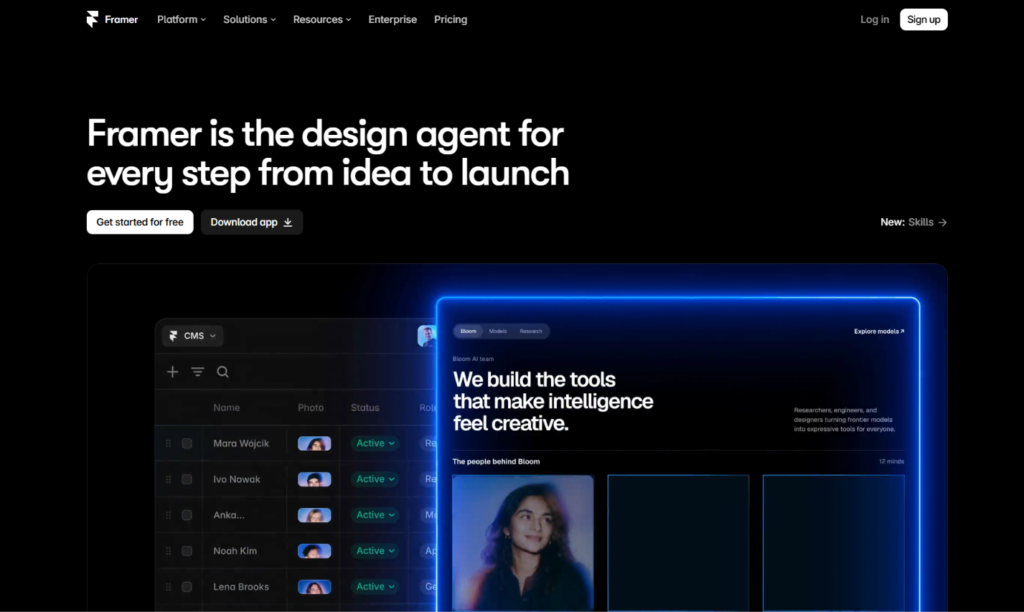
Framer is a visual website builder with a design-tool feel. If you have used Figma, the canvas, frames, stacks, and components will look familiar. You design pages, add animations and interactions, connect a CMS, and publish to a live site without leaving the editor. Hosting, security certificates, and delivery are handled for you.
Its strengths are design control, a built-in toolkit for marketing teams (CMS, localization, redirects, A/B testing), and flexibility for developers who want to add custom code or React components. Framer also includes AI tools that draft pages and layouts for you to refine. It revised its plans in mid-2026, adding AI credits and changing editor pricing, so check current details before you buy.
The defining trait is predictability. What you see in the editor is what visitors get, and the monthly price stays steady.
What Is Lovable?
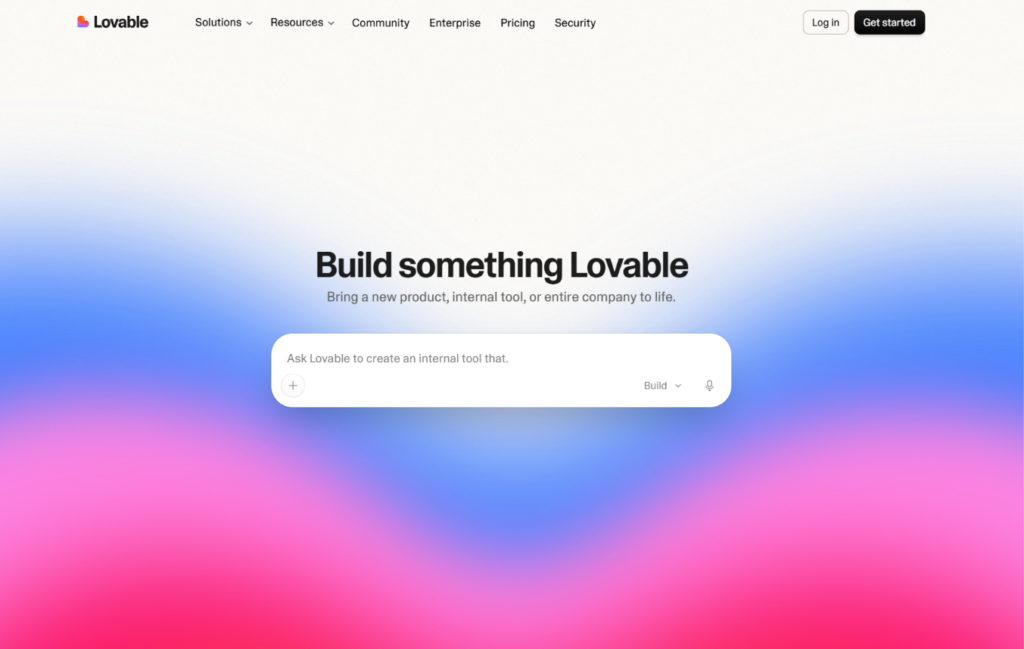
Lovable is an AI app builder in the “vibe coding” category. You describe an idea in plain English, such as “a booking site for my yoga studio with client accounts,” and Lovable generates a working application. Published reviews describe the output as a React front end connected to a Supabase backend, which handles the database, user authentication, and file storage. Paid plans can host the finished app for you.
After the first draft, you keep chatting to change it: adjust the layout, add a feature, fix a bug, connect a payment tool. Lovable also offers GitHub and GitLab sync, so a copy of your code lives outside the platform, and its paid plans add custom domains and private projects.
It is helpful to see Lovable as a fast way to build software, not simply a faster way to make a website. It can produce marketing pages, but its real strength is interactive products.
The Core Difference: Design Tool vs. AI Coder
Here is a simple comparison. Framer is like working with a skilled graphic designer who also publishes your site. You make the decisions, you see the results instantly, and nothing surprising happens. Lovable is like working with a very fast junior developer. You give instructions, it writes code quickly, and you review what it produced. The speed is impressive, but you need to check the work.
Neither approach is better in the abstract. A bakery, consultant, or agency usually needs a beautiful, reliable site, which suits Framer. A founder who needs user accounts, saved data, and custom workflows needs an application, which suits Lovable.
The question to ask is not “which tool is more advanced?” It is “am I building a website for people to read, or a product for people to use?”
Ease of Use and Learning Curve
Framer asks you to learn a few concepts, such as stacks, breakpoints, and component variants. Designers pick them up quickly, and beginners can start from templates. Because the editor is visual, you can always see what you are changing, and undoing a mistake is simple.
Lovable is easier to start with, because you type what you want. The learning curve shows up as your project grows. You need to write clear, specific prompts, test every change, and notice when something stops working. AI builders can introduce regressions, where a new change breaks something that worked before. Builders who succeed with Lovable tend to work in small steps, test often, and keep their code synced to GitHub as a safety net.
Verdict: Lovable is faster to begin. Framer is easier to control and maintain.
Design Quality and Customization
Framer gives you fine control over typography, spacing, layout, and motion. You can build scroll animations, hover effects, page transitions, and interactive components without code, then reuse them across the site through components. The output looks consistent because you define the system.
Lovable can produce clean, modern interfaces, and it has been improving at visual polish. Still, design happens through conversation, and the AI interprets your words. It works well for functional layouts, dashboards, and typical app screens. It is less precise for exact spacing, a distinctive brand identity, or detailed animation, and an adjustment to one element can shift others. Many teams generate a first version in Lovable and then refine the design by hand in code.
Verdict: Framer for brand-led, pixel-precise design. Lovable for functional interfaces where speed matters more than fine polish.
Features and Functionality
This is where Lovable has a clear advantage.
Framer excels at pages, content, and marketing features. You get a CMS for blogs and case studies, localization, redirects, forms, and A/B testing. It connects to outside tools for more advanced needs, but it does not run custom server logic.
Lovable can generate user sign-up and login, databases, dashboards, role-based access, API connections, payments, and AI features inside your product. If your project needs things to happen when a user signs in, saves data, or pays, Lovable gives you a path that a website builder cannot.
The trade-off is responsibility. More features mean more places for bugs and security gaps to hide, and you are accountable for testing and maintenance, even though AI wrote the code.
Verdict: Framer for websites and content. Lovable for applications and custom logic.
CMS, Blogging, and Content Management
Framer’s built-in CMS is a major strength. Marketers can create collections for blog posts, case studies, or resources, then design templates that display each entry. Editing content does not touch layout, and new entries turn into new pages automatically.
With Lovable, content management is something you build. You can ask the AI to create a blog with a database and an admin screen, and it may work well enough. But you will be maintaining a custom system instead of using a mature, tested CMS, and your editors will not get the polished writing experience of a dedicated tool.
Verdict: Framer, clearly, for content-driven websites.
SEO and Performance
Google does not favor a website because of the tool that built it. It rewards crawlable, fast, mobile-friendly pages with helpful, original content. Both tools can support that goal, but they begin from different places.
Framer gives you direct control over page titles, meta descriptions, clean URLs, headings, alt text, redirects, sitemaps, and structured data through custom code. It publishes pages on a lean foundation that helps with Core Web Vitals, and marketers can manage everything themselves.
Lovable’s SEO depends on how the generated code renders. Reviews describe its output as a React application, and many React apps load content in the browser instead of sending finished pages from the server. That can make it harder for search engines to process your content. If organic search matters, ask for pre-rendered or server-rendered pages, give every page its own title and meta description, generate a sitemap, and test with Google Search Console and PageSpeed Insights. These steps are doable, but Framer handles most of them by default.
For many teams, the simplest answer is to keep the search-focused marketing pages on a tool built for it and put the interactive product elsewhere.
Verdict: Framer for SEO-driven websites. Lovable for apps where search traffic is secondary, or for teams ready to handle the technical setup.
Security and Reliability
Framer handles hosting, SSL certificates, and updates. Since you are not writing server code or managing a database, the security surface is small, and the platform is mature.
Lovable deserves more caution. Because it produces real application code and databases, security becomes your concern in a way it never is with a website builder. A 2026 audit reported in third-party reviews found that a large share of scanned Lovable apps had Supabase row-level security disabled, which can leave data exposed. Lovable itself reports security certifications for its platform and offers a security scan feature, but those tools do not replace a careful review of how your own app handles data.
If your app stores personal information, takes payments, or has user accounts, treat security as a launch requirement. Enable row-level security, review permissions, and have an experienced developer check the setup before real customers arrive.
Verdict: Framer for low-risk simplicity. Lovable for capability, with extra care required.
Code Ownership and Lock-In
Framer does not let you export your site as standalone code. Your site lives on Framer’s platform, so a future move means rebuilding pages and setting up redirects.
Lovable offers a stronger exit route. Two-way GitHub and GitLab sync keeps a copy of your code outside the platform, which means a developer can take over later. One caveat from reviewers: data stored in Lovable’s managed backend does not automatically travel with the code. If you leave, you may need to set up your own Supabase project and migrate the schema and data. Plan for that early if the app will hold important information.
Verdict: Lovable for code portability. Framer for simplicity, at the cost of lock-in.
Collaboration and Team Workflows
Framer supports real-time collaboration, comments, and quick publishing, which suits small teams of designers, marketers, and developers. Extra editors are billed separately from site plans.
Lovable bills per workspace rather than per seat, and reviewers note that plans let you invite collaborators without per-seat fees. Its Business tier adds team features such as single sign-on and workspace controls. Because the work happens through chat and code, collaboration works best when someone on the team can read and review the output.
Verdict: Framer for visual teamwork. Lovable for small product teams, especially cost-conscious ones.
Pricing: Framer vs. Lovable
Both companies change plans often, and Lovable has reportedly adjusted its pricing more than once in 2026. Treat the figures below as approximate and confirm them on each official pricing page.
Framer pricing
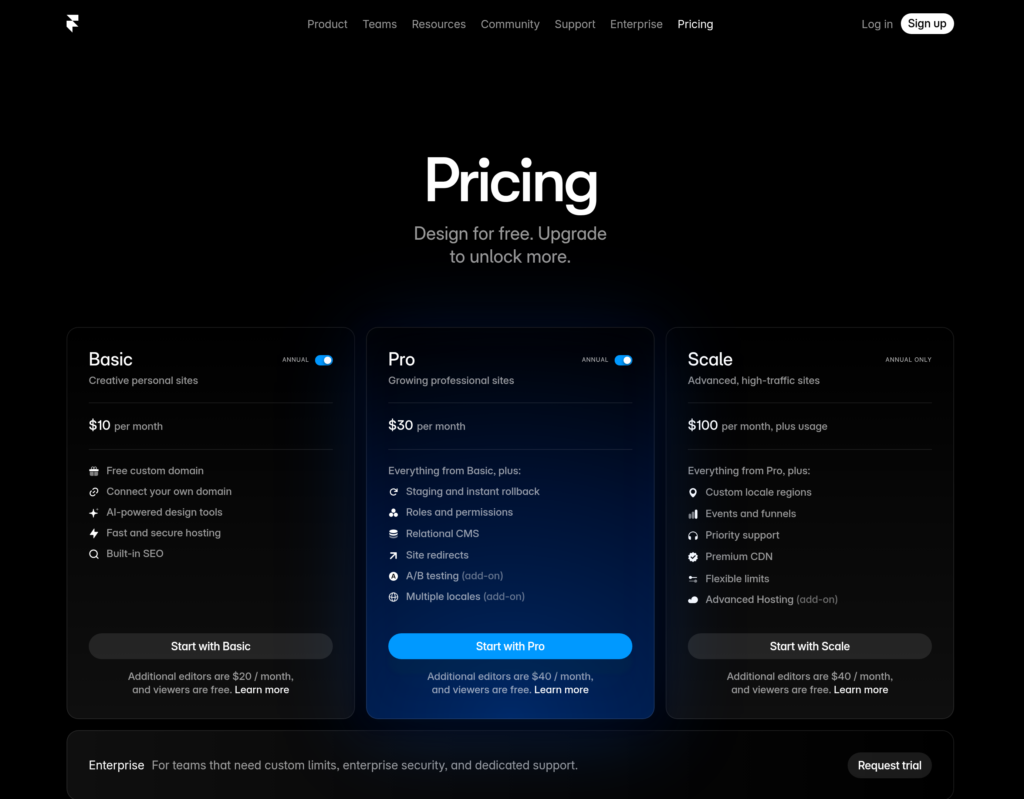
- Free: A framer.website subdomain with a Framer badge.
- Basic: Around $10 per month per site, billed annually.
- Pro: Around $30 per month per site, billed annually.
- Enterprise: Custom pricing.
Framer charges per site, and extra editors are billed on top. You know roughly what you will pay each month.
Lovable pricing
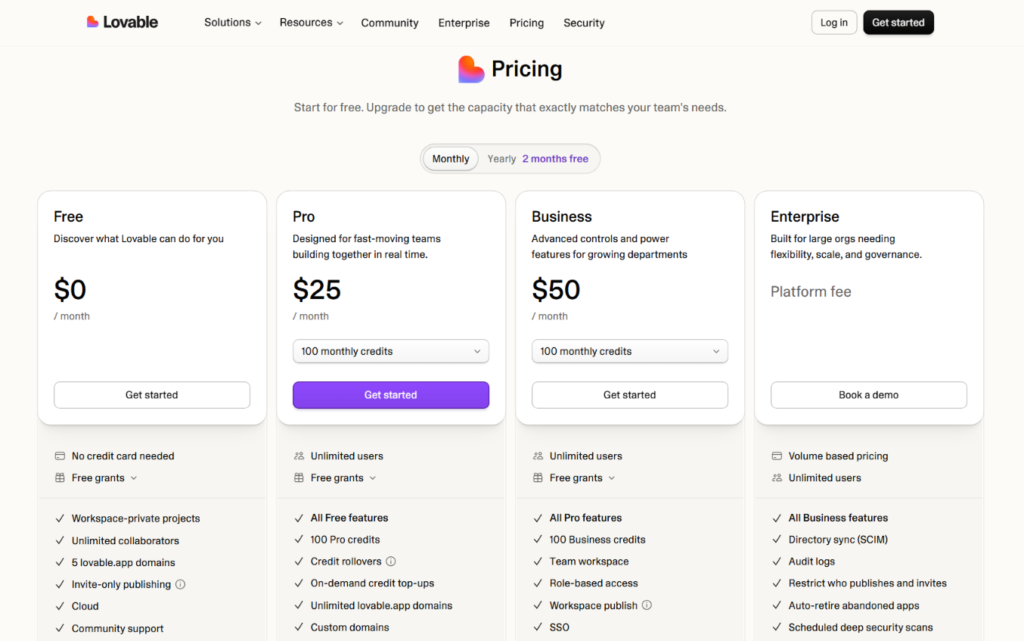
Lovable uses a credit-based model. Based on published pricing guides from mid-2026:
- Free: $0, with a small daily credit allowance, public projects, and Lovable branding.
- Pro: Starting around $25 per month, with custom domains, private projects, and GitHub sync. Higher credit tiers cost more.
- Business: Starting around $50 per month, adding features such as SSO, team workspaces, and data privacy controls.
- Enterprise: Custom pricing.
Credits are used whenever you build or change something, and more complex requests cost more. Top-up credits are available when you run out. Lovable also bills backend and AI usage through the same credit system in some cases, and apps that outgrow free database limits may require a paid Supabase plan.
One third-party estimate puts a solo founder shipping a simple SaaS product at about $60 to $80 per month once the backend and email are included, though your own number will vary.
What the sticker price leaves out
A $25 plan looks cheap, but real costs depend on how efficiently you work. Vague prompts, repeated fixes, and long experiments burn credits. Framer’s cost is steadier, and for a typical marketing site it is lower. Lovable can still be a bargain when it replaces weeks of paid development.
Verdict: Framer for predictable, low-cost websites. Lovable when the savings on development justify variable costs.
Limitations to Know Before You Choose
Framer limitations
- No custom backend or database logic
- No native e-commerce
- No code export, so your site stays on Framer’s platform
- Editors are billed separately
Lovable limitations
- Credit-based pricing makes costs harder to predict
- AI changes can introduce regressions that need testing
- Less precise design control than a visual editor
- SEO needs extra technical attention
- Security and data protection are your responsibility
- Produces web apps only, with no native mobile apps
- Backend data may need migration if you leave
Can You Use Framer and Lovable Together?
Yes, and it is a popular setup for startups. Build the public website in Framer, where design, speed, SEO, and content matter most. Build the product in Lovable, such as a dashboard, client portal, or tool that sits behind a login. Link the two with clear calls to action like “Log in” or “Start free trial,” and keep your branding and typography consistent.
This split gives you a fast, search-friendly front door and a flexible product behind it, and it lets each tool do what it does best.
Who Should Choose Framer?
Framer is the better choice if you:
- Need a marketing website, portfolio, landing page, or blog
- Care about design quality, animation, and brand consistency
- Want a built-in CMS and strong SEO controls
- Prefer predictable monthly pricing
- Want to update the site yourself without touching code
- Do not need a custom backend
Who Should Choose Lovable?
Lovable is the better choice if you:
- Need a web app, MVP, dashboard, or internal tool
- Want AI to write the code, database setup, and logic
- Need user accounts, saved data, or payments inside the product
- Want code you can sync to GitHub and hand to developers later
- Are comfortable testing, reviewing, and iterating
- Can manage variable, credit-based costs
Real-World Scenarios
A freelance designer building a portfolio. Framer. Design control and fixed, low pricing fit the job.
A founder building a membership platform with accounts and payments. Lovable. A website builder cannot handle that logic.
A SaaS startup that needs a marketing site and a product dashboard. Both. Framer for the website, Lovable for the app.
A local restaurant that wants a menu, hours, and a contact form. Framer. A custom app would be overkill.
An operations manager who needs an internal tool for tracking requests. Lovable. It can generate forms, a database, and views without a developer.
A writer who wants a blog and newsletter signup. Framer. The CMS and SEO controls match the need.
How to Decide: A Short Checklist
- Is it mainly a website or an application? Websites point to Framer. Applications point to Lovable.
- Do users need accounts, saved data, or payments? If yes, lean Lovable.
- How important are design precision and brand polish? If very, lean Framer.
- How much does search traffic matter? If it is central, lean Framer.
- Can you handle variable costs, testing, and security checks? If not, lean Framer.
Try both free plans. Build a landing page in Framer and a small app in Lovable, and keep an eye on how quickly credits disappear.
Frequently Asked Questions
Is Lovable a website builder?
Not in the traditional sense. Lovable is an AI app builder that generates full-stack web applications from prompts. It can make websites, but its strength is interactive products with logins and databases.
Is Framer better than Lovable?
It depends on what you are building. Framer is better for design-led websites, blogs, and landing pages. Lovable is better for apps with accounts, data, and custom logic.
Can Lovable replace a developer?
For prototypes and simple apps, it can save a great deal of time. For complex, security-sensitive, or large-scale products, you should still have an experienced developer review and maintain the code.
How much does Lovable cost?
Reported pricing includes a free plan, a Pro plan from about $25 per month, a Business plan from about $50 per month, and custom Enterprise pricing. Credits, backend usage, and top-ups can raise the total. Check Lovable’s website for current details.
Does Framer have a free plan?
Yes. You can publish on a framer.website subdomain for free. Paid plans add a custom domain and higher limits.
Is Framer good for SEO?
Yes. Framer provides meta tags, clean URLs, redirects, and sitemaps, and it produces lean pages. Rankings still depend on content quality, search intent, and authority.
Are Lovable websites good for SEO?
They can be, but it depends on how pages render. Apps that load content only in the browser can be harder for search engines to process. Use pre-rendering or server rendering where possible, and test with Google Search Console.
Can I export my code from Lovable?
Yes. Lovable offers GitHub and GitLab sync so you keep a copy of your code. Data stored in its managed backend may need separate migration if you leave.
Can I export my site from Framer?
No. Framer sites are hosted on Framer’s platform and cannot be exported as standalone code.
Is Lovable secure?
The platform reports security certifications and includes a scan feature, but the security of your app depends on how it is configured. Review database permissions and have a developer check apps that handle sensitive data.
Which is better for beginners?
Lovable is easier to start, since you describe what you want. Framer is easier to control once you learn it, and its visual editor makes mistakes easy to see. Beginners building a simple website usually do better with Framer.
What are the best alternatives to Framer and Lovable?
For Framer, common alternatives are Webflow, Wix, and Squarespace. For Lovable, similar AI app builders include Bolt, Replit, v0, Base44, and Emergent, while Bubble is a mature no-code option for apps.
Final Verdict: Framer or Lovable?
Framer and Lovable solve different problems, and the right choice depends on what you are making.
Choose Framer if you want a beautiful, fast, search-friendly website with a built-in CMS and predictable pricing. It is the stronger tool for marketing sites, portfolios, landing pages, and blogs.
Choose Lovable if you need a real application with accounts, data, and custom features, and you want AI to do most of the coding. It is a strong option for MVPs, internal tools, and products that a website builder cannot support.
If you need both, build the front door in Framer and the product in Lovable. Start with the free plans, test your real use case, and watch the costs before you commit. Features, plans, and prices change quickly in this category, so confirm the details on each company’s official pages.
