
At first glance, Framer and Builder.io look like two answers to the same question. Both give you a visual editor. Both promise that marketers can change pages without waiting for a developer. Both talk about speed, design, and AI. So it is easy to assume they compete head to head and that you can pick the one with the nicer demo.
That assumption is the most common mistake. Framer is a complete website builder: it hosts your site, stores your content, and gives you a canvas to design on. Builder.io is a visual layer that plugs into a codebase your developers already own. One replaces the need for a website stack. The other sits on top of it. Choosing between them without understanding that difference can cost you months of rework and a good deal of money.
The short answer: Choose Framer if you want to design, build, and publish a website on your own, with hosting and a CMS included and no engineering project required. Choose Builder.io if you have developers, an existing React or Next.js codebase, and a marketing team that needs to build and edit pages inside that stack without code deployments.
Framer is built for speed and design freedom. Builder.io is built for engineering-led organizations that want to keep their own code and give content teams a safe way to publish.
This guide compares the two across setup, ease of use, design control, content management, developer experience, SEO, performance, collaboration, AI, and pricing. It also covers the hidden costs that tend to surprise buyers.
Framer vs. Builder.io: Quick Comparison
| Category | Framer | Builder.io |
|---|---|---|
| What it is | A visual no-code website builder with a built-in CMS and hosting | A visual development platform and headless CMS that connects to your codebase |
| Best for | Startups, designers, marketing teams, agencies, portfolios | Engineering-led teams with existing apps, product companies, larger organizations |
| Who sets it up | The person building the site | Developers who register components and connect the SDK |
| Hosting | Included | Not included; your own stack hosts the site |
| Code ownership | No code export | You own all the code in your own repository |
| CMS | Built in | Visual headless CMS (Publish) and data models |
| Design freedom | Very high, on a free-form visual canvas | Limited to the components developers expose, plus design tools |
| Technical skill needed | Low to moderate | Moderate to high for setup; low for day-to-day editing |
| Time to first page | Minutes to hours | Days to weeks, depending on your codebase |
| Pricing model | Flat plans per site | Per-user plans and usage credits, with custom enterprise pricing |
| Free plan | Yes | Yes, with limits |
What Is Framer?

Framer is a visual website builder with a design-tool feel. If you have used Figma, the canvas, frames, stacks, and components will look familiar. You design pages, add animations and interactions, connect a CMS, and publish to a live site without leaving the editor. Hosting, security certificates, and delivery are handled for you.
Its strengths are design control, a built-in toolkit for marketing teams (CMS, localization, redirects, A/B testing), and flexibility for developers who want to add custom code or React components. Framer also includes AI tools that draft pages and layouts for you to refine. It revised its plans in mid-2026, adding AI credits and changing editor pricing, so check current details before you buy.
The defining trait is that it is self-contained. You do not need a repository, a deployment pipeline, or an engineer to publish a page.
What Is Builder.io?
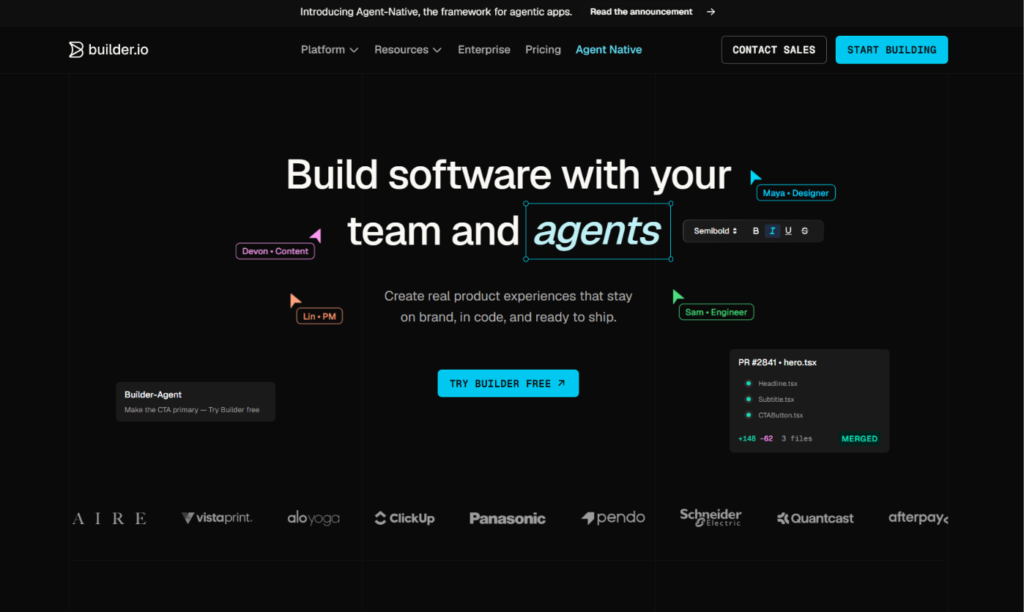
Builder.io is an AI-powered visual development platform. Its two main products serve different needs. Fusion is a visual, agent-assisted environment for building and editing real production code, including turning designs into code that fits your existing project. Publish is a visual headless CMS that lets non-technical teams create, schedule, localize, and update pages using building blocks that developers have approved.
Here is the part that surprises people. Builder.io does not replace your website stack. It embeds into it. Developers connect the platform to an existing application, typically one built with a framework such as React or Next.js, and register the components that marketers are allowed to use. Once that work is done, a marketer can drag those components onto a page, edit content, and publish without filing a ticket.
Some reviewers describe it as closer to a developer-powered visual CMS than a traditional no-code website builder. That is a fair summary. The visual editor is the visible part, and a codebase is doing the real work underneath.
The Core Difference: Standalone Builder vs. Visual Layer on Your Code
Here is a useful way to picture it. Framer is a furnished apartment. You move in, rearrange the furniture, and live there. Builder.io is a set of modular walls and fixtures that a construction team installs inside a building you already own. Once installed, residents can rearrange rooms freely within the limits the builders designed. Without the building, though, the fixtures have nowhere to go.
That is why the two tools suit different organizations. If you are a startup, a freelancer, or a marketing team without engineering support, Framer lets you start immediately. If you run a product company with a large codebase and a design system that must stay consistent, Builder.io lets marketers move faster without bypassing engineering standards.
The question to ask is, “Do I need a website, or do I need to let non-developers edit the website we already have?”
Setup and Time to Launch
With Framer, you can have a page live in an afternoon. Pick a template, edit it visually, connect a domain, and publish. There is nothing to install and nothing to deploy.
Builder.io takes more groundwork. A developer has to install the software development kit, connect the project, register components, and configure how pages render. Reviewers warn that teams sometimes adopt a visual CMS to free developers from landing page edits, then find engineers spending their sprints registering components for the drag-and-drop canvas. That investment pays off at scale, but it is real work.
Verdict: Framer for fast launches. Builder.io for teams willing to invest in setup for long-term payoff.
Ease of Use and Learning Curve
Framer has a moderate learning curve. Concepts like stacks, breakpoints, and component variants take a little time, but designers pick them up quickly, and beginners can start from templates.
Builder.io has two audiences with different experiences. For marketers, the day-to-day editor is easy once the system is set up, because they work with a limited, approved set of components. For developers, the learning curve is steeper, since they need to understand component registration, data models, and how the platform integrates with their framework.
Verdict: Framer is easier for solo builders. Builder.io is easy for editors but demanding for the engineers who set it up.
Design Freedom and Customization
Framer gives you fine control over typography, spacing, layout, and motion. You can build scroll animations, hover effects, page transitions, and interactive components without code, then reuse them across the site. A designer can create something entirely new on the canvas.
Builder.io is deliberately more constrained for editors. Marketers assemble pages from components that developers have registered, which keeps everything consistent with your design system. That protects your brand and your code quality, but it also means new layouts or components require developer involvement. The platform also offers design-to-code features, such as converting Figma designs into code, which helps developers build new components faster.
Verdict: Framer for creative freedom. Builder.io for consistency and governance.
Content Management and Publishing
Framer includes a built-in CMS. Marketers can create collections for blog posts, case studies, or resources, then design templates that display each entry. Editing content does not touch layout, and new entries turn into new pages automatically.
Builder.io’s Publish product works as a visual headless CMS. It supports content models, page building, scheduling, localization, and, on higher tiers, A/B testing and personalization. Because content is delivered through APIs to your own application, it can feed a website, an app, or several channels. That flexibility is useful for larger organizations, though it adds architectural complexity.
Verdict: Framer for simplicity. Builder.io for multi-channel content and enterprise needs.
Developer Experience and Flexibility
Framer is friendly to non-developers while still giving technical users room to work. You can add custom code, write React components, and embed scripts. It is flexible within the platform, but you cannot swap out the underlying architecture, and your site runs on Framer’s infrastructure.
Builder.io is built for developers. You keep your own repository, framework, hosting, and deployment process. The visual editor connects to your code instead of replacing it, and the output is real code you control. For teams with strong engineering standards, that is the main attraction.
Verdict: Builder.io for engineering control. Framer for teams that do not want to manage a stack.
SEO and Performance
Google does not favor a site because of the tool that built it. It rewards crawlable, fast, mobile-friendly pages with helpful, original content. Both approaches can meet that standard.
Framer gives you direct control over page titles, meta descriptions, clean URLs, headings, alt text, redirects, sitemaps, and structured data through custom code. It publishes pages on a lean foundation that helps with Core Web Vitals, and marketers can manage everything themselves.
With Builder.io, SEO and performance depend largely on how your developers implement the integration. A well-built Next.js site with server rendering can be fast and fully crawlable. A poorly configured one can load slowly or hide content from search engines. Builder.io gives you the fields and the flexibility, but the quality of the result sits in your codebase.
Verdict: Framer for strong SEO by default. Builder.io for teams that can engineer excellent performance themselves.
Hosting, Security, and Maintenance
Framer handles hosting, SSL certificates, and updates. There is no server to manage and no code of your own to patch, so the maintenance burden is small.
With Builder.io, hosting, security, and maintenance remain your team’s responsibility, since the site is part of your own application. That gives you control over compliance and infrastructure, and enterprise plans add features such as SSO, role-based access control, and privacy controls. It also means more to look after.
Verdict: Framer for low maintenance. Builder.io for organizations that need infrastructure control.
Code Ownership and Lock-In
Framer does not let you export your site as standalone code. Your site lives on Framer’s platform, so a future move means rebuilding pages and setting up redirects.
With Builder.io, your components and application code stay in your repository, so you own them outright. You do depend on the platform for the visual editor and CMS content, so check how content is stored and exported before you build around it. Even so, the underlying site is yours.
Verdict: Builder.io, for code ownership and portability.
AI Features
Both platforms use AI, but in different ways.
Builder.io has put AI at the center of its Fusion product, with agents that can work on your codebase, create and edit components, and turn designs into code. AI use is metered through agent credits, which affects cost.
Framer’s AI helps you draft pages and layouts inside the editor, which you then refine visually and publish. In 2026 it introduced AI credits as part of its pricing.
In both cases, AI output is a starting point, and code or content it produces should be reviewed.
Verdict: Builder.io for AI that works inside a real codebase. Framer for AI that helps you design and publish quickly.
Collaboration and Team Workflows
Framer supports real-time collaboration, comments, and quick publishing, which suits small teams of designers, marketers, and developers. Extra editors are billed separately from site plans.
Builder.io is built for cross-functional teams where engineers, designers, and marketers each have clear roles. Developers manage components, designers contribute through design-to-code tools, and marketers edit and publish within guardrails. Team plans include sharing and commenting, and enterprise plans add roles, permissions, and single sign-on.
Verdict: Framer for small, fast-moving teams. Builder.io for larger organizations with defined roles.
Pricing: Framer vs. Builder.io
Pricing is where careful reading matters most. Both companies change plans often, and third-party sources disagree on some Builder.io figures, because the platform has separate products with different pricing. Treat the numbers below as approximate and confirm them on each official pricing page.
Framer pricing
- Free: A framer.website subdomain with a Framer badge.
- Basic: Around $10 per month per site, billed annually.
- Pro: Around $30 per month per site, billed annually.
- Enterprise: Custom pricing.
Framer charges per site, and extra editors are billed on top. Hosting and the CMS are included.
Builder.io pricing
Builder.io’s pricing depends on which product you use.
- Fusion (visual development): A free plan, a Pro plan reported at about $24 per user per month, a Team plan reported at about $40 per user per month, and custom Enterprise pricing. Extra agent credits are sold separately, with one source listing $25 per 500 credits.
- Publish (visual CMS): A free tier with limits on users and monthly visual views, paid tiers reported in the range of roughly $39 to $49 per user per month, and custom Enterprise pricing for features such as A/B testing and personalization.
Other sources list per-project pricing for some tiers, which shows how much the structure has shifted. Ask Builder.io directly which plan matches your use.
What the sticker price leaves out
A per-user price looks modest, but costs add up. With Builder.io, you also pay for developer time to set up and maintain the integration, hosting for your own application, and agent credits if you use AI heavily. With Framer, you pay for extra editors and AI credits, but hosting and the CMS come with the plan. For a typical marketing site, Framer’s total cost is much lower. For a large engineering organization that already runs its own stack, Builder.io’s cost may be small compared with the developer time it saves.
Verdict: Framer for lower, predictable costs. Builder.io when the savings in engineering time justify the investment.
Limitations to Know Before You Choose
Framer limitations
- No custom backend or database logic
- No native e-commerce
- No code export, so your site stays on Framer’s platform
- Editors are billed separately
Builder.io limitations
- Requires developers to set up and maintain
- Editors are limited to components that developers register
- Not a standalone site builder, so you need your own codebase and hosting
- Costs can include per-user fees, agent credits, and engineering time
- Pricing structure is complex and varies by product
- Setup takes days or weeks, not hours
Can You Use Framer and Builder.io Together?
Yes, though it is less common. A company might run its product and main application on a Next.js codebase with Builder.io for marketing-managed pages, while keeping a separate Framer site for a campaign or a brand microsite. The two tools can coexist when they serve different parts of the business, but running both for the same pages adds cost and confusion.
For most teams, the better approach is to pick one primary system. If you have no engineering team, start with Framer. If you have a codebase and want marketers to edit it, consider Builder.io.
Who Should Choose Framer?
Framer is the better choice if you:
- Want to design and publish a website without engineering help
- Need a marketing site, portfolio, landing page, or blog
- Care about distinctive design and animation
- Want hosting, CMS, and SEO controls in one product
- Prefer predictable pricing for a small team
- Do not have an existing codebase to connect
Who Should Choose Builder.io?
Builder.io is the better choice if you:
- Have developers and an existing React or Next.js application
- Want marketers to build and edit pages inside your own codebase
- Need to enforce a design system and code standards
- Want to keep full ownership of your code and hosting
- Need multi-channel content delivery through APIs
- Have the budget and engineering capacity for setup
Real-World Scenarios
A startup launching its first marketing site. Framer. You can launch in days without writing code.
A product company with a large Next.js app and a marketing team that waits on developers. Builder.io. Marketers can publish pages using approved components.
A freelance designer building a portfolio. Framer. Design control and low cost fit the job.
An enterprise with strict security and compliance rules. Builder.io, since you keep your own infrastructure and can add enterprise controls.
A small agency building client sites. Framer. Visual control and fast handoff matter more than engineering integration.
A media company publishing across a website and a mobile app. Builder.io, for its headless content delivery.
How to Decide: A Short Checklist
- Do you have developers and an existing codebase? If not, choose Framer.
- Do marketers need to edit pages inside your own application? If yes, lean Builder.io.
- How much creative freedom do your designers need? If a lot, lean Framer.
- Do you need to own your hosting and code? If yes, lean Builder.io.
- How quickly do you need to launch? If it is this week, lean Framer.
Try Framer’s free plan to build a page in an afternoon. If you are considering Builder.io, ask your developers to estimate the setup time before you decide.
Frequently Asked Questions
Is Builder.io a website builder?
Not in the traditional sense. Builder.io is a visual development platform and headless CMS that connects to your own codebase. It does not host your site or replace your application stack.
Is Framer better than Builder.io?
It depends on your team. Framer is better for design-led, standalone websites with no engineering project. Builder.io is better for engineering-led organizations that want to give marketers a visual editor inside their own code.
Does Builder.io require coding?
Setup does. Developers need to integrate the platform and register components. Once that is done, non-technical teams can build and edit pages visually.
What is the difference between Builder.io Fusion and Publish?
Fusion is an AI-assisted visual development environment for building and editing production code. Publish is a visual headless CMS for creating and managing content and pages.
How much does Builder.io cost?
Builder.io offers free plans, per-user paid plans, and custom Enterprise pricing, with different pricing for Fusion and Publish. Reported figures include roughly $24 and $40 per user per month for Fusion tiers, but sources vary. Confirm current pricing on Builder.io’s website.
Does Framer have a free plan?
Yes. You can publish on a framer.website subdomain for free. Paid plans add a custom domain and higher limits.
Is Framer good for SEO?
Yes. Framer provides meta tags, clean URLs, redirects, and sitemaps, and it produces lean pages. Rankings still depend on content quality, search intent, and authority.
Can I export my site from Framer?
No. Framer sites are hosted on Framer’s platform and cannot be exported as standalone code.
Do I own my code with Builder.io?
Your application code and registered components live in your own repository. Content stored in the platform depends on Builder.io, so review its export options.
Can marketers use Builder.io without developers?
Only after developers have set it up. Marketers can then work independently using the approved components, but new components or layouts need developer help.
What are the best alternatives to Framer and Builder.io?
For Framer, common alternatives are Webflow, Wix, and Squarespace. For Builder.io, alternatives include other visual and headless CMS platforms such as Storyblok, Sanity, Contentful, and Plasmic.
Final Verdict: Framer or Builder.io?
Framer and Builder.io both promise faster pages and happier marketers, but they solve different problems for different teams.
Choose Framer if you want to design, build, and publish a website on your own, with hosting, a CMS, and strong SEO controls included. It is the better choice for startups, designers, agencies, and any team that wants to move fast without an engineering project.
Choose Builder.io if you have developers, an existing codebase, and a marketing team that needs to publish inside that stack without code deployments. It is the better choice for engineering-led organizations that value code ownership, governance, and flexibility.
If you are still unsure, ask one question: do you need a website, or do you need to let non-developers edit the one you already have? The first points to Framer. The second points to Builder.io. Test your real use case, get a setup estimate from your developers if you are considering Builder.io, and confirm current plans and prices on each company’s official pages before you commit.
