
If you have tried to work out what a Framer site costs lately, you have probably noticed that no two articles agree. One lists a $100 Scale plan. Another quotes $40 editor seats. A third says Basic allows a single CMS collection. None of them were wrong when they were written. They are simply out of date, because Framer has reshaped its plans twice in under a year.
This guide reflects Framer pricing as it stands in October 2026. It covers every plan, the add-ons that quietly raise a bill, and the billing and refund rules that the pricing cards never mention. By the end, you should be able to estimate your real monthly cost before you enter a card number.
The Short Answer: How Much Does Framer Cost?
Framer is free to build on, and paid site plans start at $10 per month. On yearly billing, Basic costs $10 per month and Pro costs $30 per month. Switch to monthly billing and those prices become $15 and $45. Enterprise has no public price; Framer quotes it on request and bills it annually.
That is the headline, but your actual bill depends on five things: the billing cycle, the number of editors, the number of languages, how far your site grows past its plan limits, and how heavily you use Framer’s AI agents. A simple portfolio can stay at $10 a month for years. A multilingual business site with a small team can pass $150 a month without doing anything unusual.
The rest of this article explains where that difference comes from.
Framer Pricing Plans at a Glance
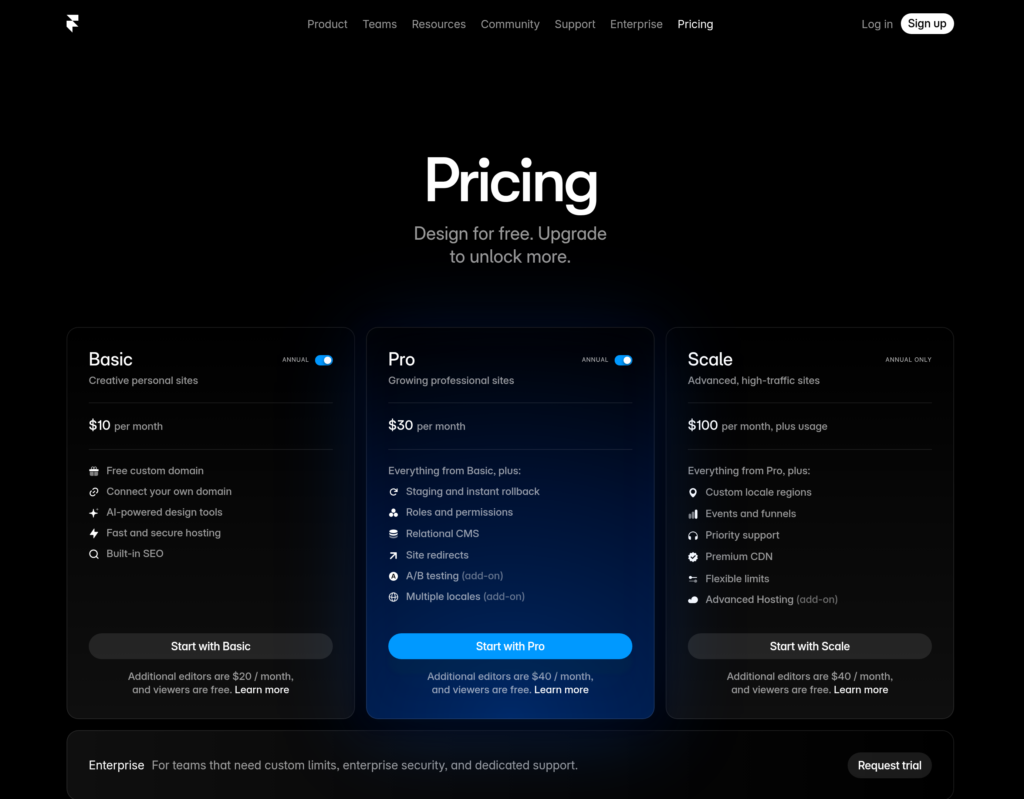
Framer sells its plans per site, which means every published site needs its own subscription. Here is how the four plans compare.
| Plan | Yearly billing | Monthly billing | Best for |
|---|---|---|---|
| Free | $0 | $0 | Designing, testing and non-commercial projects |
| Basic | $10 per month | $15 per month | Portfolios, small business sites, side projects |
| Pro | $30 per month | $45 per month | Business websites, growing CMS sites, small teams |
| Enterprise | Custom | Annual billing only | Large organizations with custom requirements |
And here is what each plan includes.
| Feature | Free | Basic | Pro |
|---|---|---|---|
| Custom domain | No (framer.website only) | Yes | Yes |
| Pages | Up to 1,000 while building | 30 | 150 (up to 700 with add-ons) |
| CMS collections | 10 while building | 2 | 10 (up to 40 with add-ons) |
| CMS items | Not stated | 1,000 | 2,500 (up to 40,000 with add-ons) |
| Monthly bandwidth | 1 GB | 50 GB | 100 GB (up to 2 TB with add-ons) |
| AI credits | 500 to try agents | 1,000 per month | 3,000 per month |
| Redirects and staging | No | No | Yes |
Two things stand out. First, Free offers higher page and CMS limits than Basic, which looks backwards until you understand what each plan is for. Second, Basic has fixed ceilings, while Pro is the only plan whose limits you can raise by paying for more. We will come back to both points.
Why Older Framer Pricing Articles Disagree
Before going plan by plan, it helps to know what changed, because it explains why so many guides contradict each other.
In October 2025, Framer cut five plans down to three: Basic, Pro and Scale. The tiny one-page Mini plan was retired, since most people needed more than a single page. Basic dropped from $15 to $10, and Pro moved from $25 to $30.
Then, in mid-June 2026, Framer launched version 3.0 with AI agents built into the canvas and changed the pricing again. The Scale plan was retired. Additional editor seats were cut from $40 to $20, a new $10 Content Editor seat appeared, and AI credits arrived on every plan. Basic also got a boost, rising to 2 CMS collections (up from 1) and 50 GB of bandwidth (up from 10 GB).
If you are already on a paid site plan, Framer says nothing changes unless you choose to switch. The lower editor price and the new Basic limits, however, applied to everyone straight away.
So how do you spot an outdated article? Look for any mention of a Scale plan, $40 editor seats, or a Basic plan limited to 10 GB of bandwidth. If you see one of those, treat the rest of the numbers with suspicion too.
The Free Plan: What You Can Do Without Paying
Framer describes its Free plan as ideal for non-commercial use, and that is a fair summary. Your site runs on a framer.website subdomain, carries a Made in Framer banner, and gets 1 GB of bandwidth. You also receive a small allowance of AI credits so you can try the agents. Framer says these credits refresh daily and are capped each month well below what Basic includes, so they are meant for experimenting and building a first site, not for heavy use.
The design limits on Free are surprisingly generous. According to Framer’s own FAQ, free projects can hold up to 10 CMS collections and 1,000 pages. That is far more than Basic’s published limits of 2 collections and 30 pages.
The reason is simple. Free is built for designing at full scale, while Basic is built for publishing on your own domain. The moment you want to connect a custom domain, you need a paid plan.
That makes Free a low-risk place to find out whether Framer suits you. You can build a whole homepage, paste in real copy, test the CMS and check how the editor feels before you spend anything. The plan costs nothing, but a full site still costs hours of your time.
Framer Basic: $10 a Month for Small Sites
Basic is where most personal and small business sites begin. At $10 per month on yearly billing, or $15 on monthly billing, it covers a custom domain, 30 pages, 2 CMS collections, 1,000 CMS items, 50 GB of monthly bandwidth and 1,000 AI credits per month. You also get built-in SEO controls, password protection, site search and 30 days of analytics history.
Framer aims Basic at students, freelancers and small studios, and that is the right audience. A portfolio, a freelancer’s site, a local business with a handful of pages, or a blog plus a few service pages all fit comfortably.
The limits are fixed, though. Basic cannot buy extra pages, CMS collections, items or bandwidth. If you need a 31st page or a third CMS collection, you have to move to Pro. It also lacks redirects, staging and team roles, which matters more than it sounds.
Why the Missing Redirects Matter
Imagine you are moving an existing site to Framer and some page addresses will change. Without redirects, anyone following an old link from Google or another website lands on an error page. That hurts both visitors and search rankings. If a migration is part of your plan, Pro’s redirects can justify the higher price by themselves.
Watch the Bandwidth
Fifty gigabytes sounds like plenty, but heavy media eats it quickly. As a rough illustration, a lightweight page of 2 MB served 25,000 times uses about 50 GB. A page loaded with autoplaying video can burn through that allowance in days, not months. If your site relies on video, host it on a dedicated video platform and embed it, or budget for Pro’s bandwidth add-on.
Free Basic for Students
Framer also offers students a Basic-level site free for a year. Eligibility is checked with a school email address and proof of enrollment, and you have to renew while you remain a student. Offer terms change from time to time, so confirm the current rules on Framer’s site before you apply.
Framer Pro: $30 a Month for Business Websites
Pro costs $30 per month on yearly billing or $45 on monthly billing. Framer positions it for professionals, agencies, startups and teams that run their marketing website on Framer.
Compared with Basic, Pro adds the tools that real business sites eventually need: redirects, a staging environment, branching with previews, roles and permissions, and five static files. It also raises the included limits to 150 pages, 10 CMS collections, 2,500 CMS items and 100 GB of bandwidth. AI credits triple to 3,000 per month, analytics history stretches to 90 days, and your site is served from a far larger network of more than 300 CDN locations instead of 20.
That last difference deserves a moment. Speed influences conversions. In a Google-commissioned study of 37 brand websites, Deloitte and 55 found that shaving a tenth of a second off mobile load times lifted retail conversions by 8.4%. The study did not test Framer specifically, but if your visitors are spread across continents, the CDN row in the plan comparison is worth weighing.
How Pro’s Limits Grow
Pro is the plan you scale on. When you hit a limit, you do not have to jump to a more expensive tier. You pay for another block of capacity instead. The ceilings are:
| Limit | Basic (fixed) | Pro included | Pro maximum with add-ons |
|---|---|---|---|
| Pages | 30 | 150 | 700 |
| CMS collections | 2 | 10 | 40 |
| CMS items | 1,000 | 2,500 | 40,000 |
| Monthly bandwidth | 50 GB | 100 GB | 2 TB |
Beyond those ceilings, you are in Enterprise territory.
Framer Enterprise: Custom Pricing
Enterprise has no listed price. Framer describes it as the option for teams that need custom limits, unlimited editors, enterprise-grade security, an uptime guarantee, SSO, SCIM and dedicated support. AI credits are priced with volume discounts, and billing is annual only.
If you are comfortable inside Pro’s ceilings and do not need single sign-on, you almost certainly do not need Enterprise. If you do, the conversation starts with a sales call rather than a checkout page.
Monthly vs Yearly Billing: A 50% Difference
The billing toggle on Framer’s pricing page changes more than the headline price. Choosing monthly billing makes both paid plans 50% more expensive. Over twelve months, Basic costs $180 instead of $120, and Pro costs $540 instead of $360.
Two other things change as well. Add-ons get more expensive, typically by 20% to 50%. And according to Framer’s pricing page, the complimentary first year of a custom domain applies only to yearly plans, so on monthly billing you buy the domain yourself.
Monthly billing is not always the worse choice. A yearly price equals eight monthly payments ($120 divided by $15, or $360 divided by $45). If a site will live for fewer than eight months, such as a campaign microsite or an event page, monthly billing costs less overall. For anything you intend to keep for a year or more, yearly billing wins easily.
One quirk to know about: even on yearly billing, Framer’s help documentation says added editors and usage charges are billed monthly. So a $20 editor on a yearly plan is charged as $20 each month, not as one annual payment.
The Hidden Costs of Framer: What the Pricing Cards Leave Out
The plan price is only the starting point. Here are the costs that tend to catch people off guard.
1. Editor Seats
The workspace owner is free, and so are viewers. Anyone else who needs edit access takes a paid seat. Seats are billed per workspace, not per site, and Basic and Pro allow up to 10 people with edit access.
There are two kinds of seat. A full editor costs $20 per month on yearly billing ($30 on monthly) and can design, edit content and publish. A content editor costs $10 per month ($15 on monthly) and can update the CMS, handle localization and make on-page edits, but cannot redesign pages.
A practical tip: keep reviewers and stakeholders as free viewers until they genuinely need to edit. Also note that members of Framer’s Pro Experts program get free editor seats on client projects, which is a real saving for agencies and freelancers.
2. Translation Locales
Localization is where bills grow fastest. Each translation locale costs $20 per month on yearly billing, or $25 on monthly billing, with up to 20 locales available on Basic and Pro.
Do the arithmetic before you promise a client a multilingual site. A Basic plan with five extra languages costs $110 per month, because the locales cost ten times the plan itself. Add all 20 and the locales alone come to $400 per month. AI-assisted translation also consumes AI credits, although translations you type in by hand do not.
Whether the spend is worthwhile depends on your audience. Research from CSA Research found that 76% of online shoppers prefer to buy products with information in their own language, and 40% will not buy from sites in other languages at all. If you sell internationally, locales can pay for themselves. If you do not, they are an easy line item to skip.
3. AI Credits
Framer’s AI agents run on credits, and every plan includes an allowance. When the allowance runs out, credit-based features pause until the next renewal or until you top up. We cover credits in detail in the next section, because they are a genuinely new cost that did not exist a year ago.
4. Extra Capacity on Pro
When a Pro site outgrows its included limits, add-ons fill the gap. Prices for the full set of paid extras are below.
| Item | Yearly billing | Monthly billing |
|---|---|---|
| Additional editor | $20 | $30 |
| Content editor | $10 | $15 |
| Translation locale | $20 each | $25 each |
| Extra pages (Pro) | $20 per 100 | $30 per 100 |
| Extra CMS collections (Pro) | $40 per 10 | $50 per 10 |
| Extra CMS items (Pro) | $20 per 10,000 | $30 per 10,000 |
| Extra bandwidth (Pro) | $40 per 100 GB | $50 per 100 GB |
| Convert, for A/B testing (Pro) | $50 per 500,000 events | $60 per 500,000 events |
| Advanced hosting (Pro) | $200 per month | $250 per month |
All prices are per month unless noted. Framer says that for some limits, bandwidth included, it may let you exceed the allowance for a month and then email you, rather than cutting your site off. Do not rely on that grace, though. Check your usage regularly.
5. Convert and Advanced Hosting
Two add-ons are exclusive to Pro. Convert handles A/B testing, funnels and custom triggers, and it bills by events such as page views, tracked link clicks and tracked form submissions. At one million events, you would pay about $100 per month on yearly billing.
Advanced hosting, at $200 per month, lets you run multiple sites under a single domain and set custom response headers. It is the right tool when a Framer site needs to live inside a larger domain, and overkill for almost everyone else. It is included with Enterprise.
6. Taxes and Domains
Listed prices do not include sales tax, which Framer adds at checkout based on your location. If you buy a domain through Framer, remember that it renews at its regular price after the first year, so put the renewal date in your calendar.
7. One Plan Per Site
Because pricing is per site, an agency running five client sites on Pro pays for five Pro plans, which is $150 per month on yearly billing. Editor seats are still billed once per workspace.
What Framer Actually Costs: Three Realistic Examples
Plan prices mean little until you add real seats, languages and traffic. These three setups use yearly billing unless stated.
| Site | What you buy | Per month (yearly billing) | Per month (monthly billing) |
|---|---|---|---|
| Personal portfolio | Basic, owner only | $10 | $15 |
| Startup marketing site | Pro, 1 additional editor, 1 content editor | $60 | $90 |
| Agency-built site with two translations | Pro, 2 additional editors, 2 locales, 100 GB extra bandwidth | $150 | $205 |
Over a year, the portfolio costs $120. The startup site costs $720 on yearly billing, or $1,080 on monthly. The agency site comes to $1,800 on yearly billing and $2,460 on monthly, so the billing cycle alone creates a $660 difference.
Each example also has a tipping point. If the portfolio needs redirects, staging or a third CMS collection, it has to move to Pro, which triples the plan price. If the agency site stays within Pro’s included 100 GB of bandwidth, the monthly bill falls to $110 on yearly billing.
None of these totals include the cost of building the site. If a designer or agency builds it, their fee sits on top, and Framer’s subscription keeps running after the handover. Judge the cost of a Framer site as the plan, the seats and the people who run it.
Framer AI Credits Explained
Framer 3.0 introduced AI credits to power its agents, which can generate pages from a prompt or a screenshot, make layouts responsive, write copy and SEO metadata, manage CMS content, audit a site for broken links or accessibility problems, and translate pages. Every plan includes an allowance, and you can buy more at any time.
Framer publishes typical credit costs for common jobs on its default model:
| Task | Approximate credits |
|---|---|
| Generate a landing page | 300 |
| Make a page responsive | 150 |
| Large edit | 100 |
| Small edit | 50 |
Model choice changes the math. Framer measures cost against its default model, which counts as 1x. Sonnet 4.6 costs 0.9x, and Opus 4.8 costs 1.8x. So a landing page costs about 270 credits on Sonnet 4.6, 300 on the default, and roughly 540 on Opus 4.8.
Framer says Basic’s 1,000 monthly credits cover around five landing pages, and Pro’s 3,000 cover about ten. Pro’s figure matches the 300-credit estimate. Basic’s does not: 1,000 divided by 300 is closer to three. Framer notes that exact costs depend on the size and complexity of the work, so it is safer to plan for about three generated pages a month on Basic.
If you run out, credit-based features pause until your allowance renews. You can upgrade, add a bigger allowance (Basic with 2,000 credits costs $20 per month and Pro with 5,000 costs $50 on yearly billing), or buy top-ups, which start at 1,000 credits.
A few habits stretch your allowance:
- Draft on a lighter model and save the most expensive one for pages that keep missing the mark.
- Use the Mark as Bad option on poor results, since Framer refunds the credits for those.
- Start large builds soon after your renewal date, when the allowance resets.
- Connect an external agent such as Claude Code, Cursor or Codex over MCP. Because the AI runs on your own subscription, it does not draw on your Framer credits.
Refunds, Downgrades and Other Fine Print
Framer’s refund rules are spread across several pages, so read them before you commit. According to its refund policy and billing help, a refund is generally available within seven days of the initial purchase, and residents of the EU and Turkey get a 14-day window.
Downgrading mid-term does not return cash. The unused value becomes account credit, which cannot be refunded. Usage-based add-ons such as extra bandwidth or credits are non-refundable once any part of them has been used.
The practical takeaway is to test on the Free plan first, then start on the cheaper paid plan and upgrade only when a real limit forces you to. Upgrading later is easy. Getting money back is not.
Is Framer Worth the Price?
For most small and mid-sized marketing sites, yes. Framer’s paid plans are inexpensive for what they deliver: a visual editor with real design freedom, built-in hosting on a global CDN, a capable CMS, and now AI agents on top. There are no plugins to update and no separate hosting bill.
Compared with Webflow, Framer tends to look cheaper on the headline. Webflow’s entry-level site plans have recently sat in the mid-teens per month on yearly billing, with CMS-capable plans costing noticeably more, and it adds a separate workspace plan on top of site plans. Framer’s per-site price plus per-workspace seats is simpler to reason about. Webflow’s pricing changes regularly, so check its current page before deciding.
Compared with WordPress, the picture differs. WordPress software is free, but hosting, premium themes, plugins, security and maintenance all add cost and time. Framer bundles those into one subscription, which usually favors small teams without a developer.
Where Framer is a weaker fit is heavy ecommerce, very large content sites, or teams that publish to the CMS daily across many editors. In those cases, the seat and capacity add-ons can add up quickly, and you should price a competing platform properly before you commit.
Which Framer Plan Should You Choose?
Start from what the site has to do, not from the price.
- Stay on Free while you are designing, testing templates or learning the editor. It cannot publish to a custom domain.
- Choose Basic for a portfolio or small site of up to 30 pages whose URLs will not change and whose CMS needs are modest.
- Choose Pro if you need redirects, staging, roles, more than two CMS collections, more than 50 GB of bandwidth, or room to grow through add-ons.
- Talk to Framer about Enterprise when you will outgrow Pro’s ceilings or need SSO, SCIM or an uptime guarantee.
Before you pay, run this short checklist:
- Count your pages, CMS collections and CMS items against Basic’s 30, 2 and 1,000.
- Decide whether you need redirects, staging or team roles, since each one means Pro.
- Multiply the languages you plan to add by $20 (or $25 on monthly billing).
- Compare your expected traffic and media weight with 50 GB on Basic or 100 GB on Pro.
- Choose the billing cycle last, once you know how long the site will run.
Smart Ways to Lower Your Framer Bill
- Pay yearly for any site that will run longer than eight months.
- Use content editor seats for people who only update text and CMS entries, and keep stakeholders as free viewers.
- Compress media and host video elsewhere so you stay within bandwidth limits.
- Add languages gradually and only where there is real demand.
- Start on Basic and upgrade when a limit actually blocks you.
- Check for student or Pro Experts benefits if you qualify.
- Use external AI agents when you want heavy AI help without spending Framer credits.
Frequently Asked Questions About Framer Pricing
Is Framer free to use?
Yes, for building and testing. The Free plan costs $0 and includes a framer.website domain, a Made in Framer banner and 1 GB of bandwidth. To use your own domain, you need a paid plan, which starts at $10 per month on yearly billing.
How much does Framer cost per month?
On yearly billing, Basic is $10 per month and Pro is $30 per month. On monthly billing, they are $15 and $45. Enterprise pricing is custom.
What is the difference between Framer Basic and Pro?
Basic suits small sites, with 30 pages, 2 CMS collections, 1,000 CMS items and 50 GB of bandwidth, all fixed. Pro raises those limits to 150 pages, 10 collections, 2,500 items and 100 GB, lets you buy more capacity, and adds redirects, staging, branching, roles and permissions.
Does Framer charge per site or per user?
Both, in different ways. Each published site needs its own plan, while editor seats are billed per workspace. The owner and viewers are free, additional editors cost $20 per month, and content editors cost $10 per month on yearly billing.
Does Framer still have a Scale plan?
No. Framer retired the Scale plan in June 2026. The paid plans are now Basic and Pro, plus custom Enterprise. Articles that still list Scale at $100 per month are out of date.
How much do Framer translations cost?
Each locale costs $20 per month on yearly billing and $25 on monthly billing, with up to 20 locales on Basic and Pro. Using AI to translate also spends credits.
Do Framer AI credits cost extra?
Not within your plan’s allowance, which is 1,000 credits per month on Basic and 3,000 on Pro. You pay more only if you need a bigger allowance or buy top-ups after running out.
Can I get a refund on Framer?
Usually within seven days of the initial purchase, or 14 days for residents of the EU and Turkey. Downgrades produce account credit rather than cash, and used add-ons are not refundable.
Is Framer cheaper than Webflow?
On headline plan prices, usually yes. The fairer comparison includes seats, CMS limits, hosting and add-ons for your specific site, since both platforms charge extra for growth.
Final Thoughts
Framer pricing looks simple on the surface: free, $10, $30, or custom. The real cost lives in the details, namely seats, languages, AI credits and the limits that Basic will not let you raise. Know those five numbers for your own site and you will rarely be surprised by an invoice.
For a personal site, Basic on yearly billing is hard to beat. For a business site you plan to grow, Pro is usually the sensible choice from day one, especially if redirects, staging or a team are involved. Either way, begin on Free, confirm the plan against your actual page count and traffic, and check Framer’s live pricing page at checkout, because Framer has shown it is willing to change its pricing quickly.
