Choosing the right landing page builder can make or break your marketing campaigns. When you’re investing money in paid ads, every click matters, and your landing pages need to convert visitors into customers, not just look visually appealing.
If you’ve narrowed your search down to Instapage vs Landingi, you’re comparing two solid platforms that take very different approaches to landing page creation. One positions itself as a premium, enterprise-grade solution with advanced collaboration tools. The other offers robust features at a more accessible price point for growing businesses.
But here’s what you really want to know: which platform delivers better value for your specific needs in 2026? Which one will help you build high-converting landing pages without draining your marketing budget or requiring a developer on speed dial?
I’ve spent weeks testing both platforms, analyzing their latest features, digging through hundreds of user reviews, and comparing their pricing structures. This isn’t a surface-level comparison; it’s a deep dive into everything that matters when you’re choosing between Instapage and Landingi.
Let’s cut through the marketing fluff and figure out which landing page builder deserves your investment.
Quick Comparison: Instapage vs Landingi at a Glance
Before we dive into the details, here’s a snapshot of how these platforms stack up:
| Feature | Instapage | Landingi |
|---|---|---|
| Starting Price | $99/month | $29/month |
| Free Trial | 14 days | 14 days |
| Templates | 500+ | 400+ |
| A/B Testing | Advanced (higher plans) | Included in all plans |
| Visitor Limits | Varies by plan | 5,000-unlimited |
| Custom Domains | Unlimited | 1-100+ depending on plan |
| Mobile Optimization | Excellent | Good |
| Learning Curve | Moderate | Easy |
| Best For | Enterprise teams, agencies | Small businesses, startups, agencies |
| AI Features | Yes | Yes |
| Collaboration Tools | Advanced | Standard |
Pricing Breakdown: What You Actually Pay
Let’s talk money, because pricing is usually where the conversation starts and sometimes where it ends.
Instapage Pricing
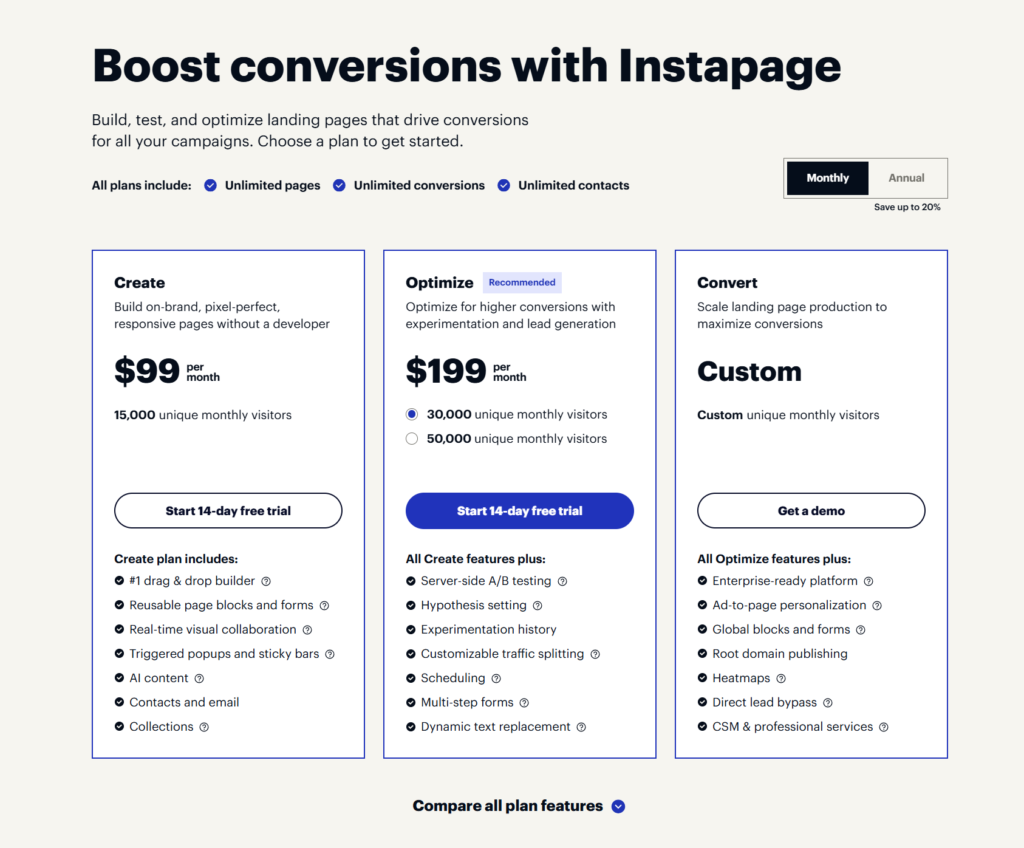
Instapage has recently restructured its pricing, and honestly, it’s become less budget-friendly for smaller businesses. Here’s what you’re looking at:
Create Plan: $99/month (billed monthly) or $79/month (annual)
- Up to 15,000 unique monthly visitors
- Unlimited landing pages
- AI content generation
- Drag-and-drop builder
- Sticky bars and popups
- Reusable blocks
Optimize Plan: $199/month (billed monthly) or $159/month (annual)
- 30,000 unique monthly visitors
- Everything in Create, plus:
- A/B testing
- Dynamic text replacement
- Heatmaps
- Multi-step forms
- Advanced analytics
Scale Plan: $359/month (billed monthly) or $239/month (annual)
- 50,000+ unique monthly visitors
- Everything in Optimize, plus:
- AdMap for campaign visualization
- Global blocks
- Advanced team collaboration
- Priority support
The biggest complaint I’ve seen from users? Hidden costs. Once you exceed your visitor limits, you’ll need to upgrade. Some advanced integrations require enterprise-level plans, which necessitate contacting sales for custom pricing that can easily exceed $500 to $1,000 per month.
Landingi Pricing
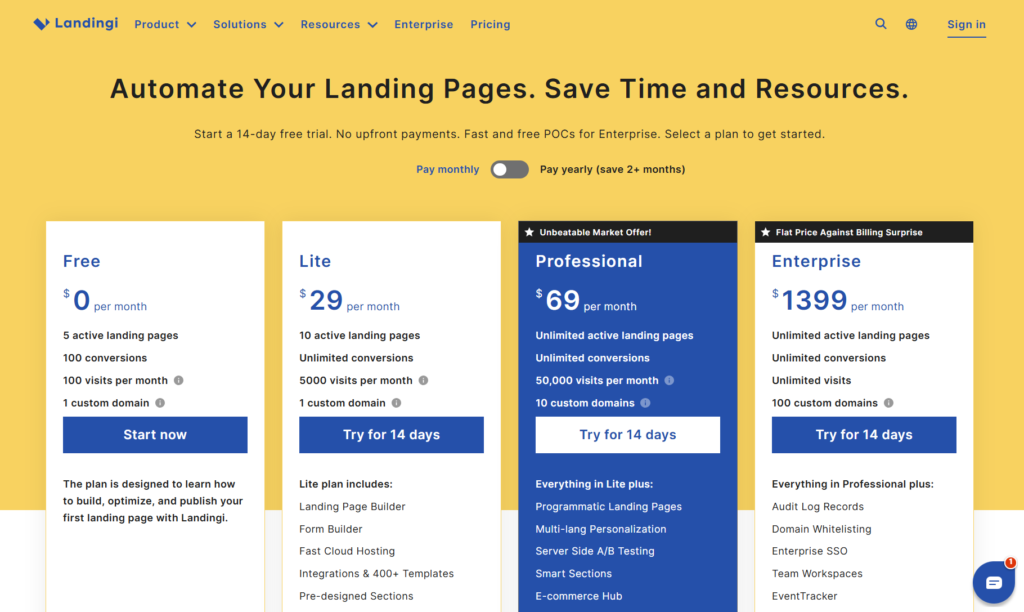
Landingi takes a more straightforward approach with clearer pricing tiers:
Core Plan: $29/month (billed monthly) or $290/year
- 5,000 monthly visits
- 10 landing pages
- 1 custom domain
- 160+ templates
- Form builder
- Analytics
Create Plan: $69/month or lower with annual billing
- 50,000 monthly visits
- Unlimited landing pages
- 5 custom domains
- Everything in Core, plus:
- A/B testing
- Pop-ups and sticky bars
- Smart sections
- EventTracker
Automate Plan: $149/month or lower with annual billing
- 150,000 monthly visits
- Unlimited landing pages
- 50 custom domains
- Everything in Create, plus:
- Marketing automation
- Background videos
- Advanced integrations
Agency Plan: Starting at $990/month
- Unlimited traffic
- Unlimited everything
- White labeling
- Client management tools
- Audit logs
The Real Cost Comparison
Here’s where things get interesting. For a small business or startup running moderate traffic (around 30,000 monthly visitors), you’re looking at:
- Instapage: $199/month minimum to get A/B testing and optimization tools
- Landingi: $69/month for similar features with higher traffic allowances
That’s a difference of $1,560 per year, money that could go into your actual ad spend or other marketing tools.
However, if you’re an enterprise team managing multiple high-traffic campaigns with complex collaboration needs, Instapage’s higher-tier features might justify the premium. The question is: do you actually need those features, or are you paying for capabilities you’ll rarely use?
Feature Comparison: What Can Each Platform Actually Do?
Landing Page Builder and Editor
Instapage’s Builder: The editor is polished, intuitive, and genuinely enjoyable to use. The drag-and-drop interface feels responsive, with automatic alignment guides that help you create pixel-perfect designs. Instablocks (reusable content blocks) are a standout feature, build a section once, save it, and deploy it across multiple pages in seconds.
The AI content generation works surprisingly well for creating headlines, body copy, and CTAs. It’s not going to replace a skilled copywriter, but it’s great for getting past writer’s block or quickly testing different messaging angles.
One frustration: mobile optimization requires manual tweaking. While pages are responsive, you’ll often need to adjust layouts specifically for mobile views, which adds time to your workflow.
Landingi’s Builder: Landingi’s editor is more straightforward, which newer users appreciate. The drag-and-drop functionality works smoothly, and the block-based approach provides helpful structure. Smart Sections let you update elements across multiple pages simultaneously, a massive time-saver when you’re managing dozens of landing pages.
The Composer AI feature generates page structures quickly, though it’s not quite as sophisticated as Instapage’s AI. Mobile views also require separate optimization, which some users find tedious.
The honest assessment? For pure design control and polish, Instapage edges ahead. For speed and simplicity, Landingi wins.
Templates and Design Quality
Instapage: Offers 500+ professionally designed templates across various industries. The templates are modern, conversion-focused, and highly customizable. They’re clearly designed with paid advertising in mind, clean, focused, with minimal distractions.
Landingi: Provides 400+ templates, which is still a substantial library. The designs are solid and professional, though some feel slightly less contemporary compared to Instapage’s sleeker options. However, Landingi templates cover a wide range of industries and use cases.
Both platforms let you start from scratch if you prefer, and both support custom CSS and HTML (though you’ll need higher-tier plans for full code access).
A/B Testing and Optimization
This is where the platforms diverge significantly.
Instapage: A/B testing is only available on the Optimize plan ($199/month) and above. However, when you get it, it’s robust. Server-side testing ensures clean data, and you can run multiple variants simultaneously. The built-in heatmaps show exactly where visitors click, scroll, and engage, invaluable for optimization.
Dynamic text replacement automatically adjusts headlines and copy based on UTM parameters or visitor data. This personalization can dramatically improve conversion rates, especially for PPC campaigns.
Landingi: A/B testing is included starting from the Create plan ($69/month). The functionality is solid, letting you test different versions and track performance. While it lacks some of Instapage’s advanced features, like server-side testing, it gets the job done for most businesses.
EventTracker provides behavior tracking (clicks, scrolls, form interactions) in real-time, filling the gap between basic analytics and dedicated user experience tools. It’s not as comprehensive as Instapage’s heatmaps, but it’s available at a much lower price point.
Integrations and Connectivity
Instapage: Integrates seamlessly with major marketing tools, including:
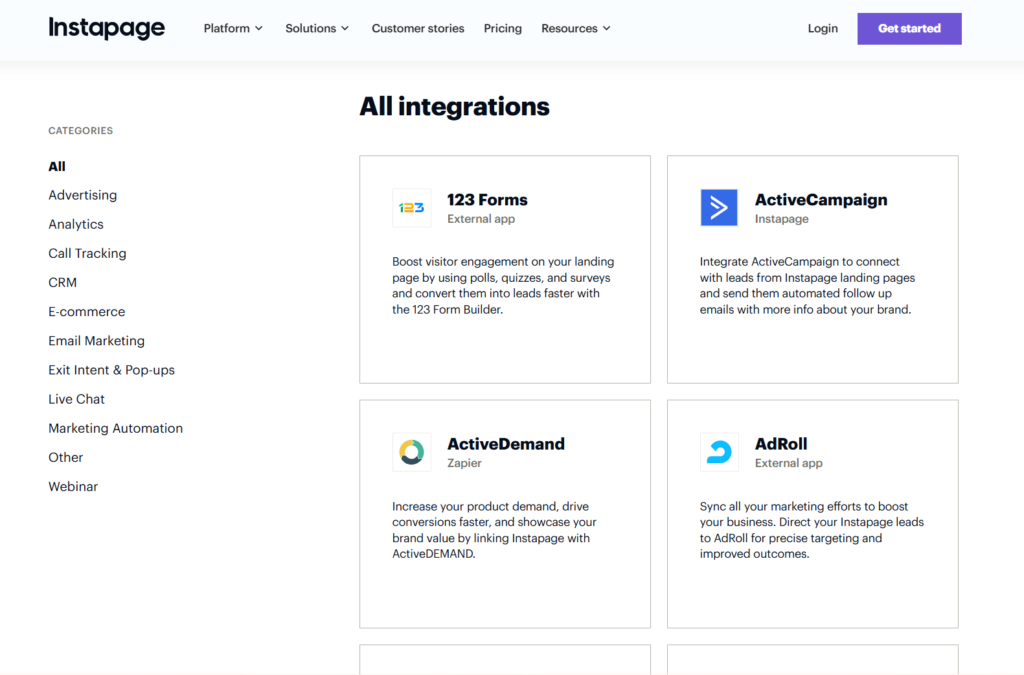
- CRMs: Salesforce, HubSpot, Pipedrive
- Email platforms: Mailchimp, ActiveCampaign, ConvertKit
- Analytics: Google Analytics, Google Tag Manager
- Ad platforms: Google Ads, Facebook Ads
- Webinar tools: Zoom, GoToWebinar
The AdMap feature visualizes how your ad campaigns connect to specific landing pages—incredibly useful for PPC marketers managing complex campaigns.
Landingi: Offers broad integration capabilities, including:
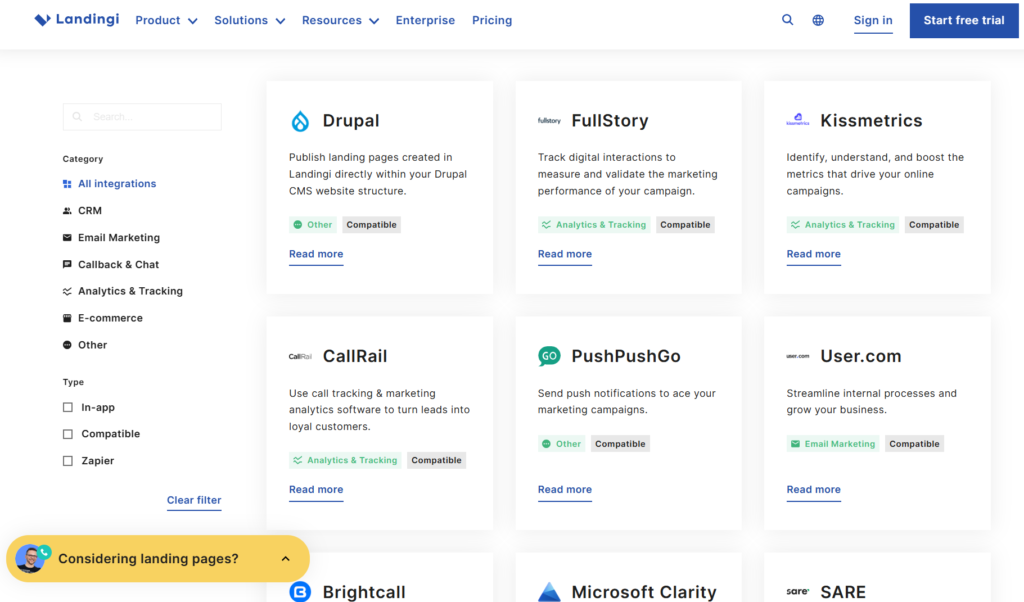
- Email marketing: Mailchimp, GetResponse, AWeber
- CRMs: HubSpot, Salesforce, Zoho
- Analytics: Google Analytics
- Zapier for connecting to 1,000+ other tools
The integration library is extensive, though some users report that setup can be slightly more technical than Instapage’s streamlined process.
Collaboration and Team Features
Instapage: This is where Instapage truly shines. Real-time collaboration tools let teams work together seamlessly. You can leave comments directly on landing pages, track changes, and manage approval workflows. For agencies managing multiple client accounts, workspace separation and permission controls are essential.
Landingi: Offers standard collaboration features, including team member access, permissions, and client subaccounts (on higher plans). The audit log tracks who made changes and when. While functional, it’s not as sophisticated as Instapage’s collaboration suite.
If you’re a solo marketer or small team, Landingi’s collaboration tools will suffice. If you’re an agency with complex approval processes, Instapage’s advanced features justify the higher cost.
Analytics and Reporting
Instapage: Provides comprehensive analytics, including visitor data, conversion tracking, and performance metrics. The heatmap feature (Optimize plan and above) visualizes user behavior, showing exactly where people click and how far they scroll.
Landingi: Delivers standard performance metrics with conversion tracking and visitor analytics. The EventTracker adds behavioral data without requiring external tools. While not as visually polished as Instapage’s reporting, it provides the insights most marketers need.
Both platforms integrate with Google Analytics for more detailed tracking, which is essential for serious conversion optimization.
Ease of Use: Which Platform Is Easier to Learn?
Instapage: The interface is beautifully designed and intuitive once you understand the workflow. New users typically need 1-2 hours to feel comfortable, but the learning curve is reasonable. The extensive template library helps you get started quickly without building from scratch.
Some users report that certain advanced features have confusing interfaces or require workarounds. Customer support is helpful but response times vary.
Landingi: Widely praised for its user-friendly interface. Most users report being able to create their first landing page within 30 minutes. The simpler approach means fewer features to learn, which is both a strength and a limitation.
The trade-off is that power users sometimes feel restricted by the simplified interface when they want more granular control.
Verdict: Landingi is easier for beginners. Instapage offers more power but requires more time to master.
Customer Support: Who Has Your Back?
Instapage:
- Live chat support (availability varies by plan)
- Email support
- Knowledge base and tutorials
- Onboarding assistance on higher plans
User reviews are mixed. Some praise the knowledgeable support team; others report slow response times and issues that take too long to resolve. Enterprise customers generally report better support experiences.
Landingi:
- Live chat support
- Email support
- Phone support (higher plans)
- Comprehensive knowledge base
- One-on-one onboarding sessions available
Consistently praised for responsive, helpful support. Multiple users specifically mention support staff going above and beyond to solve problems quickly.
Mobile Optimization and Performance
Both platforms create mobile-responsive landing pages, but implementation differs:
Instapage: Provides granular control over mobile optimization. You can adjust layouts specifically for different device sizes, ensuring perfect display across screens. However, this requires manual work, pages don’t automatically optimize ideally for mobile; you need to fine-tune them.
Page load speeds are generally excellent thanks to the Thor Render Engine and AMP support.
Landingi: Mobile views require separate optimization work, which some users find tedious. However, once set up, pages perform well across devices.
Load speeds are good, though not quite as consistently fast as Instapage in independent tests.
Pros and Cons: The Honest Truth
Instapage Pros:
- Premium, polished interface with excellent UX
- Advanced collaboration tools for teams and agencies
- Sophisticated A/B testing and heatmaps (on higher plans)
- 500+ high-quality, conversion-focused templates
- Dynamic text replacement for personalization
- AdMap for campaign visualization
- Excellent mobile optimization control
- AI content generation that’s actually useful
Instapage Cons:
- Expensive, especially for small businesses ($99-$359/month)
- A/B testing locked behind $199/month plan
- Visitor limits can be restrictive
- Hidden costs and forced upgrades as you scale
- Some features require enterprise-level pricing
- Mobile optimization requires manual work
- Recent price increases without proportional feature additions
- No free plan; only 14-day trial
Landingi Pros:
- Significantly more affordable ($29-$149/month for most users)
- A/B testing included from $69/month plan
- Higher visitor allowances for the price
- User-friendly, beginner-friendly interface
- Excellent customer support reputation
- Smart Sections save massive time
- EventTracker provides behavioral insights
- Good template library (400+)
- Translate pages into 29 languages
- Free plan available
Landingi Cons:
- Less polished interface compared to Instapage
- Fewer advanced features for enterprise users
- Collaboration tools less sophisticated
- Some users report occasional bugs
- Mobile optimization requires separate work
- Limited font customization options
- Form logic less advanced than competitors
- Some advanced features restricted to higher plans
Who Should Choose Instapage?
Instapage makes sense if you:
- Run high-budget PPC campaigns where small conversion improvements justify the cost
- Manage multiple clients as an agency and need advanced collaboration
- Have complex landing page requirements with sophisticated personalization
- Value design precision and want pixel-perfect control
- Need advanced analytics like heatmaps and detailed behavior tracking
- Can justify the ROI of $200-$400/month on landing page software
- Have a team that will utilize real-time collaboration features
It’s genuinely a powerful platform for professional marketers and agencies where landing page performance directly impacts substantial revenue. If you’re spending $10,000+ monthly on ads, Instapage’s features can help you optimize that spend effectively.
Who Should Choose Landingi?
Landingi is the better choice if you:
- Need affordable pricing without sacrificing essential features
- Want A/B testing without paying $200/month
- Run a small to medium business with moderate traffic levels
- Prefer simplicity over extensive customization
- Value responsive customer support and easier onboarding
- Need to scale without dramatic cost increases
- Want higher visitor limits for less money
- Manage multiple landing pages efficiently with Smart Sections
For most small businesses, startups, and even many agencies, Landingi offers the right balance of features, usability, and cost. The money you save can go directly into your marketing budget or other essential tools.
Real User Experiences: What People Actually Say
Instapage Users Report:
“I’ve been using Instapage since 2015. The biggest strength is how fast you can get a professional landing page live. The drag-and-drop editor is smooth and the A/B testing has genuinely improved our conversion rates.” — Verified G2 reviewer
“The price is honestly too high for what we get. We’re paying $199/month and still don’t have access to some features that competitors include at lower price points. The value doesn’t match the cost anymore.” — Capterra reviewer
“Real-time collaboration is a game-changer for our agency. We can share pages with clients, collect feedback, and make changes without endless email chains.” — G2 reviewer
Landingi Users Report:
“Support is incredible. Whenever I have an issue, I get immediate help. That alone makes Landingi worth it.” — G2 verified user
“Easy to use and affordable. I can create professional landing pages in under an hour without any design skills.” — Capterra reviewer
“Some features feel limited compared to premium platforms, but for the price, it’s honestly hard to complain. I get everything I need without breaking the bank.” — Software Advice user
“EventTracker gives me insights I was previously paying for separate tools to get. Having it built-in saves money and headaches.” — Verified Landingi user
The 2026 Landing Page Builder Landscape
The landing page market has evolved significantly. In 2026, several trends are reshaping what users expect:
AI-Powered Content: Both platforms now offer AI tools, but they’re becoming table stakes rather than differentiators. Users expect AI-assisted copywriting, design suggestions, and optimization recommendations as standard features.
Personalization at Scale: Dynamic content that adapts to visitor behavior, demographics, and traffic source is no longer optional for serious marketers. Instapage excels here; Landingi is catching up.
Mobile-First Design: With 83% of landing page traffic coming from mobile devices, optimization for small screens isn’t optional. Both platforms support mobile responsiveness, but neither has perfected automatic mobile optimization—you’ll still need manual adjustments.
Page Speed Matters More Than Ever: Landing pages loading in under 3 seconds show 32% higher conversion rates. Both Instapage and Landingi deliver decent speeds, though Instapage’s Thor Render Engine and AMP support give it a slight edge.
Integration Depth: Landing pages don’t exist in isolation. Seamless connections with CRMs, email platforms, and analytics tools are essential. Both platforms handle this well, though Instapage’s native integrations tend to be more polished.
Common Questions Answered
Q: Can I switch between these platforms easily?
Neither platform allows direct import/export of landing pages between systems. You’ll need to rebuild pages if you switch, though you can use similar templates to speed up the process. Factor this lock-in when making your decision.
Q: Which platform is better for PPC campaigns?
Instapage was specifically designed for PPC marketers and includes features like AdMap and dynamic text replacement that directly support paid advertising. However, Landingi works perfectly well for PPC at a fraction of the cost.
Q: Do I need coding knowledge?
No for basic use on either platform. Both offer drag-and-drop editors. However, if you want advanced customization, both platforms support HTML/CSS editing (on appropriate plans).
Q: What about SEO?
Both platforms support SEO basics: custom meta tags, alt text, fast loading speeds, and mobile optimization. Neither platform significantly outperforms the other for SEO purposes.
Q: Can I use my own domain?
Yes, both platforms support custom domains. Instapage allows unlimited domains on all plans, while Landingi’s custom domain limits vary by pricing tier (1-100+ domains).
Q: Which has better templates?
Instapage offers 500+ templates vs. Landingi’s 400+. Instapage templates tend to be more modern and polished, while Landingi templates are solid and functional. Both provide enough variety for most industries.
Q: What’s the refund policy?
Instapage offers a 14-day trial but no money-back guarantee after purchase. Landingi also offers a 14-day trial. Always test during the trial period to ensure the platform fits your needs.
Making Your Decision: A Framework
Here’s a practical decision framework:
Choose Instapage if:
- Your monthly ad spend exceeds $10,000
- You’re an agency managing multiple client campaigns
- You need advanced team collaboration features
- Landing page performance directly impacts significant revenue
- You value design precision and are willing to pay for it
- Budget isn’t your primary concern
Choose Landingi if:
- You’re a small to medium business watching costs
- You need A/B testing without paying $200/month
- You value ease of use and responsive support
- You’re running moderate traffic (under 100,000 monthly visitors)
- You want essential features without premium pricing
- ROI matters more than having every possible feature
Choose neither if:
- You only need 1-2 landing pages (consider a simpler, cheaper tool)
- You’re comfortable building pages on WordPress (free plugins exist)
- Your budget is under $50/month (look at Leadpages or similar)
The Bottom Line: Which Landing Page Builder Is Worth Your Money?
After extensive testing and analysis, here’s my honest take:
Instapage is an excellent platform that delivers on its promises. The interface is polished, features are powerful, and for the right user—typically agencies, enterprise teams, or businesses with substantial ad budgets—it’s worth the investment. You’re paying for premium features, sophisticated tools, and a platform designed for serious conversion optimization.
However, for most small businesses and startups, Instapage represents overkill. You’ll pay for features you don’t need while being restricted by visitor limits that seem designed to force upgrades.
Landingi offers better value for the majority of users. You get the essential features—A/B testing, unlimited landing pages, good templates, solid analytics—at prices that won’t demolish your marketing budget. The interface is user-friendly, support is responsive, and you can scale without dramatic cost increases.
The money you save with Landingi can go directly into your actual marketing—more ad spend, better tools, or hiring help. For most businesses, that’s a smarter allocation of resources than paying premium prices for landing page software.
My recommendation: Start with Landingi’s 14-day trial. For most readers, it’ll do everything you need at a fraction of Instapage’s cost. If you find yourself constrained by Landingi’s limitations or if your business scales to the point where Instapage’s advanced features become genuinely valuable, you can always upgrade later.
The best landing page builder isn’t the one with the most features—it’s the one that helps you convert visitors effectively while fitting your budget and workflow. For most businesses in 2026, that’s Landingi.
Your Next Steps
- Define your requirements: List what you actually need (number of pages, traffic levels, must-have features)
- Set your budget: Determine what you can realistically spend monthly
- Try both platforms: Take advantage of free trials to test with your actual content
- Run a real campaign: Build a landing page and run a small test campaign to see real performance
- Make your decision: Choose based on results, not marketing promises
Landing pages are too important to your marketing success to choose based on flashy sales pitches. Test both platforms with real campaigns, measure actual results, and make your decision based on data.
Whatever you choose, remember: the landing page builder is just a tool. Your messaging, offer, and understanding of your audience matter far more than which software you use. The best landing page builder is the one that gets out of your way and lets you focus on what really drives conversions, connecting with your customers and giving them exactly what they need.
Now stop reading comparison articles (yes, even this one) and start testing. Your perfect landing page builder is waiting.
Read more related articles:
Unbounce Coupon Code: Get Upto 35% OFF