Looking for an Instapage coupon to help reduce the cost of this premium landing page builder? You’re in the right place.
While Instapage doesn’t frequently offer traditional coupon codes, there are legitimate ways to save money on your subscription. The most significant discount available is the 20% savings you’ll receive when choosing annual billing over monthly payments. That translates to real money saved, $240 per year on the Create plan and $480 annually on the Optimize plan.
In this comprehensive guide, I’ll show you exactly how to access Instapage discounts, walk you through the platform’s features and pricing, and help you determine whether this investment makes sense for your business.
Current Instapage Pricing (December 2025)
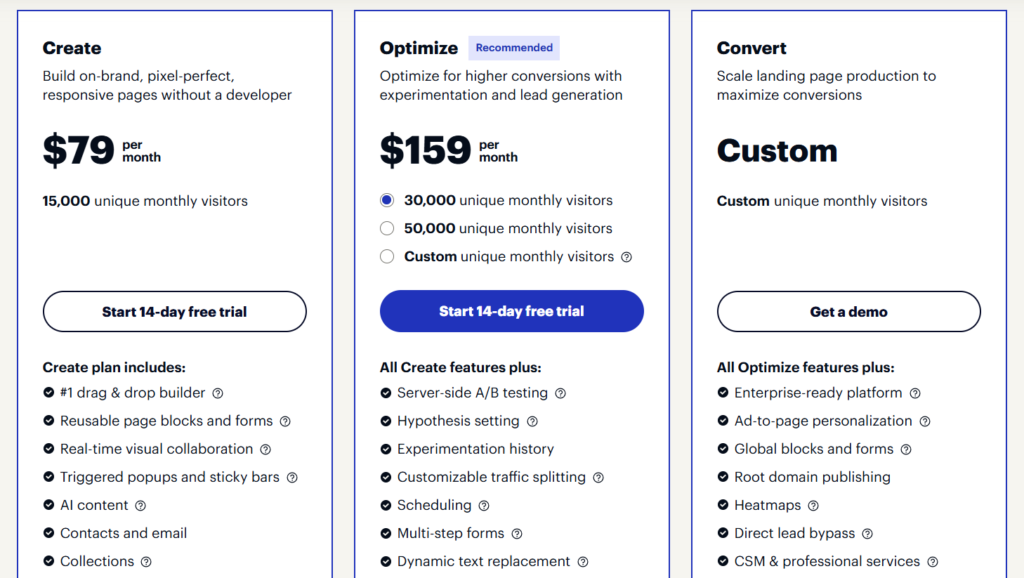
Before diving into discounts, let’s look at what Instapage actually costs. The company updated its pricing structure in February 2024, introducing three distinct plans:
Create Plan
- Monthly: $99/month
- Annual: $79/month (20% discount = $240 saved per year)
- 15,000 unique monthly visitors
- Unlimited landing pages
- Drag-and-drop builder
- 500+ customizable templates
- Basic integrations
- Mobile-responsive pages
- SSL encryption
Optimize Plan
- Monthly: $199/month
- Annual: $159/month (20% discount = $480 saved per year)
- 30,000 unique monthly visitors (standard) or 50,000 (expanded)
- All Create features, plus:
- Server-side A/B testing
- Dynamic text replacement
- Heatmaps and analytics
- Multi-step forms
- Page scheduling
- Advanced personalization
Convert Plan
- Custom pricing (enterprise)
- Custom visitor limits
- All Optimize features, plus:
- Dedicated success manager
- Priority support
- Advanced security and compliance
- Custom integrations
- Bulk lead downloads
- Global blocks
How to Get the Best Instapage Coupon Code?
Here’s the truth about Instapage discounts: the platform rarely offers promotional coupon codes. However, you can still save substantially through these proven methods:
1. Choose Annual Billing (20% Automatic Discount)
The most straightforward way to save on Instapage is to select annual billing during signup. This isn’t a hidden deal—it’s prominently displayed on their pricing page and represents the best legitimate discount available.
How to activate this discount:
- Visit the Instapage pricing page
- Toggle the billing option to “Annual” (the monthly/annual switch is clearly visible)
- Select your preferred plan (Create or Optimize)
- Click “Start 14-day free trial”
- Complete your signup information
- The 20% discount will be automatically applied to your annual subscription
No coupon code required—the savings are built right into the annual pricing structure.
2. Start With the 14-Day Free Trial
Every Instapage plan (except Convert) comes with a 14-day free trial. This gives you full access to test features before committing to a paid subscription.
Important trial details:
- Full feature access during the trial period
- Limited to 2,500 unique monthly visitors
- Requires credit card information upfront
- Cancel anytime during 14 days without charge
- Trial ends automatically if you hit the visitor limit
This trial period is valuable because it lets you determine whether Instapage’s premium pricing is justified for your specific use case.
3. Consider Third-Party Marketplace Discounts
Some SaaS marketplaces offer cashback or additional discounts on Instapage subscriptions:
- NachoNacho: Offers 25% cashback on Instapage purchases made through their platform
- Other marketplaces: Occasionally feature stackable deals during promotional periods
While these aren’t direct discounts from Instapage, they can provide additional value beyond the standard 20% annual billing discount.
4. Watch for Seasonal Promotions (Rare)
Instapage occasionally runs promotions during major sales events like Black Friday or Cyber Monday, though these aren’t guaranteed. If timing isn’t urgent, monitoring their website during November-December could yield additional savings.
According to recent research, Instapage historically hasn’t been aggressive with seasonal discounts, so don’t wait indefinitely for a deal that may not materialize.
What is Instapage? Understanding the Platform
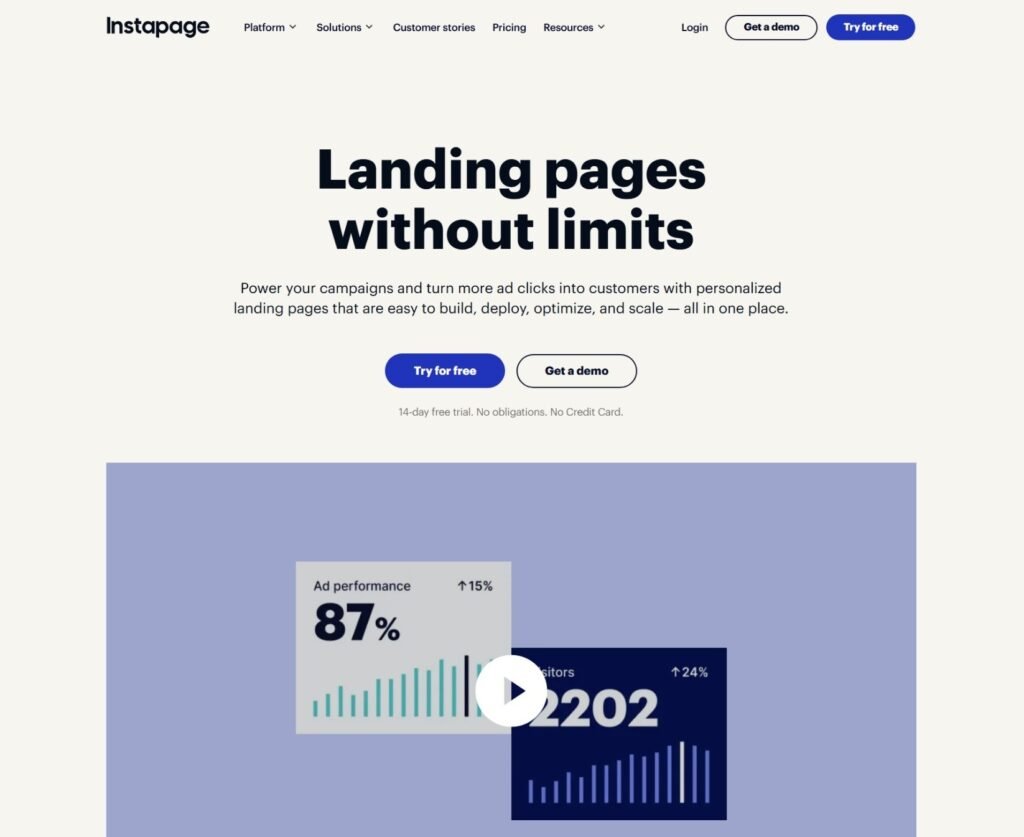
Instapage is a specialized landing page platform built specifically for marketers who run paid advertising campaigns. Unlike general website builders, it focuses exclusively on creating high-converting post-click landing pages that maximize your return on ad spend.
The platform distinguishes itself through:
- Post-Click Optimization: Instapage coined the term “post-click automation” to describe their approach to optimizing the experience after someone clicks your ad. Every feature is designed to reduce friction between the ad click and the conversion.
- Enterprise-Grade Performance: The Thor Render Engine powers Instapage pages, ensuring fast load times that directly impact conversion rates. Slow pages kill conversions, Instapage addresses this technically.
- Collaboration Tools: Unlike many competitors, Instapage includes built-in real-time collaboration features that let marketing teams, designers, and stakeholders provide feedback and make edits without endless email chains.
- Advanced Personalization: Dynamic text replacement lets you automatically customize page content based on the ad keywords or parameters visitors used to arrive, creating a seamless, personalized experience.
Key Instapage Features Worth Your Investment
Intuitive Drag-and-Drop Builder
Create professional landing pages without writing a single line of code. The builder offers pixel-perfect control, position elements anywhere on the canvas with precision that feels more like Adobe InDesign than a typical website builder.
The learning curve is moderate. If you’ve used any design software before, you’ll adapt quickly. Complete beginners might need a few hours to feel comfortable, but the interface is far more intuitive than coding from scratch.
500+ Professional Templates
Choose from over 500 conversion-optimized templates designed by professional designers. Each template is customizable and mobile-responsive, giving you a strong starting point regardless of your industry.
Templates span categories including:
- SaaS and software
- E-commerce and retail
- Professional services
- Education and courses
- Real estate
- Financial services
- Healthcare
AI-Powered Content Generation
Instapage includes an AI Content Generator that helps create headlines, body copy, and calls-to-action. While the output can sometimes feel generic (as with all AI writing tools), it significantly accelerates the page creation process and provides solid starting points for your messaging.
Server-Side A/B Testing (Optimize Plan and Above)
True server-side A/B testing eliminates the “flicker effect” you see with many testing tools. Visitors get served the correct variation immediately, without the jarring visual shift that hurts user experience and skews results.
You can test unlimited variations and adjust traffic splits on the fly without page reloads.
Heatmaps and Analytics
Understand exactly how visitors interact with your pages. Heatmaps show where people click, how far they scroll, and which elements capture attention. This data-driven approach removes guesswork from optimization decisions.
Dynamic Text Replacement
Automatically customize page headlines and content based on the search keywords or URL parameters visitors used to find your page. If someone searches “blue running shoes” and clicks your ad, your landing page headline can dynamically display “Blue Running Shoes” without creating dozens of separate pages.
AdMap Technology
Visualize your entire advertising campaign structure in one place. Connect specific ads to their corresponding landing pages, ensuring message match between what visitors see in the ad and what they experience after clicking.
Real-Time Collaboration
Marketing doesn’t happen in isolation. Instapage’s collaboration features let team members leave comments, make suggestions, and edit pages together in real-time—similar to Google Docs, but for landing pages.
Mobile Responsiveness
Every page automatically adapts to mobile devices, though you may occasionally need to make manual adjustments for optimal mobile appearance. Given that mobile traffic often represents 50%+ of visitors, this feature is non-negotiable.
Extensive Integrations
Connect Instapage with your existing marketing stack:
- CRM systems (Salesforce, HubSpot, Zoho)
- Email marketing (Mailchimp, Constant Contact, ActiveCampaign)
- Analytics (Google Analytics, Facebook Pixel)
- Advertising platforms (Google Ads, Facebook Ads)
- Zapier (extending to thousands of additional apps)
How to Redeem Your Instapage Discount (Step-by-Step)
Since Instapage’s primary discount is the 20% annual billing savings, redemption is straightforward:
- Step 1: Visit the Instapage website and navigate to the Pricing page.
- Step 2: Toggle the billing switch from “Monthly” to “Annual” at the top of the pricing table. You’ll immediately see the discounted per-month pricing.
- Step 3: Select your preferred plan by clicking “Start 14-day free trial” on either the Create or Optimize plan.
- Step 4: Create your account by entering your name, email address, and password. You can also sign up using your Google account.
- Step 5: Review your plan details. The annual pricing discount should be clearly displayed in your order summary.
- Step 6: Enter your billing information. You won’t be charged during your 14-day trial period.
- Step 7: Click “Sign Up” to activate your trial and lock in your discounted annual rate.
- Step 8: Check your email for account confirmation and login instructions.
If you encounter any issues during signup, Instapage’s support team is available via live chat and email at support@instapage.com.
Who Should Use Instapage?
Instapage isn’t for everyone—and that’s intentional. The company targets a specific customer profile where the premium pricing makes business sense.
Ideal for:
- PPC-focused marketers: If you’re spending thousands monthly on Google Ads, Facebook Ads, or other paid traffic, even small conversion rate improvements justify Instapage’s cost.
- Marketing agencies: Managing multiple client campaigns becomes streamlined with Instapage’s workspace structure and collaboration tools.
- Mid-sized to enterprise companies: Businesses with dedicated marketing teams benefit most from advanced features like A/B testing, dynamic personalization, and enterprise security.
- Conversion optimization specialists: If your job depends on squeezing maximum performance from landing pages, Instapage provides the tools needed to test and optimize systematically.
- SaaS companies: Software businesses running demo-driven campaigns appreciate the lead capture forms, integrations, and analytics that support longer sales cycles.
Less ideal for:
- Complete beginners: If you’ve never created a landing page and have limited marketing experience, Instapage’s learning curve and price point might be overwhelming. Consider starting with a more basic tool.
- Bootstrap startups: At $79-$159 per month minimum, Instapage represents a significant investment for early-stage companies with limited budgets.
- Bloggers and content creators: If you primarily need landing pages for email signups or simple lead magnets—not paid advertising campaigns—more affordable alternatives exist.
- Small local businesses: If you’re running modest local advertising campaigns with limited conversion tracking, you may not need Instapage’s advanced features.
Instapage Pros and Cons
Advantages
Conversion-Focused Design: Every feature exists to improve conversion rates. The platform doesn’t try to be a full website builder—it excels at its specific purpose.
Professional Results: Even non-designers can create polished, credible landing pages that don’t look “template-y” with some customization effort.
Speed and Performance: Pages load fast thanks to the Thor Render Engine, which directly impacts conversion rates and ad quality scores.
Robust Testing Capabilities: Server-side A/B testing, heatmaps, and detailed analytics give you the data needed to make informed optimization decisions.
Team Collaboration: Real-time editing and commenting features streamline the approval process across marketing teams, agencies, and clients.
Reliable Platform: Instapage has been in business since 2012 and serves major brands like Verizon, eBay, and HelloFresh. The platform is mature and stable.
Excellent Customer Support: Users consistently praise Instapage’s support team for quick, knowledgeable, and genuinely helpful assistance.
Disadvantages
Premium Pricing: There’s no getting around it—Instapage is expensive compared to alternatives. The Create plan at $79/month (annual) is significantly more than Leadpages ($37/month) or Unbounce’s entry tier.
Limited Visitor Caps: The Create plan restricts you to 15,000 unique monthly visitors. For growing businesses, this ceiling arrives quickly, forcing an upgrade.
Missing Features on Basic Plan: The Create plan excludes A/B testing, heatmaps, dynamic text replacement, and other conversion optimization tools that represent Instapage’s core value proposition.
Moderate Learning Curve: While not as complex as coding from scratch, Instapage requires more time investment than simpler builders like Carrd or Leadpages.
No Month-to-Month Refunds: After your 14-day trial ends, subscriptions are non-refundable (except within 24 hours of purchase). This makes the trial period critical for evaluation.
Template Flexibility Limitations: Some users report that while templates look professional, they can feel restrictive when attempting significant structural changes.
Basic Analytics: For the price point, Instapage’s native analytics are somewhat limited. Most serious marketers supplement with Google Analytics for deeper insights.
Instapage Alternatives to Consider
If Instapage’s pricing doesn’t align with your budget, several alternatives offer solid landing page capabilities:
Leadpages ($37-$74/month): More affordable with a simpler interface. Best for beginners and small businesses. Lacks advanced personalization and testing features.
Unbounce ($74-$149/month): Direct competitor with similar features and comparable pricing. Strong A/B testing and dynamic text replacement.
Swipe Pages ($29-$119/month): Budget-friendly alternative with AMP support and decent templates. Less robust than Instapage but significantly cheaper.
ClickFunnels ($97-$297/month): Better choice if you need complete sales funnels with payment processing, membership areas, and email automation. Overkill for simple landing pages.
Landingi ($29-$109/month): Mid-range pricing with solid features. Good balance between cost and capabilities for growing businesses.
Frequently Asked Questions
Does Instapage offer a free plan?
No, Instapage does not offer a free plan. They provide a 14-day free trial for the Create and Optimize plans, giving you full feature access with a 2,500 visitor limit. For enterprise needs, the Convert plan offers a demo rather than a trial.
How can I get an Instapage coupon code?
The most reliable Instapage discount is the 20% savings from annual billing—no coupon code required. Simply select annual billing during signup to automatically receive this discount. Third-party marketplaces like NachoNacho occasionally offer additional cashback (up to 25%), but direct coupon codes from Instapage are extremely rare.
Can I cancel my Instapage subscription?
Yes, you can cancel anytime during your 14-day trial without charges. For paid subscriptions, cancellation is available through your account settings under Account Management > Subscriptions > Cancel. Cancellations take effect at the end of your current billing period. Note that refunds are only available within 24 hours of purchase after the trial ends.
What’s included in the 14-day free trial?
The free trial provides complete access to all features in your chosen plan (Create or Optimize). You can build unlimited landing pages, test integrations, use templates, and explore the drag-and-drop builder. The only limitation is 2,500 unique monthly visitors. If you exceed this limit, your trial ends automatically, and you’ll need to upgrade.
Is Instapage worth the high price?
That depends entirely on your situation. If you’re running significant paid advertising campaigns where a 10-20% conversion rate improvement could generate thousands in additional revenue, Instapage’s cost is easily justified. For small businesses with modest advertising budgets or those just building email lists, more affordable alternatives make better financial sense.
Does Instapage work with WordPress?
Yes, Instapage integrates with WordPress, allowing you to publish landing pages directly to your WordPress site. You can also publish to custom domains, subdomains, or use Instapage’s hosted option.
What traffic limits apply to each plan?
- Create Plan: 15,000 unique monthly visitors
- Optimize Plan: 30,000 (standard) or 50,000 (expanded) unique monthly visitors
- Convert Plan: Custom visitor limits based on your needs
- Free Trial: 2,500 unique monthly visitors regardless of plan
Can I upgrade or downgrade my plan?
Yes, you can change plans at any time through your account settings. When upgrading, you’ll be charged a prorated amount for the remainder of your billing cycle. Downgrades take effect at the next billing cycle to ensure you have access to your current plan’s features for the time you’ve paid.
Final Verdict: Should You Use an Instapage Coupon?
Instapage stands out as one of the most powerful landing page platforms available, particularly for marketers managing paid advertising campaigns where conversion optimization directly impacts ROI. The platform delivers on its promises: fast-loading pages, professional design capabilities, and advanced testing tools that help you systematically improve results.
However, the premium pricing demands careful consideration. At $79-$159 per month minimum (with annual billing), Instapage represents a significant marketing expense.
You should invest in Instapage if:
- You’re spending $3,000+ monthly on paid advertising
- Conversion rate improvements of even 1-2% would generate meaningful revenue
- Your team needs collaboration tools for faster campaign launches
- You require advanced features like dynamic personalization and server-side testing
- You’re managing multiple client campaigns as an agency
You should consider alternatives if:
- Your advertising budget is under $1,000 monthly
- You primarily need simple lead capture pages
- You’re in the early stages of learning digital marketing
- Budget constraints make the $79-$159 monthly investment difficult
The best approach is starting with Instapage’s 14-day free trial. Build a few landing pages, test the integrations you need, and run real traffic through your pages. This hands-on experience will quickly clarify whether the premium pricing delivers sufficient value for your specific business situation.
Remember that the 20% annual billing discount is your best legitimate savings opportunity—no special Instapage coupon code needed. Simply select annual billing during signup to lock in the lower rate and save $240-$480 annually.
Ready to test Instapage yourself? Start your free 14-day trial today and see whether this premium platform can measurably improve your advertising conversion rates.

