You’re staring at your screen at 2 AM, deadline looming, wondering if there’s a better way to ship code.
Your Twitter feed is flooded with developers praising AI coding tools, but nobody’s giving you the straight answer you need: which one actually works?
Here’s the reality: Emergent.sh and Cursor aren’t even fighting in the same ring. One lets you describe an app and builds it entirely for you. The other supercharges your existing coding workflow with intelligent AI assistance.
Choosing between them is like asking whether you need a chef or a better knife; the answer depends entirely on whether you want to cook.
I’ve spent the past four months testing both platforms, tracking real user costs, debugging AI-generated disasters, and watching both tools evolve through major updates. This comparison cuts through the hype with actual numbers, honest performance assessments, and the pricing surprises that neither company advertises upfront.
Whether you’re a founder trying to validate an idea without burning cash on developers or a senior engineer looking to 10x your output, you’ll know exactly which tool fits your situation by the end of this.
Understanding the Core Difference: Full-Stack Builder vs AI Code Editor
Before we compare features and pricing, you need to understand what you’re actually choosing between. This distinction shapes everything else.
Emergent.sh
Emergent.sh is a full-stack vibe coding platform where you describe your app in natural language, and AI agents handle the entire development lifecycle, from planning and coding to database setup, API creation, testing, and deployment.

You don’t write code; you have a conversation with AI that builds production-ready applications. Think of it as having an entire development team working from your instructions.
Cursor
Cursor, on the other hand, is an AI-enhanced code editor built on Visual Studio Code. It’s designed for developers who want to write code faster with intelligent AI assistance. You’re still coding.
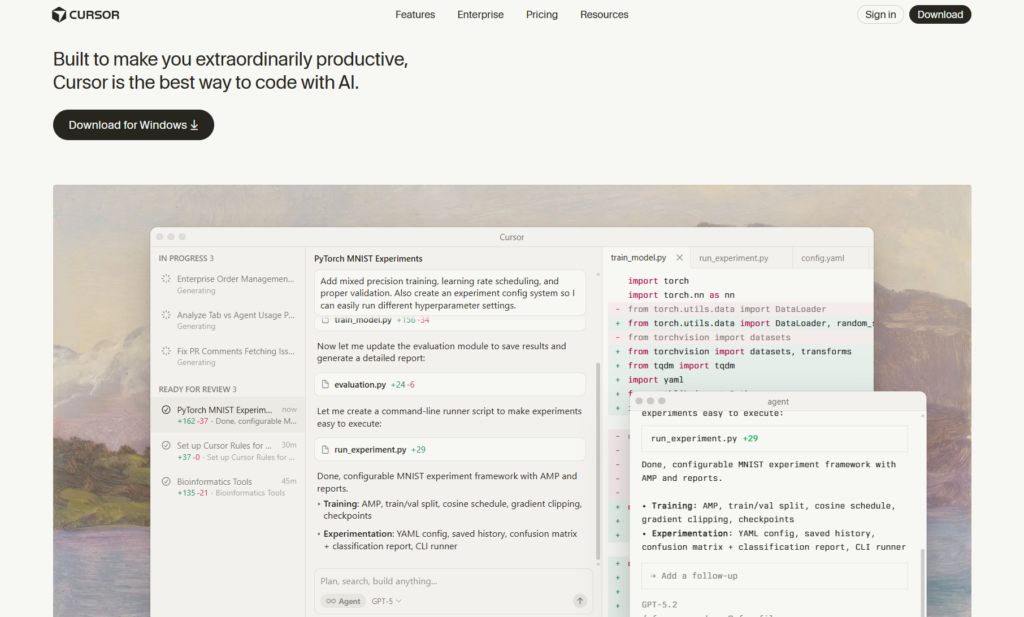
Cursor just supercharges the process with context-aware suggestions, multi-file editing, and agent workflows. It understands your entire codebase and helps you work smarter, not replace your coding entirely.
The fundamental question: Do you want to describe what you want and let AI build it (Emergent.sh), or do you want AI to accelerate your own coding process (Cursor)?
Who Actually Uses These Tools?
Emergent.sh User Profile
Emergent.sh attracts a specific crowd: non-technical founders building MVPs, small business owners creating internal tools, product managers who need quick prototypes, and developers who want to automate repetitive boilerplate work.
If you’ve got a clear idea but limited coding expertise, or you’re a developer who’d rather focus on architecture while AI handles implementation, Emergent.sh makes sense.
The platform shines when you need to ship something functional quickly. Users report deploying simple apps in under 10 minutes and more complex dashboards or marketplaces within 30-40 minutes.
That speed comes from Emergent’s multi-agent system: a Manager Agent plans the architecture, a Backend Agent writes the database schema and APIs, and a Frontend Agent builds the UI.
Cursor User Profile
Cursor users are professional developers, engineering teams working on complex codebases, and technical founders who live inside their code editor.
Over half of the Fortune 500 companies use Cursor, which tells you everything about its enterprise appeal. Developers choose Cursor when they want deep AI integration that respects their existing workflow without forcing them to abandon code.
The tool excels at tasks developers actually do every day: refactoring legacy code, implementing features across multiple files, debugging complex systems, and maintaining large-scale applications.
Cursor users aren’t looking for AI to replace them; they want AI to handle the tedious parts so they can focus on high-level problem-solving and architecture.
Feature Breakdown: What You Actually Get
Development Approach
Emergent.sh uses conversational AI to build applications. You type something like “Build a customer feedback dashboard with user authentication, email notifications, and data visualization,” and the platform generates everything: database tables, API endpoints, frontend components, and deployment configuration. The system even creates a GitHub repository for you and deploys to a live URL automatically.
The platform supports web apps, mobile apps (React Native via Expo), internal tools, marketplaces, SaaS products, and workflow automations. Every build is responsive across desktop, tablet, and mobile without additional work. You can connect integrations like Google Sheets, Airtable, Notion, Slack, and Stripe to extend functionality.
Cursor provides multiple AI modes that scale with task complexity. Tab completion predicts your next actions with striking accuracy; users report acceptance rates around 28% higher than previous models. Cmd+K (or Ctrl+K) lets you make targeted edits with natural language. The Composer feature creates and edits multiple files simultaneously, handling complex refactors that span your entire codebase.
Cursor 2.0, released in late 2025, introduced its proprietary Composer coding model designed specifically for software development inside the editor. This model delivers “instant enough” generation speeds that remove friction from iteration. The agent-centric interface now makes it easier to run and manage multiple AI agents in parallel.
Codebase Understanding and Context
This is where the tools diverge significantly.
Emergent.sh doesn’t need to understand an existing codebase because it’s building from scratch each time. The platform does offer GitHub integration, so you can push your generated code to version control and potentially continue development there, but the core workflow is conversational generation rather than codebase comprehension.
Cursor indexes your entire project and maintains deep contextual awareness. It doesn’t just see the file you’re editing; it understands how that file relates to every other component in your system. This context makes suggestions dramatically more relevant than competitors.
When you ask Cursor to “refactor the UserService to handle password resets,” it knows which files need updates, where to add new methods, which API routes to modify, and how to maintain consistency with your existing patterns.
Integration Capabilities
Emergent.sh offers integrations with popular services: Google Sheets, Airtable, Notion, Slack, and Stripe for payments. The platform focuses on integrations that extend app functionality rather than developer workflow tools. GitHub integration allows you to export your code and own your repository.
Cursor connects deeply with the developer ecosystem. It supports VS Code extensions, themes, and keybindings directly, over 30,000 extensions work seamlessly. The platform integrates with GitHub for version control, includes browser control for testing, and supports Model Context Protocol (MCP) for connecting external tools and data sources. You can customize model behavior with reusable, scoped instructions and manage team prompts.
AI Model Flexibility
Emergent.sh runs on Claude Sonnet 4, which powers the multi-agent system. Users don’t choose between different models, the platform uses what it determines works best for the task.
Cursor gives you complete control over which AI model handles each task. You can choose between GPT-5, Claude Sonnet 4.5, Claude Opus 4.5, Gemini 3 Pro, and Grok Code, plus Cursor’s proprietary Composer model. The “Auto” mode selects the optimal model for you and offers unlimited usage on Pro and Ultra plans. This flexibility matters because different models excel at different tasks, some are faster, some handle larger contexts better, others produce cleaner code.
Deployment and Hosting
Emergent.sh handles deployment automatically. When you finish building, clicking Deploy pushes your app live with SSL certificates and cloud hosting. The platform manages infrastructure so you never touch AWS, Vercel, or server configuration. However, this convenience has a catch: deployment costs 50 credits per month (around $10) to keep your app live, and users only discover this cost when they click the Deploy button.
Cursor doesn’t host anything. It’s an editor, not a deployment platform. You deploy through your own CI/CD pipeline and infrastructure choices, which gives you complete control but requires more technical knowledge. For teams with existing DevOps workflows, this is exactly what they want. For non-technical users, it’s a deal-breaker.
Pricing Reality Check: What It Actually Costs
Emergent.sh Pricing Breakdown

Emergent.sh uses a credit-based pricing model that sounds straightforward but gets complicated in practice.
Free Plan: 10 credits per month. This is purely for exploration—you literally can’t deploy a single application since deployment alone costs 50 credits. Use this to test prompts and understand the interface, nothing more.
Standard Plan: $20/month ($204/year with 17% discount), includes 100 monthly credits plus 10 daily credits, unlimited small projects, GitHub sync, fork capabilities, and integrations with Google Sheets and Airtable. Mobile app building is supported. This plan targets solo developers and freelancers creating 1-2 projects monthly.
Pro Plan: $200/month ($2,004/year with 17% discount), provides 750 monthly credits, premium integrations including Stripe, 1M token context window, custom agent creation, system prompt editing, early beta feature access, priority support, and faster processing on more powerful machines. Designed for larger, complex projects and serious development work.
Team/Enterprise: Custom pricing starting around $250/month for collaborative teams needing shared resources, advanced permissions, and dedicated support.
Here’s the problem: credits burn faster than you expect. Each action, coding, testing, deploying, or even fixing AI-generated bugs, consumes credits. One user reported that 110 credits didn’t last a full day of development.
Another spent $80 in top-ups before realizing he should have started with the Pro plan. The per-project budget caps at 500 credits (a technical constraint to maintain agent performance), so extremely complex projects require splitting into multiple tasks.
Real project costs are unpredictable. A simple portfolio site might use 30-40 credits. A customer dashboard with authentication could consume 150-200 credits. A complex marketplace with payments, user roles, and analytics? Easily 400-500 credits, plus that 50 credits monthly deployment fee.
Cursor Pricing Breakdown
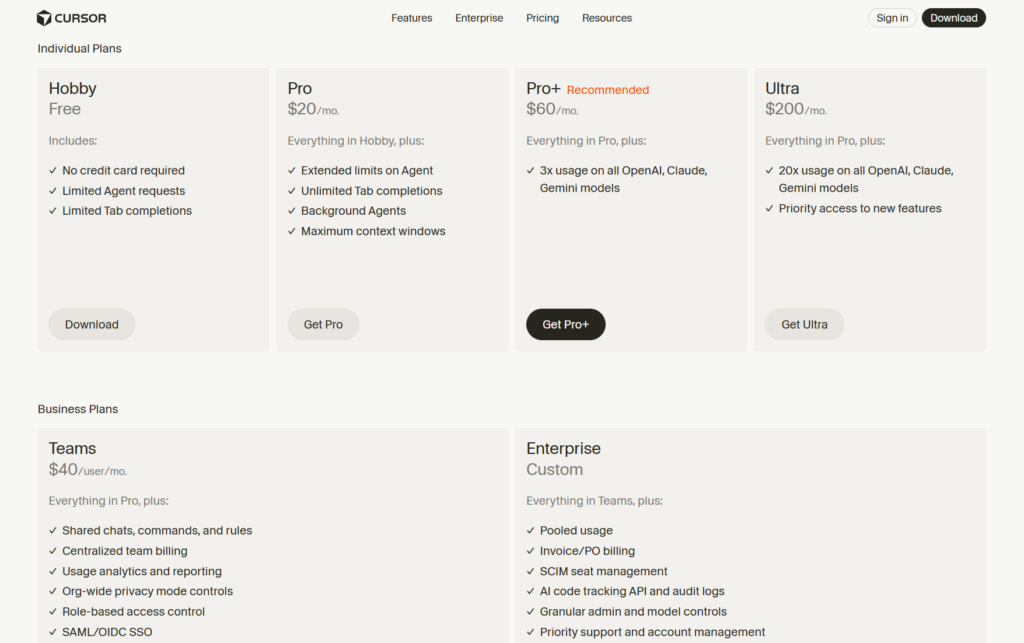
Cursor switched from request-based to usage-based billing in June 2025, causing significant community friction.
Here’s how it works now:
Hobby Plan: Free forever. Includes 2,000 AI code completions and 50 slow requests monthly. No fast requests, no frontier model usage, and no background agents. This tier works for learning and light personal projects but not serious development.
Pro Plan: $20/month. You get unlimited Tab completions, unlimited Auto mode usage, and $20 of model inference at API prices per month. Background agents and frontier models (like GPT-5, Claude Opus 4.5) use your monthly credit pool. Once you exceed the $20 allowance, you pay for additional usage at the same price the model’s API would cost.
Ultra Plan: $200/month. Provides 20x more usage than Pro (around $400 worth of model inference), unlimited access to all features, and is designed for heavy AI users who constantly work with large contexts and complex multi-file edits.
Business Plan: $40/user/month. Includes everything in Pro plus centralized billing, admin controls, usage analytics, and audit logs. Enterprise pricing is custom for organizations needing SSO, security controls, and service level agreements.
The critical detail: model selection dramatically affects costs. The “Auto” mode is unlimited and cost-efficient because Cursor chooses appropriate models for each task. But if you manually select premium models like Claude Opus 4.5 or GPT-5 for every request, you’ll consume your credit pool rapidly and hit overage charges.
Context window size also matters. Giving the AI access to more files and larger code snippets makes suggestions smarter but increases token consumption and costs. MAX mode provides a bigger context and longer reasoning, but burns through your allowance faster.
Hidden Costs and Surprise Charges
Both platforms have costs that aren’t immediately obvious.
Emergent.sh’s biggest surprise is the 50 credits/month deployment fee, half the Standard plan’s entire allocation, that you only discover when clicking Deploy. Many users also burn credits fixing AI-generated bugs, essentially paying twice for the same feature. One user noted spending credits iterating because the AI made mistakes, then spending more credits to fix what the AI broke.
Cursor’s main hidden cost is overage charges when you exceed your monthly credit pool, especially if you favor expensive models. The June 2025 pricing change reduced “fast request” allotments while pushing users toward pay-as-you-go overages, which felt like a “rug-pull” to existing customers who thought they had unlimited usage.
For Cursor, add potential infrastructure costs if you need API management, monitoring tools, or team coordination systems ($20-30/month for some teams). The learning curve also represents an opportunity cost, most developers report needing 2-3 weeks to fully optimize their Cursor workflow.
Performance and Reliability
Emergent.sh Performance
Speed is Emergent’s strongest selling point. The multi-agent architecture ensures cleaner code and smoother functionality compared to single-agent platforms. Simple apps deploy in under 5 minutes; more complex projects typically complete in 20-40 minutes, including database setup, authentication, and deployment.
However, reliability issues surface frequently in user reviews. Several users report server problems that interrupt generation or deployment, forcing them to restart tasks and consume additional credits. The AI sometimes “hallucinates” capabilities, claiming it’s successfully connected to services or runs tests when no actual connection exists.
The platform’s credit system creates a perverse incentive: when the AI makes mistakes (which happens more often than it should), you spend more credits fixing those mistakes. Some users suspect the system is designed to consume credits quickly, though this is more likely a consequence of immature AI agent coordination rather than intentional exploitation.
Cursor Performance
Cursor 2.0’s Composer model delivers nearly instant generation speeds that eliminate the friction of waiting for AI responses. Users report that the editor feels responsive enough to not break their flow state, a critical factor for professional developers.
The codebase indexing works reliably across projects of all sizes. Developers working with massive enterprise codebases confirm that Cursor maintains context and relevance even with thousands of files. The multi-agent judging feature (introduced in December 2025) helps ensure quality by having multiple agents review code changes.
Performance issues exist, primarily with large codebases, where the editor can lag or occasionally freeze. Some users on older hardware report slowdowns when multiple agents run simultaneously. These are workflow interruptions rather than critical failures, but they matter when you’re trying to maintain momentum.
User Experience and Learning Curve
Emergent.sh User Experience
Emergent’s interface is intentionally simple. You describe what you want in plain English, watch the agents work, and see your app materialize. For non-technical users, this feels effortless, there’s no code to debug, no configuration files to understand, no deployment pipelines to manage.
The catch: when things go wrong, non-technical users have limited recourse. If the AI generates buggy code or misunderstands your requirements, you need to iterate with more prompts (consuming more credits) until it gets it right. There’s no easy way to jump in and manually fix specific issues unless you export to GitHub and work on the code yourself.
The platform provides a visual editor for styling adjustments and GitHub connectivity for advanced users who want manual control, but the core experience assumes you’re directing AI rather than writing code.
Cursor User Experience
Cursor assumes you’re a developer comfortable with code editors. It looks and feels like VS Code because it’s built on the same foundation, so if you’re already familiar with VS Code, the transition is seamless. Your muscle memory, keybindings, and workflow habits carry over immediately.
The learning curve comes from mastering AI features: understanding when to use Tab vs Cmd+K vs Composer, learning how to write effective prompts for agents, configuring rules for consistent behavior, and optimizing context window usage. Most developers report needing about two weeks to get comfortable with advanced features, but the productivity gains justify the investment.
Plan Mode (improved in recent updates) helps by breaking complex tasks into structured steps before execution, reducing wasted iterations. Debug Mode identifies issues and often fixes them in one click. The interface now centers on agents rather than just files, reflecting Cursor’s evolution from “VS Code with AI” to “an agent workbench that happens to be an editor.”
Real-World Use Cases: Which Tool for What?
When Emergent.sh Makes Sense
Choose Emergent.sh if you need to validate a business idea quickly without hiring developers. Founders building MVPs to test market fit, small business owners creating internal tools for operations, product managers prototyping features without engineering support, and marketers building landing pages or simple automations all benefit from Emergent’s speed and accessibility.
The platform excels at well-defined projects with clear requirements: customer feedback forms, booking systems, directory listings, ROI calculators, simple marketplaces, and membership sites. If you can describe exactly what you want in a few paragraphs, Emergent can probably build a functional first version in under an hour.
It’s less suitable for projects requiring deep customization, complex business logic, or integration with existing systems.
The credit consumption model also makes it risky for exploratory development, where requirements aren’t fully defined, you’ll burn through credits iterating on unclear specifications.
When Cursor Makes Sense
Choose Cursor if you’re a professional developer working on production codebases, an engineering team maintaining complex applications, a technical founder who lives in your IDE, or a developer who values control and understanding over speed.
Cursor dominates at tasks developers face daily: refactoring legacy code to modern frameworks, implementing features that span multiple files and services, debugging intricate system interactions, optimizing performance bottlenecks, and maintaining large-scale applications with thousands of files.
The tool also shines for Test-Driven Development, security-focused coding with best practices, API integration work, and any scenario where deep codebase understanding is critical. If your project’s value comes from code quality, maintainability, and architectural soundness rather than just getting something deployed quickly, Cursor is the obvious choice.
Integration with Existing Workflows
Emergent.sh Workflow Integration
Emergent.sh sits outside your traditional development workflow. It’s not replacing your editor or CI/CD pipeline; it’s replacing the initial development phase entirely. You generate code in Emergent, then optionally export to GitHub to continue development in your normal tools.
This works well for prototyping or creating standalone projects, but it’s awkward for ongoing maintenance. If you build an app in Emergent, deploy it, and later need to add features, you face a choice: continue iterating in Emergent (consuming more credits) or export to your own environment and lose the conversational AI interface.
The platform’s integration capabilities (Google Sheets, Airtable, Slack, Stripe) are about connecting your application to external services, not about fitting Emergent into your development stack.
Cursor Workflow Integration
Cursor is designed to be your primary development environment. It imports VS Code extensions, themes, and keybindings directly, so your entire customized workflow translates immediately. GitHub integration is native and seamless.

You can use Cursor with any deployment platform, Vercel, Netlify, AWS, or your own servers, because it’s an editor, not a hosting service.
For teams, Cursor fits into existing processes: code reviews happen in GitHub/GitLab, CI/CD runs on your infrastructure, and testing frameworks work normally. The AI enhancement layer sits on top of your workflow without disrupting it.
MCP support allows connections to internal tools, databases, CRMs, and custom APIs, which is crucial for enterprise teams that need AI to work with proprietary systems. You can create reusable rules and prompts that enforce company coding standards across your team.
The Verdict: Which Should You Choose?
After extensive testing and analysis, here’s the honest recommendation:
Choose Emergent.sh if:
- You’re a non-technical founder who needs to validate an idea with a working MVP before raising capital or hiring developers
- You’re building simple, well-defined internal tools for your business and want them deployed quickly
- You’re a developer who hates writing boilerplate and wants AI to handle repetitive setup work
- Budget constraints mean you need something functional for $20/month and you understand you’re accepting limitations
- Your project timeline is measured in hours or days, not weeks or months
Choose Cursor if:
- You’re a professional developer who writes code daily and wants to accelerate your workflow
- You’re working on complex, production-grade applications where code quality matters
- You need to maintain or refactor existing codebases rather than build from scratch
- Your team uses standard development practices (Git, code review, testing) and needs tools that fit that workflow
- You value understanding and controlling your code over purely maximizing speed
Don’t choose either if:
- You need predictable, transparent pricing without surprise charges (both platforms have problematic pricing models, though for different reasons)
- You’re building mission-critical applications where AI-generated code presents unacceptable risk
- Your budget is extremely tight, and you can’t afford $20-40/month minimum (consider Cursor’s free Hobby plan for learning, but not production work)
The Bigger Picture of Vibe Coding in 2026
Both Emergent.sh and Cursor represent different approaches to the same trend: AI fundamentally changing how we build software. Vibe coding, the practice of collaborating with AI through natural language to generate code, isn’t replacing developers, but it is changing what “development” means.
Emergent.sh pushes the boundary of no-code/low-code platforms by letting anyone build functional applications through conversation. It democratizes app creation but introduces new challenges around cost transparency, reliability, and maintenance.
Cursor enhances traditional software development by making experienced developers exponentially more productive. It keeps humans in the driver’s seat while automating tedious tasks and surfacing relevant suggestions at the exact moment you need them.
The market is heading toward consolidation. Industry analysts predict 20-30% price reductions across AI coding tools by Q3 2026 as competition intensifies. Cursor, Windsurf, GitHub Copilot, Claude Code, and emerging players are all fighting for market share, which benefits you as a customer.
Token costs continue to decline as AI inference becomes cheaper and more efficient. This trend favors pay-per-use models like Claude Code over subscription models with fixed limits, potentially pressuring both Emergent.sh and Cursor to adjust their pricing strategies.
Practical Advice for Getting Started
Whichever tool you choose, here’s how to maximize value:
For Emergent.sh users:
- Start with the Free plan to understand credit consumption before committing financially
- Write detailed, specific prompts to minimize AI misinterpretation and wasted credits
- Monitor your credit usage closely and set mental budgets per feature
- Export important projects to GitHub immediately so you’re not locked into the platform
- Use the Standard plan for learning; upgrade to Pro only when you’re confident in your prompting efficiency
- Remember that deployment costs 50 credits/month, budget accordingly
For Cursor users:
- Begin with the two-week Pro trial to test the full feature set
- Stick to “Auto” mode initially rather than manually selecting expensive models
- Learn to write concise, effective prompts—specificity improves results and reduces token consumption
- Set up Rules early to establish coding patterns and standards
- Use Plan Mode for complex tasks to avoid wasted iterations
- Monitor your credit usage in the first month to understand your actual consumption patterns
- Consider the Ultra plan only if you’re consistently hitting Pro limits
Final Thoughts
Emergent.sh vs Cursor isn’t really a fair comparison because they’re solving different problems for different people. Emergent.sh makes software creation accessible to non-developers by handling the entire development process through AI. Cursor makes developers dramatically more effective by enhancing their existing coding workflow with intelligent assistance.
The right choice depends entirely on who you are and what you’re building. If you’re reading this trying to decide between them, ask yourself: “Do I want to learn to code better, or do I want to avoid coding entirely?” That question reveals your answer.
Both tools have significant strengths and notable flaws. Emergent.sh’s credit-based pricing and reliability issues frustrate users, but its speed and accessibility are genuinely impressive. Cursor’s pricing changes upset the community, but the platform delivers undeniable productivity gains for serious developers.
We’re watching both platforms evolve rapidly. Emergent.sh needs better pricing transparency and improved reliability to earn developer trust. Cursor needs more predictable costs and better onboarding for developers new to AI-assisted coding.
The AI coding assistant market will change dramatically over the next 12 months. New competitors will emerge, pricing will shift, and features will improve. Stay flexible, avoid long-term commitments, and be willing to switch tools as the landscape evolves.
For now, both Emergent.sh and Cursor have earned their places in the 2026 developer toolkit, just make sure you’re choosing the right one for your specific situation. Your time and money deserve tools that actually deliver on their promises, not just impressive demos and marketing hype.
Frequently Asked Questions
Can I use both Emergent.sh and Cursor together in my workflow?
Absolutely, and many developers do exactly this. The combination works particularly well when you use Emergent.sh to generate the initial boilerplate and basic structure, then export the code to GitHub and continue development in Cursor. This approach lets you leverage Emergent’s speed for scaffolding while using Cursor’s superior code editing and maintenance capabilities for refinement and ongoing work.
However, be mindful that you’re paying for two tools and the workflow requires manual bridging between platforms. For most users, picking one tool that matches your primary use case makes more financial and practical sense.
How do Emergent.sh and Cursor compare to GitHub Copilot?
GitHub Copilot sits between these two tools philosophically. Like Cursor, Copilot is an AI assistant integrated into your code editor (it works in VS Code, JetBrains IDEs, and others), but it’s less powerful than Cursor’s multi-agent system and codebase-wide understanding.
Copilot excels at line-by-line suggestions but lacks Cursor’s ability to orchestrate complex multi-file changes or understand architectural patterns across your entire project.
Compared to Emergent.sh, Copilot is fundamentally different; it assists you in writing code rather than generating entire applications from descriptions. Pricing-wise, Copilot costs $10/month for individuals or $19/month for Copilot Business, making it cheaper than both tools but with fewer advanced capabilities.
What happens to my app if I stop paying for Emergent.sh?
This is a crucial question that catches many users off guard. If you stop paying for Emergent.sh, your deployed application will go offline since you’re paying 50 credits per month (about $10) specifically for hosting.
However, you won’t lose your code, you can export it to GitHub at any time and host it yourself on platforms like Vercel, Netlify, or AWS. The challenge is that Emergent-generated code isn’t always optimized for self-hosting, and you’ll need technical knowledge to set up your own deployment pipeline. Always export your code to GitHub as soon as you build something important, regardless of whether you plan to continue using Emergent.sh.
Is Cursor worth it if I’m already comfortable coding without AI?
The answer depends on what “worth it” means to you personally. Experienced developers report time savings of 30-50% on routine tasks like refactoring, writing tests, and implementing standard features across multiple files. That translates to finishing in three days what used to take a week.
However, Cursor won’t make you better at architectural decisions, system design, or solving novel problems, those skills still require human expertise.
If you value your time highly (freelancers billing $100+/hour, for example), the $20/month cost pays for itself if Cursor saves you even two hours monthly. But if you genuinely enjoy the craft of writing every line yourself and don’t feel time pressure, the productivity gains might not justify changing your workflow.
Can non-technical people really build production apps with Emergent.sh?
Yes and no. Non-technical people can definitely build functional applications that work for their specific use case, simple marketplaces, booking systems, customer portals, and internal tools are all achievable without coding knowledge.
However, “production-ready” implies more than just functionality. It includes security hardening, performance optimization, proper error handling, data privacy compliance, and ongoing maintenance. Emergent.sh handles the basics but doesn’t guarantee production-grade quality in these areas.
Non-technical founders should view Emergent.sh as a prototyping and validation tool, not as a replacement for proper development when scaling to thousands of users. If your MVP gains traction, budget for a developer to audit and improve the code before scaling.
Which tool has better customer support when things go wrong?
Cursor’s support depends on your plan tier. Hobby users get community support only (forums and Discord). Pro users receive email support with response times typically under 24 hours. Business and Enterprise customers get priority support with faster response times and dedicated assistance. The Cursor community is extremely active, so forum help is often faster than official support for common issues.
Emergent.sh provides email support for all paid plans, with Pro and Enterprise users getting priority response. However, user reports suggest support quality is inconsistent—some users praise helpful responses while others report slow resolution times for billing and technical issues.
The platform’s smaller community means fewer resources for peer support compared to Cursor. When evaluating support, consider that Cursor’s larger user base means better community resources, while Emergent.sh’s simpler model means fewer potential points of failure requiring support in the first place.
This comparison reflects the state of Emergent.sh and Cursor as of January 2026. Pricing, features, and capabilities may change. Always verify current details on official websites before making purchasing decisions.