Here’s something nobody tells you about Emergent AI: that $20/month “Standard” plan probably won’t build what you think it will.
Last month, I watched three founders hit the same wall. They signed up, started building their MVPs, and ran out of credits before their apps were even close to deployment.
One spent $80 in top-ups before realizing he should’ve started with the Pro plan. Another deployed his app only to discover it costs 50 credits per month just to keep it live—half his entire monthly allocation gone before writing a single line of new code.
The problem? Emergent AI’s credit-based pricing looks simple on paper, but gets complicated fast in practice.
How much does Emergent AI actually cost? The real answer depends on what you’re building, how you prompt the AI, whether you deploy on their platform, and about a dozen other factors that aren’t obvious until you’re already committed.
If you’re researching Emergent AI pricing in 2026, this guide gives you something the official pricing page doesn’t: transparent breakdowns of real project costs, hidden fees that catch users by surprise, and the exact framework I use to help clients choose the right plan without wasting money.
What is Emergent AI and Why Does Pricing Matter?
Before diving into the numbers, let’s establish context.
Emergent AI is an AI-native development platform that uses multiple specialized agents to build production-ready applications through natural language conversations.
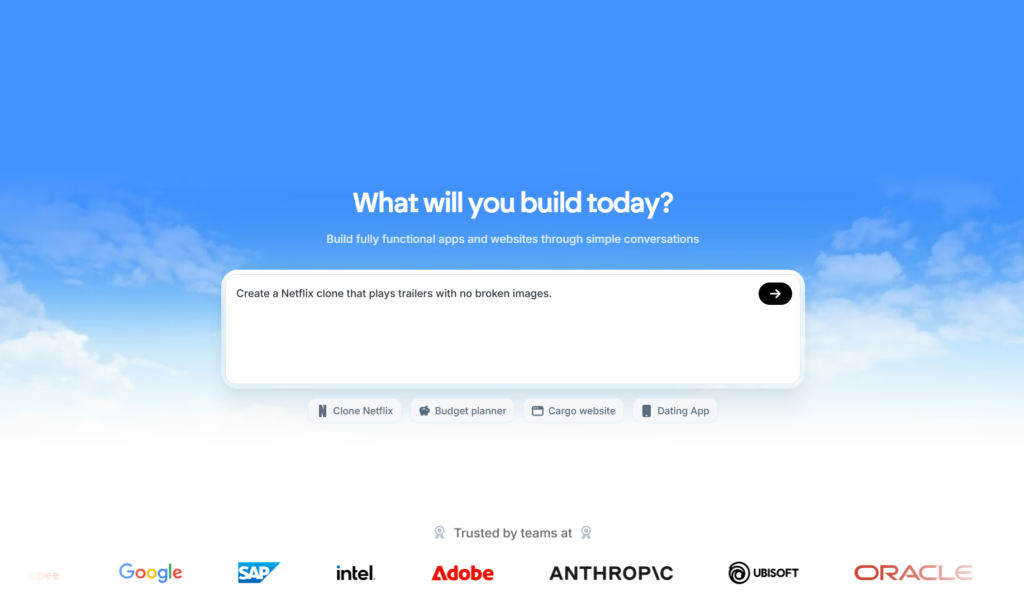
Instead of writing code line by line, you describe what you want, and Emergent’s AI agents handle planning, coding, testing, debugging, and deployment.
This sounds magical, and it often is. But there’s a catch that many first-time users discover too late: Emergent uses a credit-based pricing model, not the traditional flat-rate subscription you might expect from other SaaS tools.
Understanding how Emergent AI pricing works isn’t just about budgeting. It’s about avoiding the frustration of running out of credits mid-project or paying for hundreds of unused credits because you picked the wrong plan.
According to recent user surveys, over 50% of Emergent users choose the wrong plan in their first month, resulting in wasted money or stalled projects.
Emergent AI Pricing Structure: The Official Plans
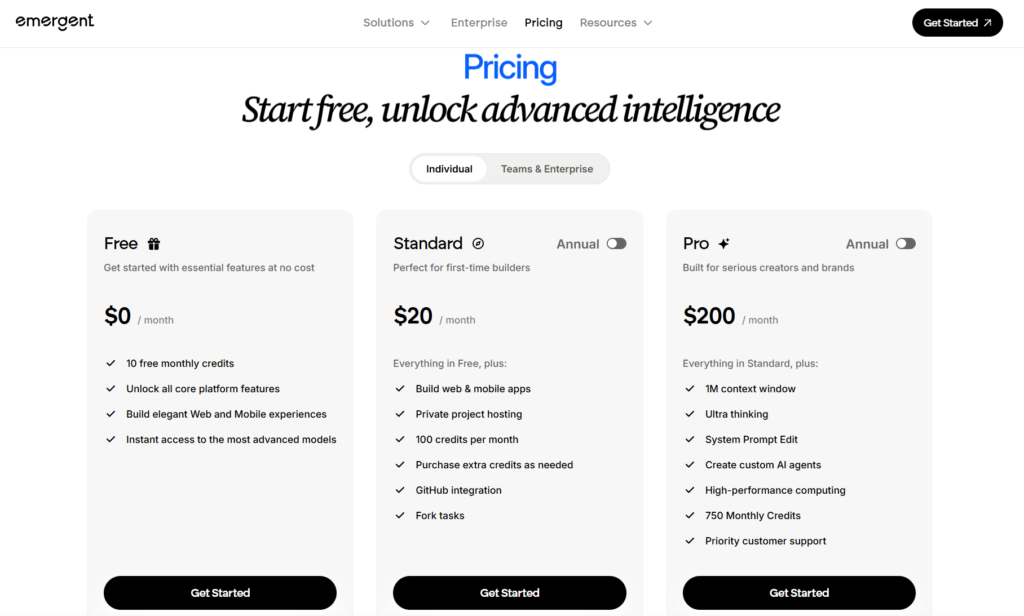
As of January 2026, Emergent offers three main pricing tiers for individuals, plus custom enterprise solutions. Here’s the complete breakdown:
Free Plan: Testing the Waters
Cost: $0/month
What You Get:
- 10 monthly credits
- Access to all core platform features
- Ability to build web and mobile applications
- Access to the most advanced AI models
- No credit card required
Who It’s For: The Free plan works well if you’re simply exploring the platform or testing whether Emergent fits your workflow. However, with only 10 credits, you can’t build anything substantial. Think of this as a sandbox for experimentation, not a serious development environment.
Reality Check: Deploying an app to Emergent’s hosting consumes 50 credits per month. With only 10 free credits, you can’t even deploy a single application. You’ll need to upgrade to actually ship anything.
Standard Plan: The Entry Point for Builders
Cost: $20/month (or $204/year with 17% annual discount)
What You Get:
- 100 monthly credits
- Everything in the Free plan
- Private project hosting
- GitHub integration for version control
- Fork tasks for project variations
- Ability to purchase additional credits as needed
Who It’s For: Solo developers, freelancers, and first-time builders who want to create 1-2 projects per month. This plan hits the sweet spot for individuals testing serious project ideas.
Reality Check: After deploying one app (50 credits), you’ll have 50 credits left for development, iterations, and bug fixes. For simple applications, this can work. For complex projects with multiple features, you’ll likely need to purchase additional credits.
Pro Plan: Built for Serious Creators
Cost: $200/month (or $2,004/year with 17% annual discount)
What You Get:
- 750 monthly credits
- Everything in Standard, plus:
- 1M token context window for handling larger codebases
- Ultra thinking mode for complex reasoning
- System prompt editing for customized AI behavior
- Create custom AI agents tailored to your workflow
- High-performance computing for faster processing
- Priority customer support
Who It’s For: Professional developers, agencies, startups building multiple MVPs, and power users who need substantial monthly capacity. The Pro plan makes sense when you’re consistently hitting 150+ credits monthly on the Standard plan.
Reality Check: At $200/month, you’re getting credits at approximately $0.27 per credit, compared to $0.20 per credit on Standard. However, the advanced features like custom agents and system prompt editing can significantly reduce credit waste through more efficient workflows.
Enterprise Plan: Custom Solutions for Teams
Cost: Custom pricing (contact sales)
What You Get:
- Tailored credit allocations
- Advanced security and compliance features
- Dedicated account management
- Role-based access controls
- Team collaboration tools
- Custom integrations
- Service level agreements (SLAs)
- Training and onboarding support
Who It’s For: Large organizations, development agencies with multiple teams, and companies requiring enhanced security, compliance, or support.
Reality Check: Enterprise pricing typically starts in the thousands per month. If your team needs fewer than 1,500 credits monthly, multiple Pro accounts might prove more cost-effective than an Enterprise plan.
Looking to save on Emergent AI? We’ve got you covered. Just use code STARTUP at checkout for 5% off all your payments.
Understanding Emergent AI’s Credit System
Here’s where Emergent AI pricing gets complicated—and where most users struggle. Unlike traditional SaaS tools where $20/month equals unlimited use within certain boundaries, Emergent’s credit system means every action consumes credits.
How Credits Work
Credits are the fundamental unit of usage on Emergent. Think of them as currency that gets spent whenever the AI performs work:
- Generating code: Uses credits based on complexity
- Testing features: Consumes credits for each test run
- Debugging errors: Takes credits proportional to the issue
- Refactoring code: Uses credits based on scope
- Deploying applications: Fixed 50 credits per month per app
- API integrations: Variable credits depending on complexity
The Unpredictability Problem
Unlike buying gasoline where you know the price per gallon, Emergent doesn’t publish a menu showing “landing page = X credits” or “dashboard feature = Y credits.” You discover costs after the AI does the work.
This creates a frustrating trial-and-error process. Your first few projects become expensive learning experiences as you figure out how your specific workflow translates to credit consumption.
What Influences Credit Usage?
Several factors affect how many credits you’ll burn through:
Project Complexity: A simple task tracker might use 30-40 credits to build. A full e-commerce platform with payment processing could consume 200+ credits before deployment.
Prompt Quality: Vague, unclear prompts force the AI to make assumptions and iterate more, burning extra credits. Specific, detailed instructions reduce waste.
Project Scope: Emergent can understand and modify entire projects at once. Larger codebases with more context require more processing power—and more credits.
Iteration Cycles: Most MVPs aren’t built in one shot. Each round of revisions, feature changes, and bug fixes adds to your total credit usage.
Debugging Complexity: Sometimes the AI gets stuck in loops trying to fix an issue, consuming credits without making progress. This is frustrating but happens occasionally.
Hidden Costs and Fees You Need to Know
Emergent’s pricing page looks straightforward. But several hidden costs can catch you off guard:
1. Deployment Fees (The Big Surprise)
The Hidden Cost: Deploying an app to Emergent’s managed hosting costs 50 credits per month, per application.
Why It Matters: If you’re on the Standard plan ($20/month, 100 credits), deploying just one app consumes half your monthly allocation. You’re left with only 50 credits for development, which severely limits what you can build.
Many users don’t discover this until they click the “Deploy” button and receive a notification that they don’t have sufficient credits. This feels like a bait-and-switch, especially since most competing platforms include free deployment.
The Workaround: You can export your code and deploy on platforms like Vercel, Netlify, or AWS. You’ll save the 50 credits but lose Emergent’s one-click deployment convenience.
2. Credit Top-Up Economics
The Hidden Cost: Running out of credits mid-project forces you to purchase top-ups at $10 for 50 credits ($1 = 5 credits).
Why It Matters: While the rate seems consistent, frequent top-ups indicate you’re on the wrong plan. Users often don’t realize they should upgrade until they’ve already spent an extra $30-40 in top-ups, money that could have gone toward a higher-tier subscription.
The Math: If you’re consistently purchasing 100+ extra credits monthly (costing $20+), you’d save money by upgrading from Standard to Pro and getting better features.
3. Monthly Credit Expiration
The Hidden Cost: Unused monthly credits expire at the end of each billing cycle. They don’t roll over.
Why It Matters: If you subscribe to Standard for 100 credits but only use 60, you’ve wasted $8 worth of credits. This penalizes users with unpredictable workloads or seasonal project needs.
Purchased Credits: Fortunately, credits you purchase separately through top-ups don’t expire. They remain in your account until used.
4. Per-Task Credit Limits
The Hidden Cost: Emergent enforces a maximum of 500 credits per individual task, with some sources mentioning a 1,000-credit technical constraint.
Why It Matters: If you’re building a complex application that requires more than 500 credits, you can’t complete it in one continuous session. You must split the work into multiple tasks, save to GitHub, and start fresh tasks, adding overhead and potential context loss.
The Reason: Emergent’s research shows that AI agent performance degrades beyond certain context sizes. The limit ensures code quality but creates workflow friction.
5. Credit Consumption Transparency
The Hidden Cost: You can’t see credit usage estimates before starting tasks. You only know how many credits were consumed after the work is done.
Why It Matters: This makes budget planning nearly impossible. You can’t confidently answer “Can I afford to build this feature?” until you’ve already spent the credits.
6. Team Collaboration Costs
The Hidden Cost: If you need multiple people working on projects, you’ll need either multiple Standard accounts or an Enterprise plan.
Why It Matters: Three developers on Standard plans costs $60/month (300 total credits). An Enterprise plan might seem expensive, but shared credit pools and collaboration features could actually be more economical.
Real-World Cost Examples: What Will You Actually Pay?
Let’s break down what different types of projects typically cost in Emergent credits:
Simple Task Manager App
- Initial Build: 25-35 credits
- Basic Features (adding, editing, deleting tasks): 10-15 credits
- User Authentication: 15-20 credits
- Deployment: 50 credits/month
- Total First Month: 100-120 credits
- Monthly Cost: Standard plan ($20) plus possible $10 top-up
Landing Page with Contact Form
- Page Design and Layout: 15-20 credits
- Contact Form Integration: 10-15 credits
- Responsive Design Adjustments: 5-10 credits
- Deployment: 50 credits/month
- Total First Month: 80-95 credits
- Monthly Cost: Standard plan ($20) sufficient
E-Commerce MVP
- Product Catalog System: 40-60 credits
- Shopping Cart Functionality: 30-40 credits
- Stripe Payment Integration: 25-35 credits
- User Accounts and Order History: 30-40 credits
- Admin Dashboard: 35-45 credits
- Testing and Debugging: 20-30 credits
- Deployment: 50 credits/month
- Total First Month: 230-300 credits
- Monthly Cost: Pro plan ($200) or Standard + $100-120 in top-ups
SaaS Dashboard Application
- Multi-user Authentication System: 35-45 credits
- Main Dashboard with Data Visualization: 50-70 credits
- API Integrations (Google Sheets, Stripe): 40-60 credits
- Settings and User Management: 25-35 credits
- Notifications System: 20-30 credits
- Complex Business Logic: 40-60 credits
- Testing and Refinement: 30-50 credits
- Deployment: 50 credits/month
- Total First Month: 290-400 credits
- Monthly Cost: Pro plan ($200) recommended
Mobile-Responsive Game
- Game Mechanics and Logic: 60-80 credits
- UI/UX Design: 30-40 credits
- Player Progress Tracking: 25-35 credits
- Leaderboard System: 20-30 credits
- Testing and Bug Fixes: 35-50 credits
- Deployment: 50 credits/month
- Total First Month: 220-285 credits
- Monthly Cost: Pro plan ($200) or Standard + $80-100 in top-ups
Key Insight: These are first-month estimates. Ongoing maintenance, feature additions, and bug fixes will require additional credits in subsequent months, though typically less than the initial build.
How to Choose the Right Emergent AI Plan
Choosing the wrong plan wastes money or leaves you stuck mid-project. Here’s how to decide:
Start with Your Project Volume, Not Features
Every plan offers the same AI capabilities. The only differences are credit allocations and advanced features. Base your decision on how much you’ll actually build, not what sounds impressive.
Decision Framework:
Choose Free if:
- You’re evaluating whether Emergent fits your workflow
- You want to understand the interface before committing
- You’re learning vibe coding concepts
- You’re not planning to deploy anything yet
Choose Standard ($20/month) if:
- You’re building 1-2 small to medium projects monthly
- You’re a solo founder testing an MVP idea
- You rarely need complex iterations or major refactoring
- You’re comfortable exporting code to deploy elsewhere (saving 50 credits)
Watch out if: You’re an heavy experimenter. Trial-and-error learning burns credits fast. Budget an extra 30% beyond your estimates.
Choose Pro ($200/month) if:
- You consistently need 150+ credits monthly
- You’re building 3+ active projects simultaneously
- You need advanced features like custom agents or system prompt editing
- You value priority support
- You benefit from the better per-credit rate ($0.27 vs $0.20)
Math check: Once you’re purchasing 150+ top-up credits monthly (costing $30+), Pro becomes more economical.
Choose Enterprise if:
- You have 3+ developers collaborating
- You require role-based access controls
- You need enhanced security and compliance
- You want dedicated support and SLAs
- Your monthly usage exceeds 1,500 credits
For teams: Compare the cost of multiple individual accounts versus one Enterprise plan. Three Pro accounts cost $600/month for 2,250 credits. If Enterprise pricing is comparable but includes better collaboration tools, it might be worth it.
Emergent AI Pricing Compared to Competitors
Understanding where Emergent sits in the competitive landscape helps you make informed decisions:
Bolt.new (StackBlitz)
- Bolt.new pricing model: Pay-as-you-go, starts around $20/month
- Deployment: Free
- Best For: Developers comfortable with more hands-on coding
- vs. Emergent: More control, steeper learning curve
Base44
- Base44 pricing model: Credit-based, starting at $20/month for 100 credits
- Deployment: Included in hosting
- Best For: Non-technical users wanting all-in-one simplicity
- vs. Emergent: Simpler but less customization, slower generation times
Lovable (formerly GPT Engineer)
- Lovable.dev pricing model: Subscription-based starting around $40/month
- Deployment: Included (details vary)
- Best For: Rapid prototyping with simple requirements
- vs. Emergent: Less sophisticated agent system, easier for beginners
Replit AI
- Replit pricing model: Starts at $20/month, usage-based compute
- Deployment: Included with hosting fees
- Best For: Developers who want AI assistance while coding traditionally
- vs. Emergent: More traditional development workflow, less autonomous
Cursor IDE
- Cursor pricing model: $20/month for Pro, usage limits on AI requests
- Deployment: Self-managed
- Best For: Professional developers wanting AI pair programming
- vs. Emergent: Not a full autonomous builder, requires coding knowledge
Emergent’s Position: Emergent offers the most sophisticated multi-agent system with the most autonomy. You get production-ready code with less hand-holding. However, the credit system and deployment costs make it potentially more expensive for users who need to deploy multiple applications.
Pro Tips to Minimize Emergent AI Costs
After analyzing hundreds of user experiences, here are proven strategies to reduce credit consumption:
1. Master Prompt Engineering
The quality of your prompts directly impacts credit usage. Vague requests like “build a website” force the AI to make assumptions and iterate unnecessarily.
Instead, be specific:
- “Build a landing page with a hero section, three feature cards, testimonials section, and contact form. Use a modern minimalist design with a blue and white color scheme. Include animations on scroll.”
This clarity reduces back-and-forth iterations, saving credits.
2. Use the Rollback Feature Frequently
Emergent allows you to roll back to previous states. If the AI goes down an unproductive path, don’t let it continue burning credits. Roll back and provide clearer instructions.
3. Break Large Projects into Focused Tasks
Instead of asking the AI to build an entire complex application in one task, break it into logical modules. This gives you better control and prevents hitting the per-task credit limit.
Example approach:
- Task 1: Build an authentication system
- Task 2: Create main dashboard layout
- Task 3: Add data visualization components
- Task 4: Implement API integrations
Save each completed task to GitHub before starting the next one.
4. Export and Deploy Elsewhere
If you’re comfortable with platforms like Vercel, Netlify, Railway, or AWS, export your code and deploy there. This saves the recurring 50 credits/month per app on Emergent’s hosting.
Benefit: Your Standard plan’s 100 credits can focus entirely on development instead of being split between building and hosting.
5. Start with Standard, Track Usage, Then Upgrade
Don’t guess which plan you need. Start with Standard ($20/month) and meticulously track your credit usage for 30 days. If you’re consistently purchasing top-ups, upgrade to Pro. If you’re not using most credits, you’ve confirmed Standard works.
6. Use GitHub Integration Strategically
Connect your projects to GitHub from the start. This creates automatic version control and lets you:
- Switch to traditional development tools if needed
- Collaborate with other developers outside Emergent
- Preserve your work if you decide to leave the platform
7. Leverage Community Templates
Before building from scratch, check if Emergent’s community has created something similar. Starting from a template consumes fewer credits than building from zero.
8. Avoid Deployment During Development
Don’t deploy your app until it’s genuinely ready for testing or use. Each deployment costs 50 credits monthly. If you deploy prematurely to test something, you’re committing to that recurring cost.
Use Emergent’s preview mode instead during development.
9. Batch Your Development Work
If you have an unpredictable project schedule, consider batching your work. Build multiple projects intensively during one month on a Pro plan, then downgrade to Free or Standard during slower periods.
10. Take Advantage of Discount Codes
Various communities and affiliate programs offer discount codes (like VIBE5 or ELEVORAS) for 5% off subscriptions. While modest, this adds up over time.
Emergent AI Pricing FAQs
Does Emergent offer annual discounts?
Yes, annual subscriptions offer a 17% savings compared to monthly billing. Standard becomes $204/year instead of $240, and Pro becomes $2,004/year instead of $2,400.
Can I cancel anytime?
Yes, Emergent operates on a standard subscription model. You can cancel anytime, though you’ll lose access to your monthly credit allocation.
What happens to purchased top-up credits if I cancel?
Purchased top-up credits don’t expire and remain in your account even if you cancel your subscription. You can use them if you reactivate later.
Is there a student or educational discount?
As of January 2026, Emergent doesn’t publicly advertise educational pricing. However, it’s worth contacting their sales team if you’re an educational institution or student organization.
Can I share my account with team members?
On Standard and Pro plans, accounts are designed for individual use. For team collaboration, you’ll need multiple accounts or an Enterprise plan with proper licensing.
How do refunds work if I’m unhappy with the service?
Emergent’s refund policy isn’t prominently published on their pricing page. It’s recommended to thoroughly test the Free plan before upgrading, and contact support immediately if you experience issues with a paid subscription.
Can I downgrade my plan mid-cycle?
Plan changes typically take effect at your next billing cycle. You’ll retain your current plan benefits until then. Contact support for specific downgrade questions.
Is there a limit to how many projects I can create?
Your project limit depends on your plan. Free and Standard plans have limitations, while Pro and Enterprise allow more extensive usage. The real constraint is credit availability, not project counts.
Do credits carry over between months?
Monthly subscription credits expire at the end of each billing cycle. However, purchased top-up credits never expire and remain available indefinitely.
How long does a typical project take to build?
Simple apps can be generated in 10-30 minutes. Medium-complexity applications take 1-3 hours. Complex SaaS platforms might require 5-10 hours of AI work plus human oversight and refinement.
Time doesn’t directly correlate with costs since credit consumption depends on complexity, not duration.
Is Emergent AI Pricing Worth It?
After extensive analysis, here’s the honest assessment:
Emergent Pricing is Worth It If:
Emergent Pricing May Not Be Worth It If:
The Bottom Line on Emergent AI Pricing
Emergent AI’s pricing reflects a fundamental shift in how software development works. You’re not paying for software access—you’re paying for AI labor that replaces (or dramatically augments) human development work.
The Standard plan ($20/month) represents remarkable value if you’re building 1-2 simple to medium projects monthly. A freelance developer would charge $500-2,000 for equivalent work.
The Pro plan ($200/month) becomes economical when you’re consistently using 200+ credits. The advanced features and priority support justify the cost for serious creators.
The hidden costs around deployment and credit unpredictability create frustration. Emergent would benefit from clearer upfront cost estimates and free deployment like competitors offer.
The recommendation: Start with the Free plan to understand the workflow. Upgrade to Standard when ready to build something real. Track your usage meticulously for the first month. Upgrade to Pro if you’re consistently purchasing top-ups. Consider exporting and deploying elsewhere to save the 50 credits/month per app.
Emergent AI isn’t the cheapest vibe coding platform, but it’s among the most powerful. The pricing reflects that positioning. Whether it’s worth it depends on how much you value speed, quality, and autonomy versus cost predictability.
For founders racing to validate ideas, Emergent’s pricing is a bargain compared to hiring developers. For hobbyists experimenting slowly, the credit-based model might feel restrictive.
The platform continues evolving. Monitor their pricing page for updates, new plans, or promotional offers. And most importantly, use that Free plan to test before you invest.
Ready to try Emergent AI? Start with their Free plan at emergent.sh to experience vibe coding firsthand. Your app idea is just a conversation away.
This guide reflects Emergent AI pricing as of January 2026. Pricing, features, and policies may change. Always verify current information on Emergent’s official website before making purchase decisions.