Most hosting companies design their pricing to confuse, not clarify. You’ve probably seen it yourself: low introductory rates that triple after year one, “unlimited” plans with undisclosed restrictions, and tier structures that force you to pay for features you’ll never use.
Cloudways breaks from this pattern with managed cloud hosting built on transparency. Its pay-as-you-go model means you’re charged only for the server resources you actually consume, billed hourly or monthly, whichever costs less. There aren’t any setup fees, surprise charges, or inflated renewal rates lurking in the fine print.
This guide serves anyone evaluating Cloudways: business owners launching their first WordPress site, agencies juggling multiple client projects, eCommerce operators scaling their WooCommerce operations, or developers who need rock-solid staging environments.
Whether your budget is tight or you’re ready to invest in enterprise infrastructure, understanding how Cloudways prices its services will help you make a confident decision.
Understanding Cloudways Pricing Structure
How Cloudways Billing Works?
The billing model is straightforward enough that you can explain it in one sentence: you pay for every hour your server runs, but never more than the monthly rate.
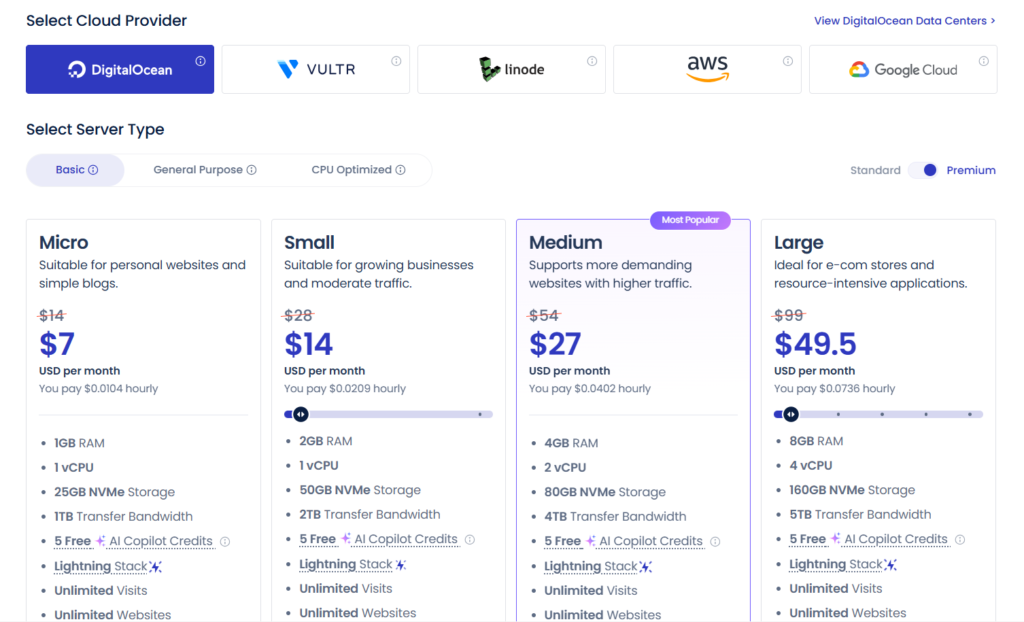
Hourly billing means exactly what it sounds like. Launch a test server at 2 PM, delete it at 6 PM, and you’ll only see charges for those four hours. This granular approach works beautifully for development environments, temporary projects, or seasonal websites that don’t need to run year-round.
Monthly billing exists as a cap. If a server costs $14/month, your hourly charges will never exceed that amount, even if the math says they should. The system automatically applies whichever calculation saves you money, with no input required from you.
Charges start the moment you launch a server and stop immediately when you delete it. You won’t wait until the end of a billing cycle or deal with prorated refunds. This creates real flexibility to spin up servers for testing, scale during traffic spikes, and scale back down without paying for capacity you don’t need.
The company maintains what it calls a no hidden fees policy, and after working with the platform, I can confirm it means it. The price you see is what you’ll pay—no setup fees, no charges for basic features, and no renewal rate surprises after your first term ends.
Factors That Affect Your Cloudways Cost
Several variables determine your monthly bill, though not as many as you might expect.
Server specifications form the foundation. RAM affects how many visitors and processes your site can handle simultaneously. CPU cores determine processing speed for dynamic content. SSD storage sets your content capacity limits, while bandwidth controls how much data you can transfer each month.
Your choice of cloud infrastructure provider creates significant pricing differences. DigitalOcean provides the most economical entry point at $14/month, while AWS and Google Cloud command premium prices for their enterprise-grade infrastructure. (I’ll break down each provider’s pricing shortly.)
Optional add-ons like automated backups, premium support tiers, and CDN services carry additional costs, but they’re genuinely optional. You’re not forced into bundles that include features you don’t want.
Traffic and resource usage matter primarily when you exceed your server’s capacity. Unlike hosts that charge overage fees, Cloudways simply recommends upgrading to a larger server when you outgrow your current plan. You maintain control over when and how you scale.
Cloudways Pricing Plans by Cloud Provider
Cloudways’ distinctive approach lets you choose your underlying cloud infrastructure, then adds its management layer on top. Each provider offers different performance characteristics and price points.
DigitalOcean Pricing
DigitalOcean powers the majority of Cloudways servers, and the reason is obvious once you see the performance-to-price ratio.
Entry-level servers start at $14/month and include 1GB RAM, a 1 Core processor, 25GB storage, and 1TB bandwidth. These specs handle small WordPress blogs, portfolio sites, and low-traffic business websites without breaking a sweat.
Mid-range plans run from $28/month (2GB RAM) to $56/month (4GB RAM). These configurations suit growing blogs with several thousand monthly visitors or small eCommerce stores in their early stages.
High-performance options extend to $224/month and beyond, delivering 16GB+ RAM and multiple CPU cores for demanding applications that need serious horsepower.
DigitalOcean makes sense for small to medium websites, WordPress blogs, portfolio sites, and businesses that need solid performance without enterprise requirements. The infrastructure is reliable, the performance is consistent, and the pricing won’t shock you when your bill arrives.
Linode Pricing
Linode, now part of Akamai, offers pricing comparable to DigitalOcean with slightly different performance characteristics that matter in specific use cases.
Plans start at $14/month for baseline specs and scale through familiar tiers: $28, $56, $112, and up to $224/month for high-memory configurations.
Where Linode distinguishes itself is CPU-intensive operations. If your application does heavy processing rather than just serving web pages, Linode’s processors handle the workload efficiently. The network performance particularly shines for audiences concentrated in specific geographic regions where Linode maintains strong infrastructure.
Value-wise, Linode occupies the same category as DigitalOcean—affordable, dependable, and well-suited for most websites and applications that don’t require enterprise-level infrastructure.
Vultr Pricing
Vultr’s pricing mirrors DigitalOcean’s structure, beginning at $14/month for entry-level servers and progressing through similar tiers.
The distinguishing factor is Vultr’s expansive global network. With data centers spanning 25+ locations worldwide, you can position your server geographically close to your target audience for optimal performance.
Choose Vultr when your audience concentrates in a region where they maintain better server coverage than competing providers, or when you need specific geographic compliance for data residency requirements.
AWS (Amazon Web Services) Pricing
AWS represents enterprise-tier offerings, and the pricing reflects this positioning without apology.
Entry-level configurations start at $42.46/month for 3.75GB RAM. Plans quickly escalate into hundreds of dollars monthly for high-performance setups, but you’re paying for infrastructure that powers some of the internet’s largest websites and applications.
The scalability options are virtually unlimited. AWS handles everything from small business websites to applications serving millions of concurrent users. The infrastructure doesn’t just scale up—it scales intelligently, with geographic redundancy and failover capabilities built in.
AWS makes sense when reliability, scalability, and performance trump budget constraints. Established eCommerce stores, SaaS applications, and businesses where downtime directly impacts revenue will find the premium pricing justified.
Google Cloud Pricing
Google Cloud occupies the premium end of Cloudways’ spectrum, starting at $37.45/month for a 1.7GB RAM configuration.
Google’s network infrastructure delivers exceptional performance, particularly for content delivery to global audiences. These premium costs reflect the underlying infrastructure quality—you’re leveraging the same network that powers Google’s own services, including Search, YouTube, and Gmail.
For high-traffic sites generating substantial revenue, Google Cloud’s superior performance and reliability justify the higher costs through improved conversion rates and user experience.
A one-second improvement in load time can boost conversions by 7%. On a site generating $50,000 monthly, that’s $3,500 in additional revenue—far more than any hosting cost difference.
Detailed Cloudways Plan Breakdown
Starter Plans ($14-$30/month)
These budget-conscious options provide surprising capability for their price point.
Specifications include 1-2GB RAM, a 1 Core CPU, 25-50GB SSD storage, and 1-2TB monthly bandwidth. These numbers might seem modest on paper, but they’re quite capable for the right applications.
Personal WordPress blogs, portfolio websites, small business sites with a few hundred daily visitors, and development environments all run smoothly on these plans. If you’re launching your first website or testing a concept, these configurations provide everything necessary.
Performance holds up well for optimized WordPress sites. Expect fast page load times, the capacity to handle moderate traffic spikes, and smooth performance for sites receiving 10,000-20,000 monthly visitors—assuming you’ve optimized your images and aren’t running fifteen plugins that you don’t need.
The storage and bandwidth allocations are generous for starter sites. Most small websites won’t approach these thresholds, and reaching them typically signals you’re ready to upgrade anyway.
Mid-Tier Plans ($50-$100/month)
This range represents a sweet spot for growing businesses that have outgrown shared hosting but don’t yet need enterprise solutions.
WooCommerce stores with hundreds of products fit comfortably here. WordPress sites with 50,000+ monthly visitors run smoothly. Membership sites with active communities maintain responsive performance. You’re getting resources that support real business operations, not hobby projects.
Multi-site hosting becomes practical at this level. With 4-8GB RAM, you can host 3-5 WordPress sites on a single server, creating significant cost savings for agencies or entrepreneurs managing multiple properties.
Resource allocations include 2-4 CPU cores, 80-160GB storage, and 3-5TB bandwidth. That’s enough headroom to accommodate growth without constant monitoring and emergency upgrades.
High-Performance Plans ($100+/month)
Enterprise solutions for online businesses where performance and reliability directly impact revenue.
These configurations handle hundreds of thousands of monthly visitors without degradation. News sites, popular blogs, and content platforms with substantial audiences thrive on these servers.
WooCommerce stores processing hundreds of daily orders, managing thousands of products, and running complex marketing automations need this level of resources. Your checkout process won’t slow down during flash sales, and your admin panel will stay responsive even during high-traffic periods.
Custom configurations extend beyond standard offerings. Cloudways can provision servers with 32GB, 64GB, or even 96GB+ RAM for truly demanding applications. You’re limited only by what the underlying cloud provider offers.
The key advantage at this tier isn’t just raw power—it’s consistency. Your site performs flawlessly during normal traffic and maintains that performance during promotions, product launches, and when your content goes viral.
Cloudways Add-Ons and Additional Costs
Cloudways keeps its base pricing clean, but several optional add-ons can enhance your hosting experience.
Premium Backup Pricing
Basic backup functionality comes included, but premium backups offer enhanced protection for businesses where data loss isn’t acceptable.
Automated backups start at $0.50/month per server for scheduled backups with longer retention periods. You choose backup frequency—daily, weekly, or custom schedules—and how many restore points to keep available.
On-demand backups are free. Create manual backups anytime before making major changes to your site, giving you instant rollback capability if something goes wrong.
Backups consume storage on your server, so sites with extensive media libraries should factor this into storage requirements when selecting a plan.
Cloudways CDN Pricing
Content Delivery Networks accelerate your website for global audiences by serving content from servers closest to each visitor.
Cloudways CDN uses straightforward pricing: $1 per 25GB of data transfer. A blog serving 50,000 monthly visitors might consume 30-50GB, translating to $1-2/month.
For businesses serving global audiences, CDN dramatically improves load times and user experience. Local businesses serving a single region gain less benefit, though even domestic sites see improvements from distributed content delivery.
Cloudways integrates smoothly with Cloudflare (which offers a generous free tier), StackPath, and other CDN providers if you prefer alternatives to their built-in solution.
Premium Support Plans
Standard support responds quickly—typically under 15 minutes—and actually solves problems rather than just linking to documentation.
Premium support tiers cost extra (pricing varies based on server configuration) but include priority ticket response, faster resolution times, and proactive monitoring that catches issues before they impact your site.
Dedicated account manager options exist for agencies and enterprise customers managing multiple servers or requiring strategic guidance.
Most users find standard support sufficient. Premium support makes sense if downtime translates directly to significant revenue loss or if you manage client sites where you need guaranteed response times written into your SLAs.
Additional Features & Costs
Several valuable features come at no extra charge:
Staging environments are free on all plans. Create perfect copies of your production site to test changes, updates, and new features without risk.
Team collaboration features let you add team members at no additional cost—perfect for agencies and businesses with multiple staff members who need access.
White-label options allow agencies to rebrand the platform for client management, though some advanced white-label features may carry premium costs.
Email hosting isn’t included, which is standard for modern cloud hosting. You’ll need a third-party email provider like Google Workspace or Microsoft 365, typically costing $6-12/user/month.
Cloudways Free Trial & Money-Back Guarantee
Cloudways wants you to test-drive its platform before spending money, and it has made it genuinely accessible.
3-Day Free Trial Details
The free trial is actually free—no credit card required to start. You get three full days to explore the platform, deploy applications, and evaluate performance under real conditions.
You can test everything: launch servers, install WordPress or other applications, configure caching and CDN, explore the management console, measure performance and speed, even deploy real websites.
This isn’t a limited demo with artificial restrictions. You get full access to all features (excluding premium add-ons), enabling informed decisions based on actual experience rather than marketing claims.
Refund Policy
Cloudways doesn’t offer a traditional money-back guarantee, but its hourly billing essentially serves the same purpose. If you’re unhappy within the first few days or even weeks, you’ll only pay for the time you actually used the servers—often just a few dollars.
Maximizing Your Trial Period
Getting the most from your three free days requires a focused approach:
Deploy your existing site using the free migration plugin. Test performance under real traffic conditions—not just empty test sites. Experiment with caching configurations and CDN settings to see the performance impact. Try out the backup and staging features with actual workflows. Contact support with questions to evaluate their responsiveness and expertise.
After three days, you’ll know whether Cloudways meets your needs—and you won’t have paid anything to find out.
Cloudways Pricing vs. Competitors
Cloudways vs. WP Engine
WP Engine starts at $20/month when paid annually, limiting you to one site and 25,000 monthly visitors. On the surface, this seems comparable to Cloudways’ $14/month DigitalOcean plan.
The difference emerges when you dig deeper. WP Engine includes certain WordPress-specific optimizations and automatic plugin updates that Cloudways doesn’t provide out of the box. You’re paying partly for convenience and WordPress expertise embedded into the platform.
For a single site, the two providers price similarly. For multiple sites, Cloudways becomes significantly more cost-effective—you can host unlimited sites on a single server, while WP Engine charges per-site fees.
WP Engine excels if you want maximum hand-holding and WordPress-specific features. Cloudways wins if you need flexibility, want to host multiple sites, or prefer choosing your cloud infrastructure provider.
Cloudways vs. Kinsta
Kinsta offers premium managed WordPress hosting built exclusively on Google Cloud, starting at $35/month for one site.
Cloudways provides Google Cloud starting at $37.45/month but with no site limits. You could host five WordPress sites on that Cloudways server for roughly the same price as one site on Kinsta.
Kinsta charges per-site with strict visitor caps. Exceed your limit, and you face overage charges. Cloudways charges for server resources with no visitor or site limits—you simply upgrade when needed.
Both deliver excellent performance on Google Cloud infrastructure. Kinsta includes more WordPress-specific optimizations and managed services, while Cloudways provides more flexibility and control over your hosting environment.
Cloudways vs. SiteGround
SiteGround’s entry-level shared hosting starts around $3-4/month for introductory pricing, making it appear much cheaper than Cloudways.
SiteGround’s shared hosting puts hundreds of websites on the same server, leading to inconsistent performance. Their managed cloud hosting (Cloud Startup) starts at $100/month—significantly more expensive than equivalent Cloudways configurations.
If you need the absolute cheapest hosting for a simple brochure site with minimal traffic, shared hosting wins on price alone. For anything requiring reliable performance, Cloudways’ cloud infrastructure delivers far better value.
SiteGround’s cloud plans jump from $100 to $300/month with limited options in between. Cloudways offers granular scaling—upgrade from $14 to $28 to $56 as needed, paying only for the resources you require.
Cloudways vs. Traditional Managed Hosting
Traditional managed hosts like Bluehost, HostGator, and GoDaddy typically range from $3-30/month for shared hosting plans.
Traditional hosts lock you into rigid plan structures. Need more than their “unlimited” resources actually allow? You’ll hit artificial limits and be forced to upgrade to expensive tiers. Cloudways gives you dedicated cloud servers with transparent resource allocations.
While traditional hosting appears cheaper initially, performance limitations, security concerns, and hidden renewal rates often make them more expensive long-term. Factor in your time dealing with slow support and performance issues, and Cloudways’ transparent pricing becomes increasingly attractive.
How to Choose the Right Cloudways Plan
Selecting the right plan depends on your specific website type, traffic patterns, and growth trajectory.
Pricing for Different Website Types
Small business websites run well on the $14/month DigitalOcean plan. A well-optimized business website with 5-10 pages, contact forms, and basic functionality will perform smoothly. Upgrade to $28/month when you add a blog and actively publish content.
WordPress blogs in the $14-28/month range handle personal and professional blogs up to 25,000 monthly visitors. Focus on optimization—caching, image compression, lazy loading—and you’ll be surprised how much traffic these plans support.
WooCommerce stores need minimum $28/month, preferably $56/month or higher depending on product count and traffic. WooCommerce is resource-intensive due to database queries, so don’t skimp on RAM. A store processing 500+ orders monthly should consider $112/month plans.
High-traffic news sites should start at $112/month for established properties with 100,000+ monthly visitors. News sites typically face many simultaneous visitors and maintain extensive content archives, requiring substantial resources.
Agency client sites in the $56-112/month range enable hosting multiple client sites on a single server. A $56/month server with 4GB RAM comfortably hosts 3-4 small business client sites, dramatically reducing your per-client hosting costs.
SaaS applications should start at $112/month minimum on AWS or Google Cloud for production environments. SaaS requires reliability, security, and scalability that justify premium infrastructure from day one.
Scaling Your Plan Over Time
Smart scaling saves money while maintaining performance, but it requires attention to your actual resource usage.
Upgrade when RAM usage consistently exceeds 80%, CPU regularly hits high loads, or page load times increase noticeably. Don’t wait for crashes—proactive upgrades prevent problems rather than react to them.
Cloudways makes vertical scaling easy, letting you resize your server and add more RAM, CPU, or storage with a few clicks. Most upgrades complete without downtime, though complex migrations might require brief maintenance windows.
As you grow larger, consider horizontal scaling with multiple servers. Run your main site on one server and offload databases, staging sites, or media-heavy subsites to additional servers. This approach costs more but provides better reliability and performance isolation.
Cost optimization matters too. Regularly review your resource usage through Cloudways’ built-in monitoring tools. If you consistently use only 40% of your allocated resources, downgrade to save money. Make data-driven scaling decisions rather than guessing based on perceived needs.
Cloudways Cost Calculator & Estimator
Accurately estimating your Cloudways costs prevents budget surprises and helps with financial planning.
How to Calculate Your Monthly Costs
Start with your base server cost based on expected traffic and site complexity. A practical formula:
- Under 10,000 visitors/month: $14-28
- 10,000-50,000 visitors/month: $28-56
- 50,000-100,000 visitors/month: $56-112
- 100,000-250,000 visitors/month: $112-224
- 250,000+ visitors/month: $224+
Add optional costs like CDN ($1-5/month for most sites), premium backups ($0.50-2/month), premium support if needed, and any additional servers for staging or specific purposes.
Bandwidth and Storage Considerations
Cloudways’ bandwidth allocations are generous for typical use cases. A standard WordPress site consumes roughly 1GB per 1,000 visitors. So 50,000 monthly visitors use about 50GB—well within even the base plan’s 1TB limit.
Storage needs vary dramatically by site type. A text-focused blog might need only 10GB total. An eCommerce store with hundreds of product images could require 100GB or more. Don’t forget to account for backups, which essentially duplicate your storage usage.
Seasonal Traffic Planning
Sites experiencing seasonal spikes—holiday shopping, annual events, tax season—benefit enormously from Cloudways’ pay-as-you-go model. Upgrade to a larger server before your peak season, then downgrade when traffic normalizes. You’ll only pay the higher rate during the months you actually need it.
Budget Forecasting Tips
Plan for 20-30% annual growth in hosting costs as your traffic increases. Budget for at least one upgrade per year to accommodate growth. Keep a buffer for unexpected traffic spikes from viral content or media coverage. Factor in optional add-ons you might adopt as you grow—CDN, premium backups, additional servers.
Most businesses find their Cloudways costs grow proportionally with revenue. As you make more money from your website, you can afford the necessary infrastructure upgrades.
Hidden Savings & Cost Optimization Tips
Ways to Reduce Your Cloudways Costs
Server size optimization starts with right-sizing from the beginning. Don’t over-provision based on theoretical needs. Start smaller and upgrade as actual usage requires it. Use Cloudways’ monitoring dashboard to track real usage patterns rather than guessing at requirements.
Resource monitoring prevents waste. Enable notifications for high resource usage. Address inefficient plugins, unoptimized images, and code issues before they force expensive upgrades you don’t actually need.
Choosing the right cloud provider matters for cost management. For most websites, DigitalOcean, Linode, or Vultr provide the best value. Only choose AWS or Google Cloud if you specifically need enterprise-grade infrastructure or their unique features.
Leveraging caching effectively reduces server load by 50-80%, allowing smaller servers to handle substantially more traffic. Enable Cloudways’ built-in Varnish cache, configure Redis for object caching, and implement browser caching—all free features that dramatically improve efficiency.
When Cloudways Offers Best Value
Multiple website hosting creates immediate savings. Host 3-5 small sites on a single $56/month server instead of paying for separate shared hosting accounts at $10-15 each. The cost savings are substantial, and performance surpasses what you’d get from budget shared hosting.
Development and staging workflows benefit from the free staging environment, which alone saves hundreds annually compared to maintaining separate development servers. Test updates, troubleshoot issues, and experiment without risk—no additional charges.
Agency use cases see dramatic efficiency gains. Agencies managing 10-20 client sites can consolidate onto 2-3 Cloudways servers, reducing hosting costs while improving management efficiency through the unified control panel.
Predictable versus variable traffic patterns both work well, just differently. Sites with steady traffic can right-size their servers and maintain predictable costs. Sites with variable traffic benefit from easy scaling—upgrade for campaigns or launches, downgrade during slow periods.
Is Cloudways Pricing Worth It? Value Analysis
Cost vs. Features Comparison
At $14/month, you receive far more than just server space. Cloudways includes server maintenance, security patches, software updates, performance optimization, free SSL certificates, free migrations via plugin, 24/7 security monitoring, regular backups, and staging environments.
Hiring a server administrator to handle these tasks would cost $1,000-5,000/month. Cloudways bundles this expertise into its pricing, making enterprise-grade management accessible to small businesses and individual website owners.
Time Savings for Developers
Developers consistently cite time savings as Cloudways’ biggest value proposition. Tasks that took hours on DIY server setups take minutes on Cloudways. No SSH required for basic tasks. One-click WordPress installations. Simple SSL certificate installation. Easy Git integration. Automated backups and restores.
For a developer billing at $50-150/hour, the time saved in a single month often exceeds the hosting cost difference between Cloudways and cheaper alternatives.
Performance Benefits
Cloudways-optimized servers deliver measurably faster page load times compared to shared hosting—typically 40-60% faster for equivalent websites running similar content and plugins.
Faster websites translate directly to better SEO rankings, higher conversion rates, and improved user experience. For eCommerce, even a one-second load time improvement can increase conversions by 7%. On a store generating $10,000/month in revenue, that’s $700/month in additional sales—far exceeding any hosting cost difference.
Support Quality
Cloudways’ support team responds quickly—typically under 15 minutes—and actually solves problems rather than simply offering documentation links or generic troubleshooting steps.
Compare this to budget hosts where you might wait 24-48 hours for generic responses that don’t address your specific issue. The value of reliable support becomes clear the first time you face a critical problem at midnight.
ROI Considerations
Calculate Cloudways’ ROI by considering multiple factors:
Uptime and reliability at 99.99% means your site is down roughly 4 minutes per month. Budget hosting might average 99.5% uptime—that’s 3.6 hours monthly. What’s your revenue per hour of downtime?
Performance improvements should be tracked carefully. Monitor your conversion rate before and after migrating to Cloudways. Many businesses see 10-30% improvements simply from faster load times and better reliability.
Time savings add up quickly. Calculate hours saved monthly on server management, troubleshooting, and optimization. Multiply by your hourly rate or the value of your time spent on revenue-generating activities instead.
Scalability prevents lost revenue. The ability to scale instantly during opportunities—media coverage, successful campaigns, viral content—prevents lost revenue from overloaded servers that crash during your biggest traffic moments.
For most businesses generating $1,000+/month from their website, Cloudways’ superior performance and reliability deliver ROI that dwarfs the hosting cost difference.
Final Verdict: Cloudways Pricing Overview
Cloudways occupies a unique position in the hosting market—premium enough to deliver enterprise-grade infrastructure and support, yet affordable enough for small businesses and growing websites.
The pricing structure is transparent: choose your cloud provider, select server resources based on your needs, pay only for what you use with hourly or monthly billing, and scale freely as you grow. No contracts, no hidden fees, and no surprise renewal rates.
Cloudways offers exceptional value for multiple website hosting (agencies, entrepreneurs), eCommerce stores requiring reliable performance, growing blogs and content sites outgrowing shared hosting, development and staging workflows, and businesses prioritizing performance and uptime over absolute lowest price.
Choose Cloudways if you value your time, need reliable performance, want flexibility to scale, require responsive support, host multiple websites or manage client sites, or run a business that depends on your website being fast and available.
Look elsewhere if you need absolute budget hosting for a simple personal site with minimal traffic—traditional shared hosting might save $10-15 monthly, though with significant trade-offs. If you specifically require WordPress-only hosting with maximum hand-holding, specialty providers like WP Engine might better suit your needs at considerably higher cost per site.
For most website owners—from bloggers to agencies to eCommerce stores—Cloudways hits the sweet spot of performance, features, support, and pricing.
Ready to test Cloudways? Start your 3-day free trial with no credit card required, or use their pricing calculator to estimate your monthly costs based on your specific needs. The best way to evaluate Cloudways pricing is to try the platform yourself. Your time and website performance are worth far more than the few dollars difference between hosting providers.
Frequently Asked Questions About Cloudways Pricing
Q: How much does Cloudways cost per month?
Cloudways pricing starts at $14/month for a 1GB DigitalOcean server and scales to $300+/month for high-performance configurations. Most small to medium websites settle into the $28-112/month range. Your actual cost depends on cloud provider choice, server specifications, traffic levels, and optional add-ons like CDN and premium backups.
Q: Does Cloudways offer a free plan?
Cloudways doesn’t offer a permanent free plan, but they provide a 3-day free trial with no credit card required. This gives you full access to test the platform, deploy websites, and evaluate performance before making any financial commitment. The trial includes all standard features, letting you make an informed decision based on real experience.
Q: What payment methods does Cloudways accept?
Cloudways accepts major credit cards (Visa, Mastercard, American Express), PayPal, and, for certain regions, additional local payment methods. The company bills monthly in arrears based on your actual usage. There’s no requirement for annual payment, though you can prepay if you prefer.
Q: Can I change my Cloudways plan anytime?
Yes, Cloudways offers complete flexibility to upgrade or downgrade your server at any time. Most upgrades happen instantly or within minutes. Downgrades may require creating a new, smaller server and migrating your site. There are no contracts, penalties, or restrictions on changing your plan.
Q: Are there any setup fees with Cloudways?
No. Cloudways maintains a strict no setup fees policy. The price you see for your server is exactly what you’ll pay—no activation charges, no onboarding fees, and no hidden costs for getting started. Your billing begins only when you launch a server.
Q: What’s included in the base Cloudways pricing?
Base pricing includes managed cloud servers, free SSL certificates, automated backups (local), staging environments, 24/7 security monitoring, DDoS protection, regular security patches, server performance optimization, built-in caching (Varnish, Redis, Memcached), free site migrations via plugin, team collaboration features, and 24/7 support.
Q: Does Cloudways charge for bandwidth?
Bandwidth is included up to your plan’s limit, starting at 1TB/month. Most websites never exceed these allocations. If you do exceed bandwidth limits, Cloudways doesn’t charge overage fees—they’ll simply recommend upgrading to a larger server that better matches your needs.
Q: Is there a discount for annual billing?
Cloudways uses pay-as-you-go billing rather than offering annual discounts. While this means no upfront discount for yearly commitments, it provides more flexibility—you’re never locked into long contracts and can scale up or down freely.
Q: What happens if I exceed my server resources?
If your site consistently maxes out RAM or CPU, Cloudways’ monitoring will alert you to upgrade. Your site won’t be automatically suspended—instead, you might experience slower performance during high-traffic periods. Cloudways support will proactively recommend appropriate server upgrades. You control when and if you upgrade.
Q: Can I get a refund if I’m not satisfied?
Cloudways doesn’t offer traditional money-back guarantees, but their hourly billing model essentially provides the same protection. If you’re unhappy after a few days or weeks, simply delete your server. You’ll only pay for the hours you actually used it, typically under $5 for testing.
Q: Does Cloudways pricing include domain and email?
No. Cloudways is pure hosting—domain registration and email services are separate. You’ll need to register your domain through registrars like Namecheap or GoDaddy ($10-15/year) and use email services like Google Workspace ($6/user/month) or Zoho Mail (free for basic use).
Q: Are migrations to Cloudways free?
Cloudways offers a free automated migration plugin for WordPress sites that handles the entire process. For complex sites or if you prefer hands-off assistance, Cloudways offers premium migration services starting at $50-100 per site, where their team handles everything.