Looking for a way to test professional cloud hosting without pulling out your credit card
You’ve landed in the right place. The Cloudways free trial offers something rare in the hosting world: a genuine opportunity to experience premium managed cloud hosting without any financial commitment upfront.
In this comprehensive guide, I’ll walk you through everything you need to know about the Cloudways trial, from signing up to maximizing every minute of your test period. Whether you’re running a WordPress blog, managing an e-commerce store, or developing client websites, this guide will help you determine if Cloudways is the right hosting solution for your needs.
What Makes Cloudways Different from Traditional Web Hosting?
Before diving into the trial details, let’s understand what sets Cloudways apart. Unlike traditional shared hosting providers like Bluehost or HostGator, Cloudways operates as a managed cloud hosting platform.
Think of it as the bridge between complex cloud infrastructure providers (like DigitalOcean, AWS, and Google Cloud) and everyday users who want powerful hosting without the technical headaches.
Here’s the deal: major cloud providers offer incredible performance, but they require serious technical expertise to set up and manage. Cloudways takes that powerful infrastructure and wraps it in an intuitive management platform. You get the speed and reliability of cloud hosting with the simplicity of traditional hosting.
The platform currently serves over 100,000 businesses worldwide, hosting more than 570,000 websites. That’s not just impressive numbers – it’s proof that Cloudways has found a sweet spot between performance, usability, and value.
Understanding the Cloudways Free Trial: What You Actually Get
The Cloudways free trial comes in two flavors, and understanding the difference is crucial for choosing the right option for your testing needs.
The Standard 3-Day Free Trial
The most straightforward option is the three-day trial that requires absolutely no credit card. You can sign up, deploy servers, test applications, and explore the entire platform for 72 hours without sharing any payment information.
During this trial period, you get:
- Full access to DigitalOcean servers (the most popular choice for beginners)
- Ability to deploy WordPress, WooCommerce, Magento, Laravel, and custom PHP applications
- 24/7 customer support via live chat
- All core features including staging environments, SSL certificates, and automated backups
- Server management tools and monitoring dashboards
- Up to 4GB of RAM during the trial period
One important limitation: AWS and Google Cloud servers aren’t available during the free trial. You’ll need to upgrade to access those premium cloud providers. However, DigitalOcean servers deliver excellent performance and are more than sufficient for testing purposes.
Cloudways Autonomous Trial
If you’re specifically interested in Cloudways Autonomous – their fully managed, auto-scaling WordPress solution built on Kubernetes – there’s a separate three-day trial available. This trial also requires no credit card and gives you access to:
- 15GB disk space
- 50GB bandwidth
- 10,000 visits
- US data center location
- Kubernetes-based infrastructure with Google C2 machines
- Integrated Cloudflare Enterprise CDN
- Object Cache Pro for database caching
- Unlimited PHP workers
The Autonomous trial is ideal if you’re planning to run a high-traffic WordPress site or e-commerce store that needs automatic scaling capabilities. However, keep in mind that these resource limits are hard caps – if you exhaust any of them before the three days are up, your trial ends immediately.
How to Sign Up for the Cloudways Free Trial (Step-by-Step)
Getting started with your Cloudways trial takes less than five minutes. Here’s the exact process:
Step 1: Visit the Cloudways Website
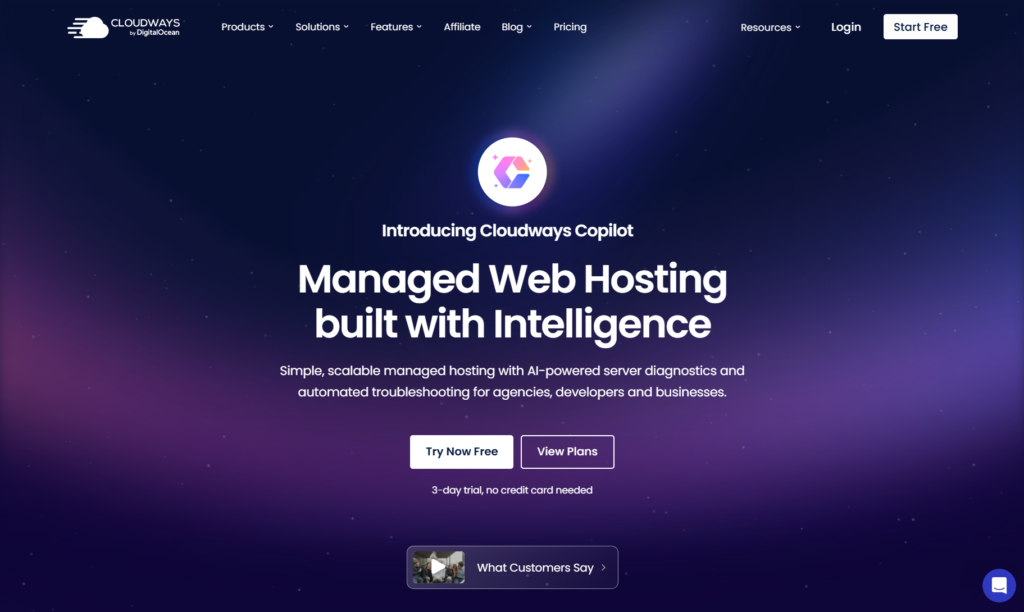
Head to Cloudways.com and click the “Start Free” button. You’ll see this prominently displayed on their homepage.
Step 2: Create Your Account
You’ll need to provide:
- Your name
- Email address
- Password
Alternatively, you can sign up faster using Google, LinkedIn, or GitHub authentication.
Step 3: Verify Your Account
Cloudways uses a two-step verification process to prevent spam and ensure only real users access the trial. You’ll receive an email verification link, click it to activate your account. They may also send a quick phone verification code, which takes less than a minute.
This verification step might seem like extra friction, but it’s actually protecting you. It ensures the platform remains spam-free and maintains the quality standards that make Cloudways worth using in the first place.
Step 5: Launch Your Server
Once verified, you’re ready to deploy your first server. This is where the magic happens:
- Choose your cloud provider (DigitalOcean for the free trial)
- Select your server size – start with the smallest option ($11-12/month tier) to maximize your free credits
- Pick your server location from nine available data centers (choose the one closest to your target audience)
- Select your application type (WordPress is the most popular choice)
- Name your server and application
- Click “Launch Now”
Your server typically deploys within 5-7 minutes. You’ll see a progress indicator showing the setup status.
Step 6: Access Your Dashboard
Once deployment completes, you’ll land in your Cloudways dashboard. This is your command center for managing servers, applications, monitoring performance, and accessing all platform features.
Congratulations! You’re now officially testing Cloudways with full access to their managed cloud hosting platform.
Features Available During Your Free Trial Period
One of the best aspects of the Cloudways trial is that it’s not a watered-down version. You get genuine access to the features that make Cloudways worth considering. Let’s break down what’s available:
Server Management Features
One-Click Application Deployment: Install WordPress, WooCommerce, Magento, Laravel, Drupal, Joomla, or custom PHP applications with a single click. No FTP uploads, no manual database configuration, no wrestling with file permissions.
Vertical Scaling: Need more resources? You can scale your server’s RAM, CPU, and storage by moving sliders in the dashboard. This happens in minutes, not hours, and with zero downtime.
Server Cloning: Create exact replicas of your servers for testing, backup purposes, or deploying multiple similar sites. This feature saves countless hours when managing multiple client projects.
SSH and SFTP Access: For developers who need command-line access, Cloudways provides full SSH terminal access and SFTP capabilities. You’re not locked out of your server – you just don’t have to manage it.
WordPress-Specific Features
Staging Environment: This is huge. You can create a complete copy of your live website to test updates, new plugins, or design changes without any risk. Once you’re satisfied, push changes to production with one click.
Free SSL Certificates: Every site gets free Let’s Encrypt SSL certificates with automatic renewal. HTTPS is no longer optional for SEO or user trust, and Cloudways makes it completely hassle-free.
WordPress Optimization: Pre-installed caching mechanisms including Varnish, Memcached, Redis, and Nginx deliver significantly faster page load times compared to traditional shared hosting.
Breeze WordPress Plugin: Cloudways’ own caching plugin comes pre-installed, trusted by over 300,000 users. It’s lightweight, effective, and integrated perfectly with the platform.
WP-CLI Access: For power users and developers, WP-CLI is available for managing WordPress installations via command line.
Performance and Speed Features
Built-In CDN Integration: Cloudways offers Cloudflare Enterprise CDN integration, which can improve page load times by up to 70%. This distributes your content across global servers, ensuring fast delivery regardless of visitor location.
Advanced Caching: The platform uses a multi-layer caching approach combining server-level caches (Varnish, Nginx), application-level caches (Memcached, Redis), and page caching (Breeze plugin).
NVMe SSD Storage: All servers use high-performance SSD storage, with premium servers offering even faster NVMe drives for database-intensive applications.
PHP 8.0, 8.1, and 8.2 Support: Run the latest PHP versions for optimal performance and security, with free seamless updates when new versions release.
HTTP/2 Support: All servers are HTTP/2 optimized for faster content delivery and improved performance.
Security Features
Dedicated Firewalls: Every server includes OS-level firewalls that automatically block malicious traffic and bot attacks.
Regular Security Patches: Cloudways handles all security updates and patches automatically. You never need to worry about outdated software creating vulnerabilities.
Two-Factor Authentication: Secure your account with 2FA to prevent unauthorized access.
IP Whitelisting: Restrict administrative access to specific IP addresses for enhanced security.
Automated Backups: Schedule automated backups hourly, daily, weekly, or on-demand. While backups aren’t entirely free (they use server storage), you can configure them during your trial.
Free SSL Certificates: As mentioned earlier, every application gets free SSL with automatic renewal.
Monitoring and Management
Real-Time Monitoring: Track over a dozen metrics in real-time, including CPU usage, memory consumption, disk space, bandwidth usage, and application response times.
CloudwaysBot: This AI-powered assistant monitors your server health and sends notifications via email, Slack, or API webhooks. Get alerts about storage scaling, bandwidth usage, performance issues, and more.
Application and Server Logs: Access detailed logs for troubleshooting and debugging without needing SSH access.
Team Collaboration: Add team members with customizable permissions, perfect for agencies managing client websites.
Support During Trial
24/7 Live Chat Support: This is not a trial-only limitation. You get the same expert support as paying customers. Average response time is around 90 seconds, and the support team can help with technical issues, migrations, and platform questions.
Knowledge Base: Access comprehensive documentation covering everything from basic setup to advanced configurations.
Community Forum: Connect with other Cloudways users (though this is primarily their Facebook group, not a traditional forum).
Support Tickets: For complex issues, you can open support tickets that receive attention from senior technical staff.
Cloudways Flexible vs. Cloudways Autonomous: Which Trial Should You Choose?
Cloudways offers two distinct hosting solutions, and choosing the right one for your trial depends on your specific needs. Let’s break down the differences:
Cloudways Flexible
This is the traditional Cloudways experience and what most users should start with during their trial. Here’s what defines it:
Best for: Developers, agencies, small to medium businesses, and anyone wanting control over their hosting environment
Key characteristics:
- Choose from five cloud providers (DigitalOcean, Vultr, Linode, AWS, Google Cloud)
- Select and customize server specifications
- Host multiple applications on a single server
- Full control over server configurations (within managed hosting limits)
- Pay-as-you-go pricing model
- Pricing starts at $11-14/month for basic DigitalOcean servers
Ideal use cases:
- Managing multiple client websites on one server
- Running different application types (WordPress, Magento, Laravel)
- Needing specific server configurations
- Budget-conscious projects that don’t need enterprise scaling
- Developers who want SSH access and more control
Cloudways Autonomous
This is Cloudways’ premium, fully managed WordPress solution built on Kubernetes infrastructure. It’s designed for hands-off management with automatic scaling.
Best for: High-traffic WordPress sites, e-commerce stores, membership sites, and businesses that need guaranteed uptime during traffic spikes
Key characteristics:
- Built on Google Kubernetes Engine with C2 machines
- Automatic scaling based on traffic demands
- WordPress and WooCommerce only
- Integrated Cloudflare Enterprise CDN
- Object Cache Pro included (normally a paid plugin)
- Unlimited PHP workers
- Pricing starts at $35/month (Plan 1)
Ideal use cases:
- E-commerce stores with unpredictable traffic
- Membership sites with concurrent user demands
- Marketing campaigns with traffic surges
- Business-critical WordPress sites needing maximum uptime
- Sites requiring enterprise-level performance without technical management
Which Should You Trial?
For most users, start with Cloudways Flexible. Here’s why:
- Lower barrier to entry: The $11-14/month tier is more affordable, and your $30 trial credits last longer
- More versatility: You can test different applications, not just WordPress
- Better learning experience: You’ll understand how the platform works without the abstraction layer
- Easier migration: Moving from shared hosting to Flexible is more straightforward
However, choose Cloudways Autonomous trial if:
- You’re running a high-traffic WordPress site (10,000+ daily visitors)
- You experience regular traffic spikes from marketing campaigns
- You need guaranteed performance during peak times
- Your business can’t tolerate any downtime
- You want completely hands-off infrastructure management
You can always start with Flexible and upgrade to Autonomous later if needed. Your data and configurations transfer seamlessly.
Making the Most of Your Cloudways Free Trial
Three days might sound short, but with proper planning, it’s enough time to thoroughly evaluate whether Cloudways meets your needs. Here’s how to maximize your trial period:
Before Your Trial Starts: Preparation
1. Define Your Testing Goals
Don’t go in blind. Write down specific things you want to evaluate:
- Page load speed improvements compared to your current host
- Ease of migration from your existing hosting
- Dashboard usability and learning curve
- Support responsiveness and helpfulness
- Specific features you need (staging, CDN, backups)
- Price comparison with your current hosting costs
2. Prepare Test Content
If you’re migrating an existing site, gather necessary information:
- Current hosting credentials
- Database access
- FTP/SFTP details
- List of plugins and themes
- Recent backup files
3. Benchmark Your Current Performance
Before switching, document your current site metrics:
- Page load times (use GTmetrix or Google PageSpeed Insights)
- Server response times
- Uptime statistics
- Current hosting costs
- Number of monthly visitors and bandwidth usage
During Your Trial: What to Test
Day 1: Setup and Initial Configuration
Start by deploying your server and getting familiar with the dashboard. Key tasks:
- Launch your server with the smallest configuration to preserve credits
- Install your application (WordPress recommended for most users)
- Explore the dashboard interface – locate key features like monitoring, backups, and SSL
- Install your theme and a few essential plugins
- Enable SSL certificate (it’s free and takes one click)
- Test the staging environment by cloning your application
Day 2: Performance and Migration Testing
This is when you dig deeper into what matters:
- Migrate a real website using Cloudways’ free migration plugin or contact support for assisted migration
- Run speed tests on your migrated site using GTmetrix, Pingdom, or Google PageSpeed Insights
- Compare results with your previous hosting benchmarks
- Test the CDN by enabling Cloudflare integration
- Simulate a small traffic spike using a load testing tool (be reasonable – don’t overdo it)
- Test backup and restoration processes
- Configure automated backups with your preferred schedule
Day 3: Support and Advanced Features
Use the final day to test support quality and advanced capabilities:
- Contact support with a technical question via live chat
- Test response time and solution quality
- Experiment with team collaboration features if managing client sites
- Try vertical scaling by upgrading server resources temporarily
- Test server cloning capabilities
- Review monitoring tools and CloudwaysBot alerts
- Calculate actual costs based on your usage patterns
Smart Tips for Extended Testing (With Promo Credits)
If you’re using promo codes for extended trial credits, you have more time for in-depth evaluation:
Month 1: Basic Functionality
- Migrate your site completely
- Configure all settings and optimizations
- Monitor daily performance metrics
- Test all features you’ll actually use
Month 2: Real-World Performance
- Handle actual traffic patterns
- Test during your typical peak periods
- Evaluate support when issues arise
- Fine-tune server resources based on actual needs
Month 3: Decision Making
- Review total usage costs
- Calculate ROI compared to current hosting
- Assess whether Cloudways solved your original pain points
- Compare with alternative hosting solutions
- Make informed decision on whether to continue
Questions to Answer During Your Trial
Create a simple evaluation checklist:
Performance:
- Are page load times faster than my current host?
- Does the site handle traffic spikes better?
- Is there noticeable improvement in backend speed?
Usability:
- Can I navigate the dashboard without constant documentation?
- Are common tasks easy to accomplish?
- Do I need technical knowledge for basic operations?
Features:
- Does the platform include everything I need?
- Are there any missing features that are deal-breakers?
- Do the included features actually work well?
Support:
- How fast are support response times?
- Can support actually solve my problems?
- Is documentation comprehensive and helpful?
Value:
- What will my actual monthly costs be?
- How does this compare to alternatives?
- Is the performance improvement worth the price difference?
Understanding Cloudways Pricing After Your Trial
Once your free trial or promo credits run out, you’ll need to decide whether to continue with Cloudways. Understanding the pricing structure helps you make an informed decision.
Pay-As-You-Go Model
Unlike traditional hosting with fixed monthly fees, Cloudways uses hourly billing. You pay only for the resources you actually use. If you run a server for 10 days and then cancel, you’re charged only for those 10 days, not the full month.
This flexibility is particularly valuable for:
- Seasonal businesses with fluctuating needs
- Testing and development projects
- Client projects with uncertain timelines
- Scaling resources up during traffic spikes and down during quiet periods
Cloudways Flexible Pricing
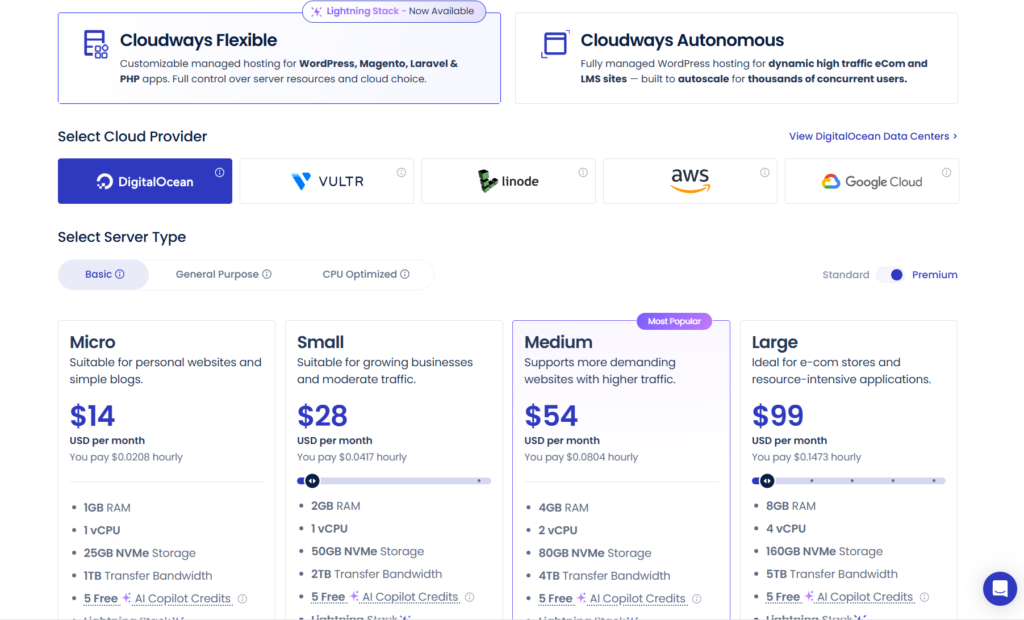
Pricing varies based on your chosen cloud provider:
DigitalOcean (Most Popular):
- 1GB RAM: $11/month
- 2GB RAM: $22/month
- 4GB RAM: $42/month
- 8GB RAM: $80/month
- Higher tiers available up to 192GB RAM
Vultr:
- Similar pricing to DigitalOcean
- 1GB RAM: $11/month
- High-frequency options available with NVMe storage
Linode:
- 1GB RAM: $12/month
- Competitive pricing across all tiers
- 25 global data center locations
AWS:
- 1.75GB RAM: $36.51/month
- Premium performance and global infrastructure
- Higher costs but enterprise-grade reliability
Google Cloud:
- 1.75GB RAM: $33.30/month
- Excellent for those already in Google ecosystem
- Premium infrastructure and performance
Cloudways Autonomous Pricing
For the fully managed WordPress solution:
- Plan 1: $35/month (suitable for growing sites)
- Plan 2: $75/month (medium traffic sites)
- Plan 3: $115/month (high traffic sites)
- Plan 4: $155/month (very high traffic sites)
- Custom plans: Available for enterprise needs
All Autonomous plans include automatic scaling, so resources adjust based on actual traffic without manual intervention.
Additional Costs to Consider
- Offsite Backup Storage: $0.033 per GB per server
- Extra Bandwidth: $0.12 per GB beyond your plan’s allocation (AWS)
- Additional Storage: $0.17 per GB for extra disk space
- Email Hosting: $1 per email address per month (via Rackspace add-on)
- Premium Support: Available as an add-on for priority responses and enhanced support access
- Advanced Support: For mission-critical sites needing faster resolution times
What’s Included in All Plans
Regardless of which tier you choose, every Cloudways plan includes:
- 24/7 expert support via live chat and tickets
- Free SSL certificates with automatic renewal
- Free website migration (after account upgrade)
- Automated backups (you pay only for storage used)
- Staging environments
- Git integration
- Team collaboration tools
- Real-time monitoring
- CloudwaysBot notifications
- Regular security patches and updates
- PHP version management
- Server cloning capabilities
- Dedicated IP address
- HTTP/2 support
Comparing Value Proposition
At $11/month for the basic DigitalOcean plan, Cloudways costs more than typical shared hosting ($3-8/month) but offers dramatically better performance. You’re getting:
- Dedicated server resources (not shared with hundreds of other sites)
- Cloud infrastructure with superior reliability
- Managed services that save hours of technical work
- Professional-grade features typically reserved for expensive VPS plans
- Scalability without migration headaches
For most businesses, the productivity gains and performance improvements justify the higher cost. A faster website means better conversions, higher search rankings, and happier visitors.
Who Should Try the Cloudways Free Trial?
Cloudways isn’t for everyone, and that’s okay. Here’s who benefits most from testing this platform:
Perfect Candidates for Cloudways
Growing Businesses: If you’ve outgrown shared hosting but aren’t ready for enterprise solutions, Cloudways hits the sweet spot. You get enterprise-level performance at reasonable prices.
WordPress Developers and Agencies: Managing multiple client sites? Cloudways’ team features, server cloning, and staging environments make client management significantly easier.
E-commerce Store Owners: WooCommerce and Magento sites benefit enormously from Cloudways’ performance optimizations and ability to handle traffic spikes without downtime.
Performance-Conscious Marketers: When page load speed directly impacts your conversion rates, Cloudways’ optimization features deliver measurable ROI.
Developers Needing Control: You get SSH access, Git integration, and the ability to run custom applications while still enjoying managed hosting benefits.
Scaling Startups: Start small with $11/month and scale seamlessly as your traffic grows, without migrating to new infrastructure.
Who Might Want to Skip
Absolute Beginners: If you’ve never set up a website before, Cloudways might have a steeper learning curve than Wix or Squarespace. You can handle it, but expect some learning time.
Extremely Budget-Conscious Users: If you need the absolute cheapest hosting and your site has minimal traffic, traditional shared hosting might suffice.
Those Needing Email Hosting: Cloudways doesn’t include email hosting in standard plans. You’ll need the Rackspace add-on ($1/email/month) or use external email services.
Non-Technical Users Wanting Full Automation: While Cloudways simplifies cloud hosting, it still requires more involvement than fully managed platforms like Kinsta or WP Engine.
Sites Under 1,000 Monthly Visitors: The performance benefits might not justify the cost difference if your traffic is very low. Consider starting with cheaper hosting and migrating to Cloudways as you grow.
Common Questions About the Cloudways Free Trial
Q: Do I really not need a credit card for the free trial?
Absolutely not. The three-day trial requires only your email address and phone number for verification. No payment information whatsoever. This is one of Cloudways’ best features – you can genuinely test the platform risk-free.
Q: What happens when my trial ends?
If you haven’t added a payment method, your servers automatically shut down after three days. Your data remains accessible for a grace period, allowing you to retrieve any content if needed. If you’ve added payment details, your account auto-converts to a paid plan and billing begins based on your server usage.
Q: Can I migrate my existing website during the trial?
Yes! This is actually recommended. You can use Cloudways’ free WordPress migration plugin or contact support for assisted migration once you upgrade your account. Testing with your actual website gives you the most accurate performance comparison.
Q: Will I get charged automatically after the trial?
Only if you’ve added a payment method. If you complete the trial without adding payment details, nothing happens – your servers simply stop running after three days. There are no surprise charges or recurring fees.
Q: Can I try both Flexible and Autonomous during my trial?
You can sign up for separate trials for each product. However, you can’t run both simultaneously on the same account using the same trial period. Choose the one more relevant to your immediate needs.
Q: Is support really available 24/7 during the trial?
Yes. Trial users get the same support access as paying customers. Average live chat response time is around 90 seconds, and support quality is generally excellent based on user reviews.
Q: Can I upgrade to a larger server during my trial?
Absolutely. You can vertically scale your server resources at any time by moving sliders in the dashboard. This happens within minutes with zero downtime. However, using larger servers consumes your trial credits faster if you’re using promo codes.
Q: What happens to my data if I don’t continue after the trial?
Your data remains accessible in your Cloudways account for a grace period. You can download backups or export your data before the account is fully closed. However, it’s best to backup your content before the trial ends to avoid any complications.
Q: Can I cancel my trial early if I decide it’s not for me?
Yes. Simply delete your servers from the dashboard. If you haven’t added payment information, you won’t be charged anything. If you have payment details on file, you’ll be charged only for the actual server usage up to that point.
Q: Can I use multiple promo codes?
No. Cloudways allows one promo code per account. Choose the code offering the best value for your situation, either free credits for extended testing or percentage discounts for long-term savings.
Final Verdict: Is the Cloudways Free Trial Worth Your Time?
After examining every aspect of the Cloudways free trial, here’s the bottom line: Yes, it’s absolutely worth trying – with some important caveats.
What Makes This Trial Stand Out
1. No Risk Testing: The no-credit-card requirement eliminates all financial risk. You can genuinely evaluate the platform without worrying about forgetting to cancel before charges hit.
2. Real Features, Not Limitations: Unlike many “free trials” that restrict important features, Cloudways gives you access to the actual platform you’d use as a paying customer. The testing experience reflects real-world usage.
3. Generous Extension Options: Combined with promo codes, you can test for up to three months essentially free, giving you ample time to make an informed decision.
4. Full Support Access: Getting the same 24/7 support as paying customers during your trial means you can resolve issues and learn the platform properly before committing financially.
Who Benefits Most
You’ll gain maximum value from this trial if you:
- Currently use shared hosting and experience performance issues
- Need to manage multiple WordPress sites efficiently
- Run an e-commerce store requiring better performance
- Want cloud hosting power without technical complexity
- Work as a developer or agency managing client websites
- Are willing to invest a few hours learning the platform
Potential Drawbacks to Consider
Time Investment: Three days requires focused testing. If you can’t dedicate a few hours to properly evaluate the platform, you might not get meaningful results.
Learning Curve: While simpler than managing cloud servers directly, Cloudways still requires more technical understanding than traditional shared hosting. Budget time for learning.
Cost Considerations: At $11-35+/month, Cloudways costs more than budget shared hosting. Ensure the performance gains justify the price difference for your specific situation.
Email Hosting Gap: Needing separate email hosting adds complexity and cost. Factor this into your decision if email is critical.
The Bottom Line
The Cloudways free trial delivers exactly what it promises: a genuine, risk-free opportunity to test premium managed cloud hosting. With no credit card required, full feature access, and optional extensions through promo codes, you have everything needed to make an informed decision.
Three days is enough to test basic functionality and performance. Three months (with promo credits) is more than enough to thoroughly evaluate if Cloudways solves your hosting challenges.
Should you try it? If you’re experiencing any of these pain points with your current hosting – slow load times, unreliable uptime, poor support, inability to handle traffic spikes, or frustration with technical management – you owe it to yourself to test Cloudways. The trial costs you nothing but a few hours, and it might reveal the hosting solution you’ve been searching for.
The worst-case scenario? You spend three days testing and decide it’s not for you. No charges, no commitments, no problem.
The best-case scenario? You discover a hosting platform that dramatically improves your website performance, saves you hours of technical frustration, and scales effortlessly as your business grows.
Given that contrast, the choice seems pretty clear. Sign up for the Cloudways free trial, spend a few focused hours testing it properly, and let the results speak for themselves. Your website – and your visitors – will thank you for doing your homework.
Ready to get started? Visit Cloudways.com, click “Start Free,” and take that first step toward potentially transforming your website’s performance.
Good luck with your trial, and may your page load times be forever fast.