
GenPage AI pricing starts at $0. The platform offers a free plan, then three paid routes: Pro at $79 per month, Scale at $249 per month, and a custom-priced Ultimate plan for larger teams.
Those two paid figures are entry prices, shown with yearly billing selected, and they rise as you choose a bigger monthly credit allowance. Credits, not page counts or visitor caps, are the real currency here.
That last point is where most of the confusion starts. If you are used to landing page builders that charge by monthly visitors, GenPage’s credit model feels different, and a quick glance at the pricing page does not fully explain how far your money goes. This guide breaks down every plan, shows what a credit actually buys, flags the costs that are easy to miss, and helps you decide whether GenPage is worth paying for.
GenPage AI Pricing at a Glance
Here is the full picture in one place. Each plan builds on the one before it, so Scale includes everything in Pro, and Pro includes everything in Free.
| Plan | Starting price | Monthly credits | Best for |
|---|---|---|---|
| Free | $0 per month | 100 | Testing the platform and publishing your first personalized pages |
| Pro | $79 per month | 500 (selectable up to 2,000) | Individual marketers and small teams building pages from lead lists or prompts |
| Scale | $249 per month | 2,500 (selectable up to 20,000) | Teams personalizing pages across ads, outbound, and the website |
| Ultimate | Custom quote | Custom | Larger organizations that want automation, security controls, and hands-on support |
Two details are worth noticing before we go deeper. First, the pricing page promotes “2 months free” on yearly billing, so the prices above should be read as the annual-billing rate.
Second, both Pro and Scale let you slide to a larger credit bundle, and the price moves with it. The figures in the table are where each plan starts, not where every buyer ends up.
What Is GenPage, and Why Does It Use Credits?
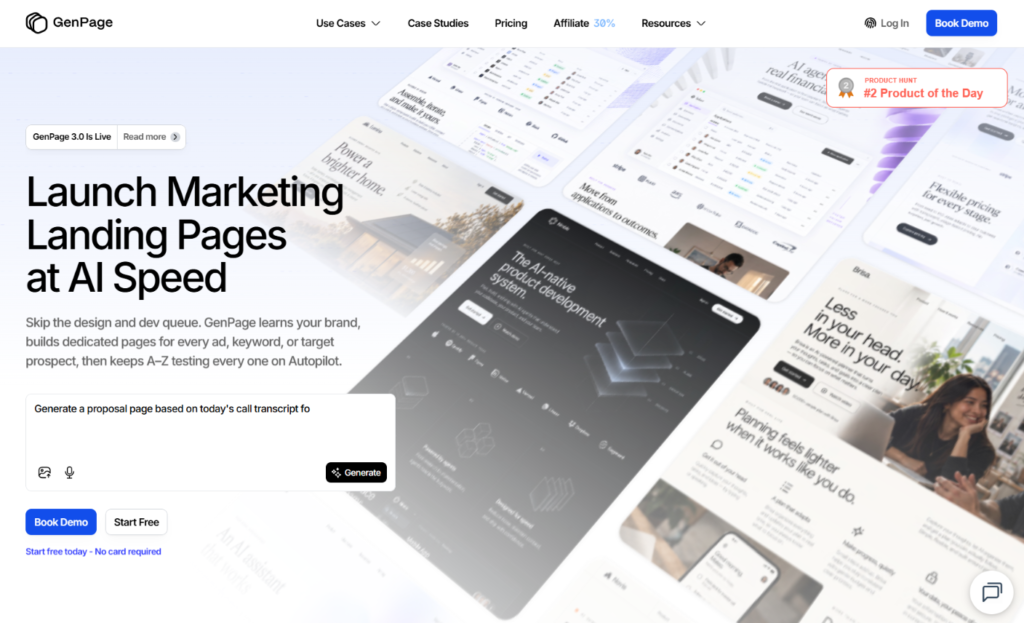
Before the numbers make sense, it helps to know what you are paying for. GenPage is an AI platform that generates personalized landing pages for individual ads, keywords, target accounts, or visitor intents.
Instead of sending every click to one generic page, you connect your website, ad campaigns, or a lead list, and GenPage produces page variations matched to each audience.
Marketing and go-to-market teams use it for account-based marketing (ABM) pages, LinkedIn outreach pages, and Google Ads landing pages. The company says more than 3,400 teams use the product, though that is a vendor claim rather than an independent figure.
Because every generated page and every data enrichment runs on AI models, usage-based pricing is a natural fit. A flat monthly fee would force light users to subsidize heavy ones. Credits let GenPage charge for the work actually done, which is also why software directories such as Capterra classify the pricing as usage based, with a free version and a free trial.
How GenPage Credits Work
A credit is the single currency for everything the platform does. The pricing page spells out three situations where credits are spent:
- Publishing a page variant costs 1 credit.
- Running AI enrichments costs 1 credit for every 10 enrichments. These are the lookups that pull in company or contact details to personalize a page.
- Generating a page costs a variable amount, depending on the AI model you choose and how complex the page is.
There are also three rules that matter for budgeting. Monthly plan credits reset every billing cycle, so unused ones do not carry over. Credits you buy separately as top-ups are different: they roll over and stay valid for 12 months. And keeping a page live costs nothing. Published pages stay online indefinitely, and credits are only consumed when you generate, publish, or enrich.
That last rule deserves attention. If you run out of credits, nothing breaks. Your live pages keep serving traffic, and you simply cannot generate or publish anything new until you top up or your allowance resets. For a marketing team, that is a far gentler failure mode than a campaign page going dark.
It is worth being upfront about one limitation. Because page generation is priced by model and complexity rather than a fixed number, no outside source, including this article, can tell you exactly how many pages a given plan produces. The fastest way to find out is to build a few pages on the free plan and watch your balance.
GenPage Free Plan: What You Get
The free plan costs $0 and includes 100 credits per month. No credit card is required to start, according to the pricing page.
Despite the price, it is not a stripped-down demo. You get:
- The AI page builder
- Unlimited pages and campaigns
- One user seat
- AI enrichments
- Custom and AI variables
- Page analytics and alerts
- Chat and email support
The limits are deliberate and fairly easy to spot. You are restricted to a single seat and a single workspace, you cannot connect a custom domain, and published pages carry a “Made with GenPage” badge. API and MCP access, CRM integrations, and priority support are also reserved for paid plans.
For context, 100 credits is not trivial. At GenPage’s own top-up rate for a 100-credit pack, that monthly allowance would cost $25. That makes the free plan a genuine way to test the product on real campaigns, as long as you can live with the badge and the shared domain.
GenPage Pro Plan: $79 per Month
Pro is the entry point for people who want to use GenPage professionally. It starts at $79 per month and includes 500 credits, with larger bundles available at 1,000, 1,500, and 2,000 credits per month.
On top of everything in Free, Pro adds:
- Unlimited user seats
- Custom domains
- Removal of the “Made with GenPage” badge
- MCP and API access
- GTM and CRM integrations
- Priority support
The practical upgrade is professionalism. Pages on your own domain, without third-party branding, look like part of your company rather than an experiment. Unlimited seats also remove a common friction point, since a sales or marketing team can collaborate without paying per user.
The pricing page describes Pro as suited to building pages from lead lists or prompts at lower volume. That is a fair summary. If you are creating personalized pages for a few hundred prospects a month, or testing the approach before expanding it, Pro covers the basics.
A quick calculation puts the cost in perspective. At the entry tier, $79 for 500 credits works out to about $0.16 per credit. That is nearly identical to the cheapest top-up pack, which is also roughly $0.16 per credit. In other words, at the starting tier you are paying for the features (domain, badge removal, integrations, seats) more than for cheaper credits. The savings on credits show up one level higher.
GenPage Scale Plan: $249 per Month
Scale is labeled the most popular plan, and the math explains why. It starts at $249 per month with 2,500 credits, which is five times the Pro entry allowance. Larger bundles go up to 5,000, 10,000, and 20,000 credits per month. At the entry tier, that is roughly $0.10 per credit, about 40 percent cheaper than Pro’s entry rate and well below any top-up.
Scale includes everything in Pro, plus:
- A custom scripts and HTML editor
- Webhooks, an SDK, and the option to bring your own AI model key (BYOK)
- Session replays and heatmaps
- Unlimited workspaces
- Basic onboarding and training
The heatmaps and session replays are the headline additions. They turn GenPage from a page generator into a tool that also shows you how visitors behave on those pages. Unlimited workspaces make Scale the natural choice for agencies, multi-brand companies, or any team that needs to keep campaigns separated.
There is one catch. Ads features are not bundled into the Scale price. They live in a separate add-on, covered next.
The GenPage Ads Module: The Add-On You Need to Plan For
If your main use case is paid advertising, this is the section that matters most. The Ads Module is an optional add-on for Scale, and the pricing page lists it from $399 per month. It is included in the Ultimate plan.
The module covers:
- Google Ads and LinkedIn Ads sync
- Ad intelligence
- Ad group and keyword page generation
- Auto-publishing of final URLs and one-click variant updates
- Variant-level conversion tracking
In practice, this is what lets GenPage build a page for each ad group or keyword and push it live automatically, rather than leaving you to do it by hand. The configurator on the Scale plan also appears to tie the module’s price to your monthly ad spend, with bands that run from up to $20,000 per month through to more than $100,000. If your ad budget is large, expect the add-on to cost more than the starting figure.
The budgeting takeaway is simple. A team that wants Scale plus ad sync should plan for roughly $648 per month at the lowest published prices ($249 plus $399), before any larger credit bundle or higher ad-spend band. That is a very different number from the $249 headline, and it is the main reason to price your real setup rather than the plan card.
GenPage Ultimate Plan: Custom Pricing
Ultimate has no public price. You book a demo and receive a quote based on the credit volume you need. It includes everything in Scale, with the Ads Module included, plus:
- Custom credit volumes
- A brand knowledge base, which lets pages draw on internal material such as case studies, decks, and product documentation instead of only your public website
- GenPage Autopilot, which continuously tests page variants and shifts traffic toward the ones that convert best
- A dedicated account manager and white-glove setup
- Single sign-on (SSO) and role-based access control (RBAC)
- Your choice of EU or US data storage
- Custom feature requests
The pricing page also notes that this is the tier where GenPage’s own team can build and manage campaigns on your behalf. It is aimed at organizations where security review, regional data hosting, and hands-off optimization are requirements rather than extras.
GenPage Credit Top-Up Pricing
If you need more credits without changing plans, you can buy one-time top-ups at any time. They are added to your balance immediately and stay valid for 12 months.
| Top-up pack | Price | Cost per credit |
|---|---|---|
| 100 credits | $25 | $0.250 |
| 500 credits | $99 | $0.198 |
| 1,000 credits | $179 | $0.179 |
| 3,000 credits | $479 | $0.160 |
Bigger packs are cheaper per credit, but GenPage itself says top-ups are meant for occasional spikes, not steady demand. If you find yourself buying them most months, upgrading is almost always cheaper. The company states that included plan credits cost less per credit than top-ups at every tier, which holds up against the numbers above.
One smart use of top-ups is as a safety net. Because purchased credits roll over for a year, a single pack bought before a product launch or a big campaign sits in reserve until you need it, without the use-it-or-lose-it pressure of monthly credits.
What Will GenPage Actually Cost You? Three Realistic Scenarios
Published prices only tell part of the story, so here are three setups based on the numbers above. Treat them as planning guides rather than quotes, since page generation costs vary.
The solo marketer or founder. You want to test personalized pages for a handful of outbound campaigns. Start on the free plan, use the 100 monthly credits, and move to Pro only when you need your own domain or want the badge gone. Expected starting cost: $0, then $79 per month.
The small growth team running Google Ads. You manage several ad groups and want a unique page behind each one. Scale gives you the credits, heatmaps, and workspaces, and the Ads Module handles the sync. Expected starting cost: about $648 per month at the lowest published prices, higher with bigger credit bundles or ad-spend bands.
The enterprise ABM team. You are personalizing pages for hundreds of target accounts, and security and data residency matter. You will need an Ultimate quote, which is the only way to price Autopilot, the knowledge base, SSO, and managed setup.
Hidden Costs and Fine Print to Check Before You Buy
Nothing here is sinister, but these are the details that most often turn a clean budget into a surprise.
- Annual versus monthly billing. The page promotes two free months on yearly billing. If that works the way the offer sounds, paying month to month would cost roughly 20 percent more than the displayed rate. Check the exact monthly price at checkout before committing.
- The credit slider. The price on each card is for the smallest credit bundle. Move the selector up and the monthly cost rises.
- The Ads Module. As covered above, it is a separate line item on Scale and can scale with ad spend.
- Ad budgets themselves. GenPage does not replace your Google or LinkedIn spend. It tries to make that spend convert better.
- Monthly credits expire. Plan credits reset each cycle. Only purchased top-ups roll over.
- Outdated listings. Several software directories still show a starting price of $59 per month, and an independent pricing index recorded Pro at that figure earlier in 2026. The official page now lists $79, so rely on the vendor’s own page rather than third-party snapshots.
GenPage Pricing vs. Traditional Landing Page Builders
It is tempting to compare GenPage’s sticker price directly with tools like Unbounce or Instapage, but the pricing logic differs, so a straight price match can mislead.
Traditional builders typically sell plans by monthly visitor volume, with tiers capped by how much traffic your pages receive. Overage fees and forced upgrades are common complaints in reviews of those tools. GenPage takes a different approach. Its pricing page lists no visitor cap, and its limits come from credits spent when pages are generated, published, or enriched. Pages stay live for free once they exist.
That makes the comparison depend on how you work:
- Few pages, lots of traffic: a visitor-based builder may be the better fit, or at least easier to predict.
- Many pages, each tailored to a person, account, or keyword: a credit model can make more sense, because your cost follows the volume of personalization rather than the volume of clicks.
The bigger difference is the job itself. Conventional builders help you design and test one page at a time. GenPage is built to generate many tailored pages from your data, so it competes more with personalization platforms than with simple page builders. If you only need a handful of static pages, you may be paying for capability you will not use.
What Users Say About GenPage
The review base is still small, so treat the following as directional rather than definitive. On G2, the product has only a handful of reviews, and it is listed on Capterra and several other directories.
The praise centers on speed and ease. One reviewer reported getting a page that was roughly 90 percent ready within ten minutes, starting from a template or a reference URL plus a short prompt. Others highlighted the AI editor, which can apply bulk changes that you approve or reject section by section, and the way the platform pulls your colors, logos, and images from your website automatically. Reviewers who work with lead lists liked being able to generate a unique page for each contact from a CSV file.
The criticism is mild but relevant to pricing. One reviewer pointed out that the number of landing pages you can create is tied to credits, which is exactly the trade-off described above. Another wished for more templates and more native integrations.
No review can substitute for your own test, which is one more reason to start on the free plan.
Pros and Cons of GenPage’s Pricing Model
What works well
- A genuinely usable free plan with no card required
- Unlimited pages, campaigns, and brand profiles on every plan, with credits as the only real constraint
- Live pages never cost anything to keep running
- Running out of credits does not take your pages offline
- Purchased top-up credits last 12 months
- Clear, public prices for three of the four tiers
What to watch
- Credit costs for page generation vary, which makes precise forecasting harder
- Monthly plan credits do not roll over
- The Ads Module adds a significant cost on top of Scale
- Top-ups are expensive compared with plan credits
- Ultimate requires a sales conversation
- Entry prices shown are tied to annual billing and the smallest credit bundle
Is GenPage Worth It?
The honest answer depends on what you are trying to do. GenPage is strong when your goal is personalization at scale: a different page for each target account, each ad group, or each outbound prospect, built quickly from data you already have. It is a weaker choice if you simply need one or two polished landing pages and have no plans to personalize.
GenPage is likely worth it if you:
- Run ABM or outbound campaigns and want pages tailored to each account or prospect
- Spend meaningfully on Google or LinkedIn Ads and want message match at the ad group or keyword level
- Need to produce many page variants without a design or development bottleneck
- Want to start free and scale only once results justify it
You may want to look elsewhere if you:
- Need only a few static pages and no personalization
- Want entirely predictable monthly costs with no usage variable
- Plan to run ad sync on a small budget, since the Ads Module may outweigh the savings
- Depend on a large library of native integrations or templates
The free plan makes the decision low risk. Build a few real pages, check how many credits they consume, and compare your credit burn against the cost of the next tier up. That single exercise will tell you more than any pricing table.
How to Get the Most Value From GenPage
A few habits will stretch your credits further.
- Start free and measure. Spend your first 100 credits on one real campaign and note how many go to generation, publishing, and enrichment.
- Upgrade when you hit the same wall twice. If you run out of credits in two consecutive months, move up a plan instead of buying top-ups.
- Skip the Ads Module until you need it. If you are not syncing ad platforms yet, there is no reason to pay for it.
- Use top-ups before big launches. Because they last a year, a pack bought in advance protects you without wasting monthly allowances.
- Reuse templates. Templates are unlimited on every plan, so build a strong one and generate variants from it rather than starting from scratch each time.
- Reevaluate every quarter. Your credit usage tells you whether you are on the right tier.
GenPage Pricing FAQ
How much does GenPage cost?
GenPage starts at $0 on the free plan. Paid plans begin at $79 per month for Pro and $249 per month for Scale, with custom pricing for Ultimate. Higher credit bundles cost more, and the Ads Module is an extra add-on starting at $399 per month.
Is GenPage free to use?
Yes. The free plan includes 100 credits per month, the AI page builder, unlimited pages and campaigns, and one user seat. Pages carry a “Made with GenPage” badge, and features such as custom domains and integrations require a paid plan.
Does GenPage offer a free trial?
The free plan works as an ongoing trial, and no credit card is required to sign up. You can also book a live demo through the GenPage website.
What is a GenPage credit?
A credit is the unit GenPage uses to meter its work. Publishing a variant costs 1 credit, 10 AI enrichments cost 1 credit, and generating a page costs a variable amount depending on the model and page complexity.
Do unused GenPage credits roll over?
Monthly plan credits reset every billing cycle. Credits you purchase as top-ups roll over and remain valid for 12 months.
What happens when I run out of credits?
Your published pages stay live and keep receiving traffic. You just cannot generate or publish new content until you buy a top-up or your credits reset.
Does keeping pages live cost credits?
No. Credits are only used when you generate a page, publish a variant, or run enrichments.
Is there a discount for annual billing?
The pricing page advertises two free months with yearly billing. Confirm the exact monthly-billing price at checkout, since the displayed figures reflect the annual rate.
How much does the GenPage Ads Module cost?
The Ads Module is a Scale add-on listed from $399 per month, and the price appears to vary with your monthly ad spend. It is included in the Ultimate plan.
Can I switch plans later?
Yes. GenPage says you can move between plans at any time. Review the terms for billing details before changing tiers mid-cycle.
Which GenPage plan should I choose?
Choose Free to test the platform, Pro if you need a custom domain and a branding-free page at lower volume, Scale if you run ads or want heatmaps and higher credit volume, and Ultimate if you need Autopilot, SSO, or managed campaigns.
What are the best alternatives to GenPage?
Tools such as Unbounce and Instapage cover conventional landing page building and testing, while personalization platforms like Mutiny and Optimizely serve the broader website personalization space. GenPage publishes its own comparison pages for each of them.
Final Verdict: GenPage AI Pricing in 2026
GenPage’s pricing is more transparent than most personalization software. You can see three of four plans, start for free without a card, and keep every published page live at no cost. The tradeoff is the credit system, which rewards teams that understand their own usage and frustrates those who want a flat number.
If you are a marketer or growth lead who wants tailored pages for ads, accounts, or outbound campaigns, GenPage is worth testing. Begin on the free plan, move to Pro when you need your own domain, and step up to Scale once volume, heatmaps, or ad sync justify the jump. If you only need a few ordinary landing pages, a simpler builder will probably serve you better.
Whatever you choose, check the live numbers at genpage.ai/pricing first. Pricing in this category shifts quickly, and the most expensive mistake is budgeting from an outdated listing.
