
Most companies pay good money to earn a click and then send that visitor to a page that was never written for them. A prospect reads a carefully targeted LinkedIn message, lands on a homepage with fifteen menu links, and has to work out alone whether the product fits.
A searcher types an exact problem into Google, clicks your ad, and arrives at a generic page that barely mentions it. That gap between the promise and the destination is the problem GenPage.ai is built to close.
GenPage is an AI platform that generates personalized landing pages for individual ads, keywords, accounts, and even named prospects, then tracks how each page performs. It shipped version 3.0 in August 2026, launched a free plan at the end of September, and is now expanding toward full multi-page websites.
With that much movement in a short time, this GenPage AI review sticks to the practical questions. What does the tool actually do? What will it cost once you are past the free tier? Where does it fall short? And who should skip it?
Quick Verdict: Is GenPage Worth It?
Short answer: yes, for the right team. GenPage is one of the more capable AI landing page builders for B2B marketing, outbound, and paid search, and the new free plan makes it easy to find out for yourself at no cost. It is a weaker fit for anyone who only needs a single simple page or a heavyweight, statistically rigorous experimentation suite.
- Our overall score: 4.1 out of 5 (editorial score, explained in the final verdict)
- Best for: B2B marketing and growth teams, sales teams running outbound, ABM programs, agencies, and paid search teams that want ad-to-page message match without waiting on design and development
- Skip it if: you need one static page, you want a classic drag-and-drop builder with years of public track record, or you cannot absorb usage-based pricing
- Pricing: Free (100 credits a month), Pro from $79 a month, Scale from $249 a month, Ultimate on custom pricing; the Google and LinkedIn Ads module starts at $399 a month
- Biggest strength: personalization that goes beyond swapping a name or keyword into a headline
- Biggest watch-out: credit-based pricing is harder to predict than a flat fee, and the headline performance numbers come from GenPage itself
How We Evaluated GenPage
Transparency matters in a product review, so here is exactly what this one is based on. We studied GenPage’s live website, its pricing page and plan comparison, its public changelog, its GenPage 3.0 launch post, its FAQs, and independent user reviews, including 60 verified reviews on AppSumo. We then compared what the company claims with what independent users say.
We did not run a paid ad campaign or a large outbound sequence through the platform for this article. Where a figure comes from GenPage rather than from an independent source, we say so. Treat vendor-reported results as a starting point for your own testing, not as a promise.
What Is GenPage AI?
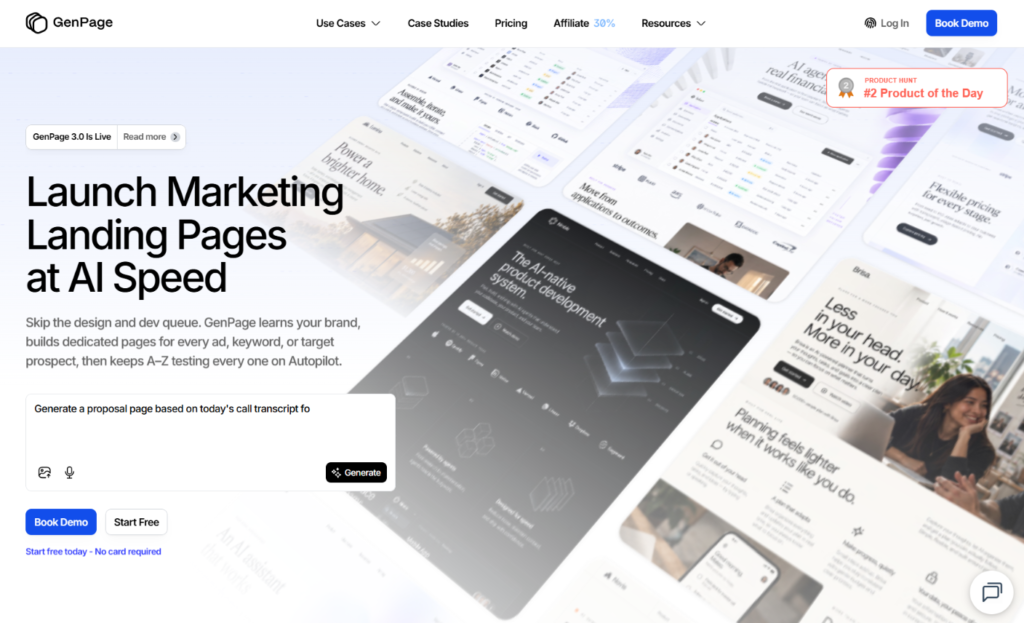
GenPage is a cloud-based, AI-native landing page platform for go-to-market (GTM) teams. Its core idea is the intent-matched landing page: a page whose message, proof, and offer reflect whatever brought the visitor there, whether that was an ad, a search keyword, a LinkedIn message, or a cold email.
The company is led by co-founder and CEO Samy Barbier and works from Seoul and Amsterdam. On its homepage, GenPage says more than 3,400 teams use it and that it generated over 200,000 pages in the past year. Those are company figures we could not verify independently, though the growth trend is consistent across its own posts: the August launch announcement cited roughly 3,200 teams, up from about 2,800 five months earlier.
In practice, the workflow has three steps:
- Connect. You link your website, ad accounts, or lead lists, and GenPage learns your brand, campaigns, and audiences.
- Generate. The platform enriches your data and uses AI to build tailored pages for each account, ad, or keyword.
- Track and optimize. You measure engagement and conversions, then refine the pages, with an automated testing layer called Autopilot planned for the highest tier.
That structure is simple on paper. The interesting part is what happens inside each step, so let’s go through the features that matter most.
GenPage Features: What You Actually Get
The AI agent: build a page by describing it
Older AI page builders started with configuration: choose a template, set a campaign type, define variables. GenPage 3.0 starts with a conversation instead. You describe the page in plain language, and the agent plans the layout, decides how the page should be personalized, pulls in context from your brand and enrichments, and walks you through the build. Behind the scenes, GenPage says it also rewrites your instructions before they reach the generation model, so results depend less on your prompting skill.
That matches what independent users report. Reviewers describe a mostly finished page appearing within minutes, followed by a round of manual polish. One AppSumo reviewer estimated that a roughly 90 percent ready page took about ten minutes. You can still start from a template, assemble pages from design blocks, import your own HTML, or give the agent a website URL and have it recreate that site as an editable page.
Brand knowledge: pages that sound like you
Generic AI pages usually fail for one reason: the model knows too little about your business. GenPage tackles this with brand profiles. Add your domain, and the platform crawls your design system, positioning, products, case studies, and blog content. A feature called Brand Memories then remembers the preferences you correct repeatedly, and persistent AI guidelines let you set a rule once instead of retyping it in every prompt.
The deepest version is the Brand Knowledge Base, which lets pages draw on internal material such as sales decks, battlecards, and product documentation. According to the pricing page, that capability sits on the custom-priced Ultimate plan. The logic is sound, since a sales deck usually describes your product more sharply than a committee-approved homepage does, but it does mean the most distinctive brand feature is not available on the entry tiers.
Personalization and enrichment: where GenPage separates itself
This is the heart of the product. GenPage offers AI variables and custom variables that change copy, visuals, and content for each visitor. The Variables Agent studies a finished page and proposes what should be dynamic, which removes a chore many teams skip.
For outbound and ABM, the enrichment options go much deeper than a first name and a company name. Version 3.0 added five target-account enrichments: LinkedIn profile, company research, prospect research, and recent LinkedIn posts for both the person and the company. A September update then added a Research Agent that answers custom questions about a lead, such as a recent funding round, hiring signals, tech stack, competitors, or recent news, and turns each answer into a variable you can use on a page.
The practical difference is easy to picture. Text replacement can put “Acme” in a headline. Research-driven personalization can change the argument itself, for example leading with a hiring surge for one account and a new product launch for another. GenPage’s own blog frames this as four levels of personalization, from one page for everyone up to pages that improve themselves, and claims version 3.0 makes the third level practical at scale. That framing is marketing, but it is a useful way to judge any competitor too.
Google Ads and LinkedIn Ads: message match at scale
For paid teams, GenPage’s ad integrations are probably the most commercially important feature. Google Ads support left beta with version 3.0. You connect your account, import campaigns, ad groups, and keywords, generate matching landing pages, publish them in bulk, and track conversions down to the individual variant. LinkedIn Ads support followed in early September.
According to the company’s roadmap, Meta Ads integration and joint ad-creative-plus-landing-page generation are both planned before the end of 2026, so check whether they have shipped before you rely on them.
The ad features live in a separate paid module, covered in the pricing section below, and that detail matters for budgeting.
Analytics, alerts, and forms
GenPage includes page analytics, a workspace overview, engagement filters, heatmaps, and session replays. Heatmaps and replays are listed from the Scale plan upward. Real-time alerts can reach your team through Slack, Gmail, or Microsoft Teams, and you can build alert templates around page visits, scroll depth, form submissions, and chat conversations.
Native forms arrived in September. You can describe a form in your prompt, edit each field, store submissions as leads, export them, and trigger alerts or webhooks. For a team that used to bolt a separate form tool onto every page, that removes a real source of friction.
Concierge: an AI chat agent on every page
GenPage Concierge adds an AI agent directly to a landing page. It knows your brand and the specific page the visitor is viewing, answers questions, and helps qualify inbound prospects around the clock.
An AppSumo reviewer called out the chat agent as a differentiator that goes beyond ordinary page building. The usual caveat applies to any visitor-facing AI: review what it says before you put it in front of high-value prospects.
Integrations, API, and MCP
GenPage connects with common GTM tools, including Clay, Apollo, HeyReach, CRMs, automation platforms, and ad platforms, and the pricing table lists a Salesforce integration.
Developers get an API, webhooks, an SDK, and an MCP server that works in both directions: the agent can pull from tools such as Figma or Notion, and you can connect GenPage to Claude or other AI tools to create pages from a call transcript or a CRM record. One verified reviewer reported chaining GenPage with Make, Apify, and Google Sheets for automated workflows.
Models, version history, and security
You can choose between models from Anthropic, OpenAI, and Gemini, set reasoning depth, and connect your own API keys to cut credit usage. Every published version of a page is tracked, so you can restore an earlier one.
For governance, GDPR consent controls work with third-party consent management platforms, and role-based access control, single sign-on, and EU or US data storage are listed on the Ultimate plan.
Autopilot: promising, but ask before you buy
Autopilot is meant to generate page variants, split traffic between them, and converge on a winner over several rounds.
It is the feature that answers the central weakness of hyper-personalization: when every segment gets its own page, no single page gets enough traffic for classic A/B testing. GenPage’s August launch post described Autopilot as being in private beta, while the pricing page lists it under Ultimate. Ask for current performance data in a demo before you count on it.
GenPage Pricing (2026)
GenPage uses a credit system. According to the pricing page, publishing a variant costs one credit, ten AI enrichments cost one credit, and generating a page varies with the model and the complexity of the job. Keeping a page live costs nothing, and published pages stay live even if you run out of credits. Monthly plan credits reset each cycle, while purchased top-up credits last twelve months.
The figures below are what the pricing page displayed with yearly billing selected, and the page advertises two free months on yearly plans, so month-to-month pricing may differ.
- Free, $0 a month: 100 credits, one user seat, one workspace, the AI page builder, unlimited pages and campaigns, AI enrichments, custom and AI variables, page analytics and alerts, and chat and email support. Custom domains and removal of the “Made with GenPage” badge start at Pro.
- Pro, from $79 a month: 500 credits (higher credit tiers go up to 2,000), plus unlimited seats, custom domains, badge removal, API and MCP access, GTM and CRM integrations, and priority support.
- Scale, from $249 a month: 2,500 credits (tiers up to 20,000), plus a custom scripts and HTML editor, webhooks, SDK and bring-your-own-key support, session replays and heatmaps, unlimited workspaces, and basic onboarding. This is the plan GenPage labels most popular.
- Ultimate, custom pricing: custom credit volume, the Brand Knowledge Base, Autopilot, a dedicated account manager, white-glove setup, single sign-on, role-based access control, and EU or US data storage.
- Ads module, from $399 a month: an add-on for Scale and included in Ultimate, covering Google and LinkedIn Ads sync, ad intelligence, ad group and keyword page generation, auto-publishing of final URLs, one-click variant updates, and variant-level conversion tracking. It is priced on the ad spend GenPage optimizes, in tiers up to $20,000, $50,000, and $100,000 a month, and beyond.
- Top-ups: 100 credits for $25, 500 for $99, 1,000 for $179, and 3,000 for $479.
Is the pricing fair?
Do the math at the entry tier of each plan. Pro works out to roughly 16 cents per credit and Scale to roughly 10 cents, while top-ups run from 16 to 25 cents. That supports GenPage’s own advice: if you go over your credits most months, upgrading is cheaper than buying top-ups repeatedly.
The number to watch is the real cost of a paid-search setup. A team that wants Google and LinkedIn Ads sync needs Scale plus the Ads module, which starts at $648 a month (that is $249 plus $399) before any top-ups. That is reasonable if your ad budget is large and landing page conversion is your bottleneck. It is hard to justify if you spend a few thousand dollars a month on ads.
The other uncertainty is credit consumption. Because page generation costs vary by model and complexity, you cannot calculate a precise monthly bill in advance. The free plan is the right way to measure your own usage before committing, and bringing your own API keys can reduce AI credit use on the plans that support it.
GenPage also ran a lifetime deal on AppSumo, which is now sold out. Reviewers credited it for making personalized pages affordable, but it is no longer an option for new buyers.
What the Results Look Like: Vendor Claims vs. Independent Feedback
What GenPage reports
GenPage advertises up to three times higher conversions, an average of three times more meetings booked, conversion lifts of 30 percent or more on its best campaigns, and page launches in under five minutes.
Its featured case study describes the agency Webtouch generating $550,000 in pipeline and 12 new customers from 6,678 emails, with a 30 percent reply rate. Customer testimonials on the site include a marketing manager at Adriel who reported a 30 percent meeting booking rate before the VivaTech trade show even started.
These are the vendor’s own numbers, selected by the vendor, and results depend heavily on the offer, the list quality, and the sender’s reputation. We would not plan a budget around them. The more interesting claim is structural rather than numerical.
Its blog cites third-party research suggesting that only about 20 percent of paid traffic reaches a page built for the campaign, and that dedicated landing pages convert far better than homepages. We did not verify those sources, but the direction matches long-standing conversion rate optimization advice.
What independent users say
On AppSumo, GenPage holds 4.83 out of 5 across 60 verified reviews: 54 five-star, 4 four-star, 1 three-star, and 1 one-star. Recurring praise includes fast page creation, an approachable interface, strong personalization options, easy automation with other tools, and useful heatmaps and session replays. Several reviewers valued the ability to shape the message after the AI produces a first draft rather than starting from a blank canvas.
The criticism is mild but consistent. One detailed reviewer noted a learning curve during setup and asked for more step-by-step tutorials, especially for integrations, custom domains, and automated workflows. AppSumo’s own summary of the reviews mentions occasional trouble with the AI understanding specific change requests.
Two cautions apply. AppSumo buyers are early adopters who paid a discounted lifetime price, which tends to skew ratings upward. And GenPage’s founder replies to many reviews, which is good for responsiveness but means the page is not a neutral forum. GenPage also reports a 5 out of 5 average on G2, a number we could not confirm or tie to a review count.
GenPage Pros and Cons
Pros
- Personalization goes deeper than text swapping. Research enrichments, a Research Agent, and AI variables let each page make a different argument, not just show a different name.
- Fast first draft. Pages arrive in minutes, and the conversational agent lowers the skill needed to get a good result.
- A real free plan. One hundred monthly credits and unlimited pages and campaigns let you test the product on live work without a card.
- Built for ads and outbound. Google and LinkedIn Ads sync, per-variant tracking, and integrations with tools like Clay and Apollo target the workflows B2B teams actually run.
- Analytics on the same platform. Heatmaps, session replays, alerts, native forms, and lead storage reduce the number of separate tools you need.
- Flexible AI controls. Model choice, reasoning depth, and bring-your-own-key support give high-volume teams a way to manage cost.
- Fast-moving product. The changelog shows major releases every couple of weeks, and the team responds publicly to user feedback.
Cons
- Credit pricing is hard to forecast. Generation costs vary, so monthly spend is less predictable than a flat subscription.
- The ad features cost extra. The Ads module adds at least $399 a month on top of Scale.
- Some standout features are gated. The Brand Knowledge Base, Autopilot, single sign-on, and role-based access control sit on the custom-priced Ultimate plan, which requires a sales conversation.
- Performance claims are self-reported. Independent, audited conversion data is thin, and the best numbers come from handpicked customers.
- Learning resources lag the product. Users asked for more tutorials, and the pace of releases makes documentation harder to keep current.
- AI output still needs human review. Generated copy, Concierge answers, and personalized claims about a prospect should be checked before they reach a real buyer.
- A shifting product scope. The move from landing pages toward multi-page websites is ambitious, and some roadmap items were still upcoming at the time of writing.
Who Should Use GenPage (and Who Should Not)
GenPage is a strong fit for:
- B2B outbound and ABM teams that want a one-to-one page for each target account or prospect.
- Paid search and paid social managers who need landing pages matched to specific keywords, ad groups, and campaigns, and who spend enough to justify the Ads module.
- Agencies managing several clients, who will likely want Scale for its unlimited workspaces.
- Founders and small sales teams who want to test personalized outreach pages cheaply, starting on Free and moving to Pro at $79 a month when they need a custom domain.
- Teams without spare design and engineering capacity who need pages to go live in hours, not weeks.
You should probably look elsewhere if:
- You need one or two static pages for a small local business. A simpler builder will cost less and ask less of you.
- Your priority is a mature, enterprise-grade experimentation program with rigorous statistical testing today. Autopilot is not yet something you can fully verify from public information.
- Your ad spend is small, so the combined cost of Scale and the Ads module would outweigh the benefit.
- Your outreach relies on very large cold email volumes, where deliverability, not the landing page, is usually the limiting factor.
How GenPage Compares to Alternatives
GenPage sits between several categories of software, so the right comparison depends on what you are replacing.
- Classic landing page builders, such as Unbounce and Instapage. These are established tools with large template libraries, familiar A/B testing, and long track records. Unbounce, for instance, offers dynamic text replacement. They generally ask you to design and manage each variant yourself, while GenPage’s pitch is generating and personalizing variants at scale. If you run a handful of high-traffic pages and value mature testing, a classic builder may serve you better. If you need dozens or hundreds of tailored pages, GenPage’s approach saves more time.
- A DIY stack, such as Webflow plus Clay. This route offers enormous flexibility, but you assemble enrichment, page generation, publishing, and analytics yourself. GenPage bundles those pieces, which costs you some control and saves you a lot of integration work.
- General-purpose AI builders, such as Lovable or pages generated in a chatbot. These can produce a good-looking page quickly. What they usually lack is built-in lead enrichment, ad platform sync, per-variant tracking, and alerting, which is where GenPage focuses.
GenPage publishes its own comparison pages for most of these tools. They are vendor-written, so read them as a source of feature lists rather than neutral verdicts, and always confirm a competitor’s current features and pricing on its own website.
How to Test GenPage Without Wasting Money
Because the free plan costs nothing, the smartest way to judge this tool is a small, disciplined trial.
- Start on Free and add your domain so the agent builds your brand profile.
- Pick one real campaign, such as a single high-intent keyword or ten target accounts, instead of experimenting in the abstract.
- Generate one page and edit it by hand. Note how much cleanup the first draft needs, because that is your true time saving.
- Track credit use from generation, enrichments, and publishing so you can estimate a monthly bill.
- Compare against your current page for at least two weeks, and ask about Autopilot, the Ads module, and onboarding on a demo call if the results justify a paid plan.
If you do outbound, remember GenPage’s own deliverability guidance: it suggests teasing the personalized page in a first email or LinkedIn message and sharing the link after the prospect replies, although smaller targeted campaigns of around 100 to 150 emails per domain per week can include the link upfront.
Final Verdict: Is GenPage Worth It in 2026?
For B2B teams that care about message match, GenPage is worth a serious look. It does something most page builders still do not: it combines research-driven personalization, fast AI generation, ad platform sync, and analytics in one place, and it lets you try that for free. Independent users are largely positive, and the pace of development is hard to ignore.
The case is not airtight. Pricing is usage-based and the ad module raises the real cost, the strongest performance claims are self-reported, and its most ambitious feature, Autopilot, still needs public proof. Our advice is to start on the free plan, test it on one real campaign, and move to Pro or Scale only after your own numbers show a gain.
Our scorecard (editorial opinion, out of 5):
- Ease of use and speed to first page: 4.5
- Personalization depth: 4.5
- Features and integrations: 4.5
- Value for money: 4.0
- Analytics and optimization: 4.0
- Independent proof and track record: 3.5
- Learning resources and onboarding: 3.5
- Overall: 4.1 out of 5
Frequently Asked Questions About GenPage
What is GenPage?
GenPage is an AI platform that generates personalized landing pages for specific ads, keywords, accounts, and prospects. It learns your brand from your website and files, builds tailored pages in minutes, and tracks engagement and conversions so you can improve them.
Is GenPage free?
Yes, there is a free plan. It includes 100 credits a month, one user seat, unlimited pages and campaigns, the AI page builder, AI enrichments, and page analytics. Custom domains and removal of the GenPage badge require a paid plan, and no card is needed to start.
How much does GenPage cost?
Pricing starts at $0 on Free, then $79 a month for Pro and $249 a month for Scale, with custom pricing for Ultimate. The Google and LinkedIn Ads module is an add-on from $399 a month. Extra credits cost from $25 per 100.
What are credits in GenPage?
Credits are GenPage’s single usage currency. Publishing a variant costs one credit, ten AI enrichments cost one credit, and generating a page costs a variable amount depending on the model and complexity. Monthly credits reset, while purchased top-ups last twelve months.
What is GenPage used for?
Teams use it for personalized landing pages tied to Google Ads and LinkedIn Ads campaigns, account-based marketing, and outbound outreach by email or LinkedIn. It is also used for inbound website personalization and, increasingly, for building multi-page sites.
Does GenPage work with Google Ads?
Yes. You can connect Google Ads, import campaigns, ad groups, and keywords, generate matching landing pages, publish them, and track conversions per variant. This requires the Ads module, which is an add-on to Scale and included in Ultimate.
Is there a GenPage lifetime deal?
GenPage previously sold a lifetime deal through AppSumo, but the listing is now marked sold out. Check the official pricing page for current plans, since offers change.
Is GenPage legit?
Based on public evidence, yes. It is an operating product with an active changelog, a status page, published pricing, and 60 verified AppSumo reviews averaging 4.83 out of 5. As with any software, test it on the free plan before paying.
Will GenPage hurt my email deliverability?
Not directly, since GenPage is only the page a link points to. Deliverability depends mainly on your sending setup and volume. GenPage suggests teasing the page first and sharing the link after a reply for larger cold campaigns.
What are the best GenPage alternatives?
Classic builders such as Unbounce and Instapage suit teams that want mature A/B testing for a few pages. A Webflow and Clay stack suits teams that want to assemble their own system, and general AI page generators suit quick one-off builds.
