
You’ve probably seen it mentioned in a designer’s Twitter thread, spotted it in a no-code community, or heard someone say their portfolio was “built in Framer.” And now you’re here, wondering what the hype is actually about.
Fair enough. The web design space is crowded, and every tool promises to be the one that finally makes building websites painless. But Framer is a genuinely different kind of product, and once you understand what it actually does and who it’s built for, you’ll know within five minutes whether it belongs in your workflow.
This guide covers everything: what Framer is, how it works, what makes it stand out, what its limitations are, how it stacks up against competitors, and whether it’s worth your money in 2026. No filler. Just the information you need to make a smart decision.
What Is Framer?
Framer is a visual website builder designed specifically for designers and creative professionals who want to build production-ready, high-performance websites without writing code from scratch.
It combines the feel of a design tool like Figma with the publishing power of a full website platform, letting you design and deploy in one place.
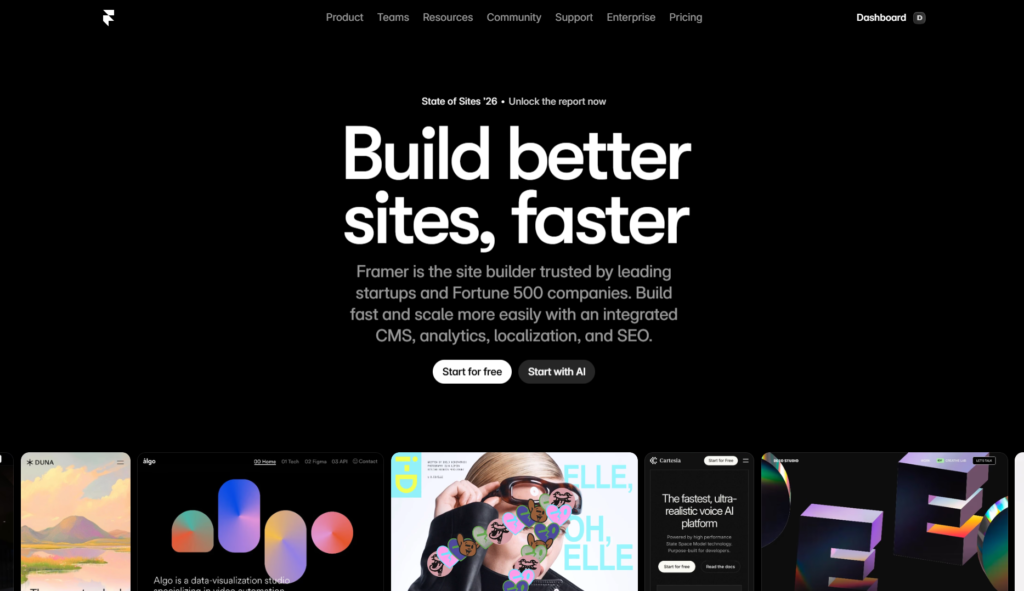
But here’s what separates Framer from the average drag-and-drop website builder: it gives you genuine design control. You’re not limited to a rigid grid system or locked-in templates. You work directly on a canvas, manipulate layout with real CSS-based precision, add animations that feel custom-built, and publish a site that loads fast and looks professional.
Think of Framer as the bridge between a design tool and a live website. Instead of designing in Figma, handing assets to a developer, and waiting for the build, you design and publish in one continuous workflow.
Originally launched as an interactive prototyping tool back in 2013, Framer went through a significant transformation around 2022 when it relaunched as a full-scale website builder.
Today, in 2026, it’s one of the most capable no-code platforms on the market, particularly for teams and individuals who care deeply about visual quality and animation.
A Brief History of Framer
To understand what Framer is today, it helps to know where it came from.
Framer was founded in Amsterdam by Koen Bok and Jorn van Dijk. The original product, Framer Classic, was a code-based prototyping tool that let designers create interactive mockups using CoffeeScript. It was powerful but niche, mostly used by designers who were comfortable getting their hands dirty with code.
Around 2019, the company introduced Framer X, a component-based version of the tool that allowed designers to use React components inside their prototypes. It was a step forward, but the product was still primarily aimed at prototyping, not publishing.
The real turning point came with Framer’s 2022 relaunch as a website builder. The company essentially rebuilt the product from the ground up, stripping away the complexity that had made previous versions intimidating and replacing it with a visual-first experience that anyone with a design background could pick up quickly.
The response from the design community was immediate. Portfolios, startup landing pages, agency sites, and product pages started appearing, all built in Framer, and many of them were strikingly well-designed.
By 2024 and into 2025 and 2026, Framer doubled down on artificial intelligence, introducing AI-powered site generation, smart layout suggestions, and content tools that significantly reduced the time it takes to go from zero to a published site.
It’s no longer just a designer’s playground. It’s become a legitimate platform for small businesses, SaaS companies, and creative agencies who want fast results without compromising on visual quality.
How Framer Works?
Framer operates on a canvas-based interface, which means you’re not clicking through menus to build a layout. You place elements directly where you want them, resize them, style them, and animate them, all in real time.
Here’s a simplified breakdown of the core workflow:
- Start with a template or a blank canvas. Framer offers a library of professionally designed templates across categories like portfolios, landing pages, SaaS websites, agency sites, and blogs. You can also start from scratch if you have a specific vision in mind.
- Build your layout. Framer uses a flexible layout system based on CSS Flexbox and Grid, which means your layouts actually behave like real-world CSS layouts rather than some simplified approximation. Frames (the equivalent of containers) can be stacked, nested, and constrained with the same logic a developer would use.
- Add content and components. Text, images, videos, icons, and interactive components all live in a searchable panel on the left. You can also bring in external components from the Framer community or build your own reusable components directly inside the tool.
- Style everything visually. On the right panel, you’ll find controls for typography, color, spacing, shadows, borders, and more. Every property has a visual control, but if you want to type in exact values, you can do that too.
- Add animations and interactions. This is where Framer really shines. You can add scroll-triggered animations, hover effects, entrance animations, and page transitions without writing a single line of code. The animation editor uses a timeline-based interface that feels closer to something like After Effects than a typical website builder.
- Connect a CMS if needed. Framer’s built-in CMS lets you manage dynamic content like blog posts, case studies, or team members. You define your content structure, connect it to your page layout, and Framer handles the rest.
- Publish with one click. Framer hosts your site on its own infrastructure, which is built on edge servers for fast global loading times. You can connect a custom domain, set up redirects, and manage SEO settings all within the platform.
The Core Features of Framer
Let’s get into specifics. Here are the features that define the Framer experience in 2026.
Visual Design Canvas
The canvas is the heart of the product. Unlike Webflow’s box-model builder or Squarespace’s section-based editor, Framer gives you a freeform canvas where you can place elements with pixel-level precision. It’s the closest thing to designing in Figma while still being a live website builder. If you’ve used Figma, the interface will feel instantly familiar.
Responsive Design Controls
Framer handles responsive design through breakpoints, similar to how a developer would write CSS media queries. You set a design on the desktop, then adjust it for tablet and mobile. Unlike some builders that just shrink everything proportionally, Framer lets you make genuinely different layout decisions at each breakpoint. This matters a lot for sites that need to look polished on every screen size.
Advanced Animation Engine
Framer’s animation capabilities are arguably its most talked-about feature. You can create:
- Scroll animations: Elements that fade, slide, or scale as the user scrolls the page.
- Hover and tap interactions: Custom effects triggered by user interaction.
- Page transitions: Smooth animated transitions between pages on your site.
- Smart components: Interactive components with multiple states (default, hover, pressed, etc.) that automatically animate between them.
The quality of these animations, and how easily they can be applied, puts Framer well ahead of most website builders when it comes to creating sites that feel genuinely alive.
Framer CMS
Framer’s content management system allows you to build dynamic pages without a separate backend. You create a collection (think: blog posts, projects, team members), define the fields you need (title, date, image, body text), and then connect those fields to your page design. Framer generates the individual pages automatically.
The CMS is solid for small-to-medium content needs, though it’s not a replacement for a dedicated headless CMS if you’re managing hundreds of content entries or need complex content relationships.
Component System
In Framer, a component is a reusable design element with its own properties and states. You can create a button component, for example, define its default and hover styles, and then use it throughout your site. If you update the component, every instance updates automatically. This is standard design tool behavior, but it’s a capability that many website builders still don’t offer well.
Framer also has a community marketplace of free and paid components contributed by designers, including navigation bars, pricing tables, testimonial carousels, and more.
SEO Tools
Framer includes solid built-in SEO controls. For every page, you can customize the meta title, meta description, Open Graph image, and canonical URL. For CMS-driven pages, you can set up dynamic SEO fields that pull from your content, which means your blog posts and project pages all get properly optimized metadata automatically.
Framer-generated sites are fast, use semantic HTML, and are crawlable by search engines, which gives you a solid technical SEO foundation right out of the box.
Localization
Framer supports multi-language websites natively, which is a significant feature for brands with international audiences. You can create translated versions of your pages and set up language routing so visitors automatically see content in their preferred language.
Framer Sites Hosting
Every site built in Framer is hosted on Framer’s own global infrastructure. Load times are fast because the platform uses edge delivery, meaning your site is served from servers close to your visitors’ locations. You don’t need to think about hosting, server maintenance, or CDN configuration. It’s all handled for you.
Framer’s AI Features
Artificial intelligence has become a central part of what Framer offers, and by 2026, the AI tools have matured considerably.
AI Site Generation
Framer’s AI can generate a complete website from a short text description. You type in something like “a landing page for a productivity app targeting remote teams,” and Framer produces a fully designed, multi-section site with placeholder content, a color scheme, and a layout that fits your description.
The output isn’t always perfect on the first try, but it’s a remarkably strong starting point. Most designers use it as a rapid prototyping tool: generate a base, then refine it manually to match the specific vision.
AI Content Writing
Inside the editor, Framer offers AI-assisted text generation. You can highlight a text block, describe what you want, and the AI will rewrite or generate content to fit. This is especially useful for filling in placeholder text with something more contextually relevant during the design phase.
AI Image Tools
Framer integrates AI image generation so you can create custom visuals directly inside the builder without switching to another app. You can generate background images, illustrations, and placeholder photography that match your brand’s look and feel.
Smart Layouts
Framer’s AI can suggest layout adjustments based on content. If you paste a long block of text into a section designed for a short headline, the smart layout tools can recommend restructuring to keep the design balanced.
These AI features don’t replace design skill or judgment, but they dramatically reduce the time it takes to move from concept to a polished draft.
Framer Pricing Plans
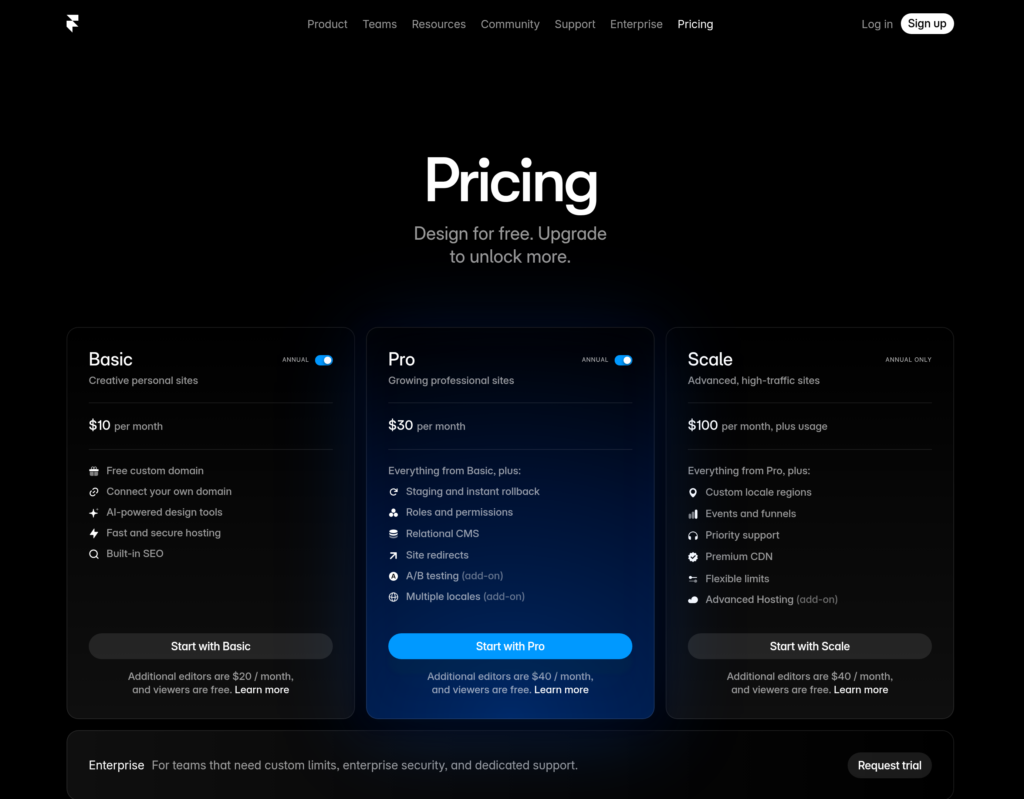
Framer uses a project-based pricing model, meaning you pay per site rather than per user account.
Here’s how the pricing tiers work.
- Free Plan: You can build and publish a basic site for free, but it will be hosted on a Framer subdomain (yoursite.framer.website). This is great for testing the platform before committing.
- Mini Plan: The entry-level paid plan starts around $5 per month when billed annually. It allows one custom domain and up to 1,000 monthly visitors.
- Basic Plan: Priced around $15 per month annually, this tier supports up to 10,000 visitors per month and includes basic CMS capabilities.
- Pro Plan: At roughly $30 per month annually, the Pro plan is designed for serious projects. It includes up to 200,000 visitors per month, a more robust CMS with up to 10,000 items, form submissions, password protection, and priority support.
- Enterprise Plan: For large teams and high-traffic sites, Framer offers custom Enterprise pricing with dedicated support, higher limits, SSO, and advanced security controls.
It’s worth noting that Framer’s pricing is competitive for what you get. The hosting, animation engine, CMS, AI tools, and publishing infrastructure would cost significantly more if you tried to replicate them by combining separate services.
One thing to keep in mind: each plan is per site. If you’re an agency managing multiple client sites, you’ll need a separate plan for each one, which can add up. Framer does offer guest editing features so clients can make content updates without needing their own paid account, which helps manage costs.
Who Should Use Framer?
Framer is not for everyone, and knowing who it’s built for will help you decide quickly whether it fits your situation.
Designers building portfolios. If you’re a UI/UX designer, motion designer, or visual designer, Framer is arguably the best platform for a personal portfolio. You have full creative control, your site will load fast, and the animation capabilities mean your portfolio can itself demonstrate your skills.
Startups and SaaS companies. Many early-stage startups use Framer for their marketing sites and landing pages. The speed of iteration is excellent: you can design, test, and publish changes quickly without a dedicated front-end developer.
Freelance designers and agencies. Framer has become popular among design studios and independent designers who build sites for clients. The quality of the output is high, the learning curve is manageable for anyone with a design background, and the client handoff experience works well.
No-code enthusiasts with design experience. Framer rewards design literacy. If you understand basic layout concepts, know what spacing and typography mean, and have some visual sensibility, Framer will feel intuitive. If you’re starting from zero design knowledge, it may feel overwhelming compared to simpler builders like Squarespace.
Teams that need fast, high-quality landing pages. Marketing teams at growth-stage companies often use Framer to publish landing pages, campaign pages, and event pages quickly without pulling engineering resources.
Who Should Probably Look Elsewhere
If you’re a blogger who needs a heavy editorial workflow, you’ll likely find Framer’s CMS limiting compared to WordPress. If you run an e-commerce store, Framer doesn’t have native shopping cart, checkout, or inventory management features, so Shopify or similar platforms are better fits.
And if you have no design background whatsoever and just need a simple business website up fast, Squarespace or Wix will get you there with less friction.
Framer vs. the Competition
Framer vs. Webflow
Webflow is the most direct competitor to Framer in the no-code website builder space. Both tools give you serious design control and produce clean code. Here’s where they differ:
Framer has a much gentler learning curve. Webflow’s power comes with complexity: interactions, binding, the designer/editor distinction, and the class-based styling system all require significant time to master. Framer feels more like a design tool and less like a web development environment.
Webflow, on the other hand, has more powerful CMS capabilities, a more mature e-commerce solution (though still not Shopify-level), and a larger ecosystem of third-party integrations. For content-heavy sites or anything requiring complex data relationships, Webflow still holds an edge.
For animation and visual quality on marketing sites and portfolios, Framer competes very strongly with Webflow and often wins on raw aesthetic output for less experienced users.
Framer vs. Squarespace
Squarespace is built for simplicity. Its target user is someone who wants a professional-looking website without dealing with any design complexity. Framer’s target user is someone who wants creative control over that design.
Squarespace has a better e-commerce offering, more straightforward blogging, and built-in marketing tools that Framer doesn’t have. Framer produces higher-quality custom designs, better animations, and more unique-looking results.
If you want a site that looks polished without much effort, Squarespace is great. If you want a site that looks exactly the way you envisioned it, Framer is the better tool.
Framer vs. Wix
Wix is extremely accessible and feature-rich in terms of built-in apps and business tools. Framer beats it decisively on design quality, animation capabilities, and performance. Wix sites can get heavy and slow. Framer sites are optimized for speed from the ground up.
For small business websites that need booking systems, e-commerce, event management, and similar features, Wix’s app ecosystem is more comprehensive. For design-forward sites, Framer isn’t even a close comparison.
Framer vs. WordPress
WordPress is a content management system first, and it remains the dominant platform for blogs, news sites, and content-heavy websites. Framer is a visual website builder first. They serve fundamentally different needs.
You can technically build a blog in Framer, but the editorial workflow, plugin ecosystem, and content management depth of WordPress are in a completely different category. Conversely, building a stunning animated landing page is far more painful in WordPress than in Framer.
Many teams use both: Framer for their marketing site and landing pages, WordPress (or another CMS) for their blog or documentation.
Real-World Use Cases for Framer
It helps to see how people are actually using Framer in practice. Here are the most common use cases:
- Product landing pages. Framer excels at one-to-five-page marketing sites with scroll animations, bold typography, and video backgrounds. The output looks premium without requiring a large team.
- Designer portfolios. This is Framer’s native habitat. Portfolios built in Framer stand out because they can include custom animations, interactive case studies, and transitions that showcase the designer’s skills.
- Agency websites. Design and creative agencies use Framer to build their own sites as a form of proof-of-concept: if their site looks this good, imagine what they can do for clients.
- SaaS marketing sites. Software companies use Framer for their primary marketing websites while keeping their web app on a separate infrastructure. Framer handles the brand presentation; the engineering team handles the product.
- Event and campaign pages. Short-lived pages for product launches, webinars, or marketing campaigns are a natural fit for Framer because they’re fast to build and easy to update.
The Pros and Cons of Framer
No platform is perfect. Here’s an honest breakdown.
What Framer Gets Right
- Design freedom. The level of creative control Framer offers in a no-code environment is genuinely impressive. You can build layouts and animations that look custom-coded.
- Performance. Framer sites are fast. The platform generates clean HTML and CSS, delivers assets efficiently, and takes performance seriously at an infrastructure level.
- Animation quality. The animations possible in Framer are a tier above what most website builders offer. Scroll effects, micro-interactions, and page transitions can be created without code.
- Figma familiarity. For designers already using Figma, the learning curve is minimal. The logic, keyboard shortcuts, and interface conventions are similar enough to make the transition smooth.
- AI tools. The AI features have matured to the point where they genuinely accelerate the design process rather than just adding novelty.
- Active community. The Framer community is active and generous. You’ll find tutorials, free templates, component libraries, and answers to common questions easily.
Where Framer Falls Short
- CMS limitations. The built-in CMS is good for small sites but doesn’t scale well for large content operations. There’s no native support for complex content relationships, user-generated content, or high-volume editorial workflows.
- No native e-commerce. If selling products is central to your site, Framer isn’t the right foundation. You can embed Stripe or use third-party tools, but it’s not a true e-commerce platform.
- Per-site pricing for agencies. Agencies managing many client sites will find the per-site pricing adds up. Framer doesn’t currently offer a volume-based agency pricing tier that competes with Webflow’s agency plans.
- Not ideal for beginners without design knowledge. Framer rewards people who already think in design terms. Pure beginners may find it overwhelming compared to template-heavy builders with more guided experiences.
- Limited third-party integrations. Compared to platforms with extensive app ecosystems (like Wix or WordPress), Framer’s native integrations are more limited. You can use tools like Zapier or Make to bridge gaps, but it requires extra setup.
Framer’s SEO Performance: What You Need to Know
One of the common questions designers ask before switching to Framer is whether sites built on the platform will rank well on search engines. The answer is: yes, with some caveats.
On the technical side, Framer is strong. Sites load quickly, use semantic HTML structure, are mobile-responsive, and support all the meta tag customizations search engines look for. Core Web Vitals scores for Framer-built sites tend to be solid out of the box.
The CMS supports dynamic SEO metadata, so blog posts and portfolio pages can each have unique titles, descriptions, and Open Graph tags without any manual work beyond the initial setup.
Where SEO in Framer requires active effort is on the content side. Framer is a design-first tool, so it doesn’t nudge you toward content best practices the way a WordPress SEO plugin might. You need to bring your own SEO strategy and be intentional about things like heading hierarchy, keyword placement, internal linking, and content depth. The tool gives you the technical foundation; the content strategy is on you.
For sites focused on visual storytelling, brand presence, and conversion rather than organic content traffic, Framer’s SEO capabilities are more than adequate.
Getting Started with Framer: What to Expect
If you decide to try Framer, here’s a realistic picture of the onboarding experience.
Day one will likely involve exploring a template or using the AI site generator to produce a starting point. Getting familiar with the canvas, the layers panel, and the properties panel takes a few hours of play.
Week one is where the learning curve lives. Responsive design in Framer, understanding components and how overrides work, and figuring out the CMS structure will take some practice. The official Framer Academy (their learning hub) has well-structured video courses that cover these topics clearly.
After two to three weeks of regular use, most designers with some tool experience report feeling genuinely productive. Complex animations, CMS collections, and multi-page sites all become manageable.
One honest note: Framer is not a five-minute tool. If you need a simple website live tomorrow, a template from Squarespace will get you there faster. But if you’re willing to invest a few weeks into the learning curve, Framer gives you capabilities that most builders simply can’t match.
Is Framer Worth It?
For the right person, absolutely. Framer has grown into a mature, capable platform that delivers on its core promise: letting designers build beautiful, high-performance websites without a developer.
The AI tools have made the initial setup faster than ever. The animation engine remains class-leading in the no-code space. The hosting is reliable and fast. And the community around the platform continues to generate templates, components, and tutorials that accelerate your workflow.
If you’re a designer, a design-focused founder, or a creative agency building client sites that need to look exceptional, Framer deserves a serious look. The free plan gives you a risk-free way to test the product before committing to a paid tier.
If you need a full blog, a store, or extensive third-party integrations, you’ll hit Framer’s ceiling sooner than you’d like. In that case, pairing Framer with another tool (or choosing a different primary platform) is worth considering.
Final Thoughts
Framer has evolved significantly from its origins as a prototyping tool. It has become one of the most powerful visual website builders available, especially beneficial for designers who want to create fast, stunning, and animation-rich websites without relying on a development team.
It’s not the right tool for every situation. Heavy content publishing, e-commerce, and complex integrations are areas where other platforms still do more. But for marketing sites, portfolios, landing pages, and brand presences where visual quality matters most, Framer is genuinely hard to beat.
If you’ve been sitting on the fence, the free plan is a low-stakes way to find out whether Framer fits the way you work. Give it a week of honest exploration. Build something real. You’ll know quickly whether this is the tool you’ve been looking for.
Frequently Asked Questions About Framer
Is Framer a design tool or a website builder?
It’s both. Framer functions as a visual design tool where you design directly on a canvas, but everything you build is a real, publishable website. You design and deploy in the same environment.
Does Framer require coding knowledge?
No. You can build and publish a complete site in Framer without writing any code. However, Framer does allow custom code injection if you want to extend functionality beyond what the visual tools offer.
Can you use Framer for a blog?
Yes, with limitations. Framer’s CMS supports blog content, and many users run small-to-medium blogs on the platform. It lacks the editorial features and plugin depth of WordPress, so it’s best for sites where the blog is a secondary feature rather than the primary purpose.
Can I import my Figma designs into Framer?
Framer has a Figma import feature that lets you bring in design elements from Figma files. The import isn’t always pixel-perfect, and some manual cleanup is usually required, but it significantly speeds up the process of translating a Figma mockup into a live Framer site.
How fast are Framer websites?
Generally very fast. Framer uses edge hosting, outputs clean code, and optimizes assets automatically. Most Framer sites score well on Google PageSpeed Insights and Core Web Vitals benchmarks.
Is Framer good for e-commerce?
Not natively. Framer doesn’t have a built-in shopping cart or checkout system. You can embed external tools like Shopify Buy Buttons or Stripe payment links, but for a proper e-commerce experience, a dedicated platform is a better choice.
