
Choosing between Instapage and Webflow can feel like standing at a crossroads where both paths look promising, but lead to very different destinations.
If you’re a marketer trying to decide which platform deserves your hard-earned money in 2026, you’re not alone. Both tools have loyal followings, but they serve fundamentally different purposes, and picking the wrong one could cost you time, money, and conversions.
Here’s the truth: Instapage and Webflow aren’t really direct competitors. They’re built for different jobs. Instapage is laser-focused on creating high-converting landing pages for marketing campaigns, while Webflow is a comprehensive website builder designed for creating entire websites with complete design freedom. Understanding this difference is the first step in making the right choice for your business.
In this detailed comparison, we’ll break down everything you need to know about Instapage vs Webflow, from pricing and features to ease of use and conversion optimization. By the end, you’ll know exactly which platform is worth your investment based on your specific needs and goals.
What Is Instapage? (And What Makes It Different)
Instapage positions itself as the world’s most advanced landing page platform, and it’s specifically built for one thing: helping digital advertisers and marketers create conversion-optimized landing pages that turn clicks into customers.
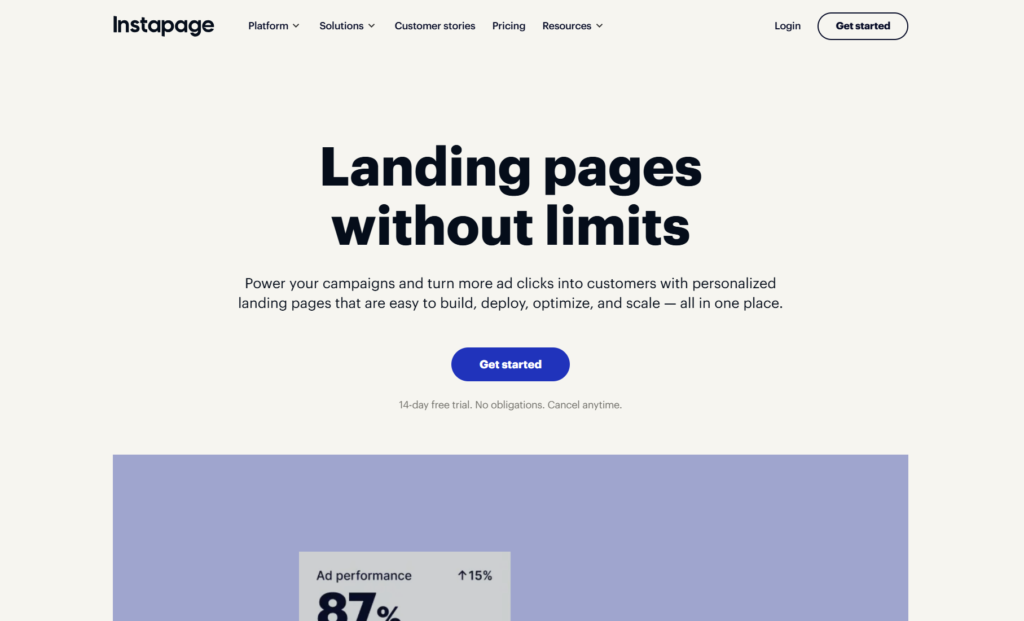
Since being acquired by airSlate in 2023, Instapage has doubled down on its core mission, providing marketers with the tools to build, personalize, and optimize landing pages at scale without needing developers or designers. The platform is particularly popular among marketing agencies, PPC managers, and growth teams running paid advertising campaigns on Google Ads, Facebook, and other channels.
Key capabilities that define Instapage:
- Drag-and-drop builder designed specifically for landing pages
- Built-in A/B testing and experimentation tools
- Heatmaps and conversion analytics
- Dynamic text replacement for personalized experiences
- AdMap feature for connecting ads to specific landing pages
- AI-powered content generation
- Instablocks for reusable content sections
- Collaboration tools with Slack-style commenting
The platform is built around a simple philosophy: every element on your landing page should drive conversions. There are no distractions, no blogging features, no e-commerce carts, just pure, focused landing page creation and optimization.
What Is Webflow? (And Who It’s Really For)
Webflow takes a completely different approach. It’s a full-fledged website experience platform that lets you build everything from simple portfolio sites to complex e-commerce stores and multi-page corporate websites, all without writing code.
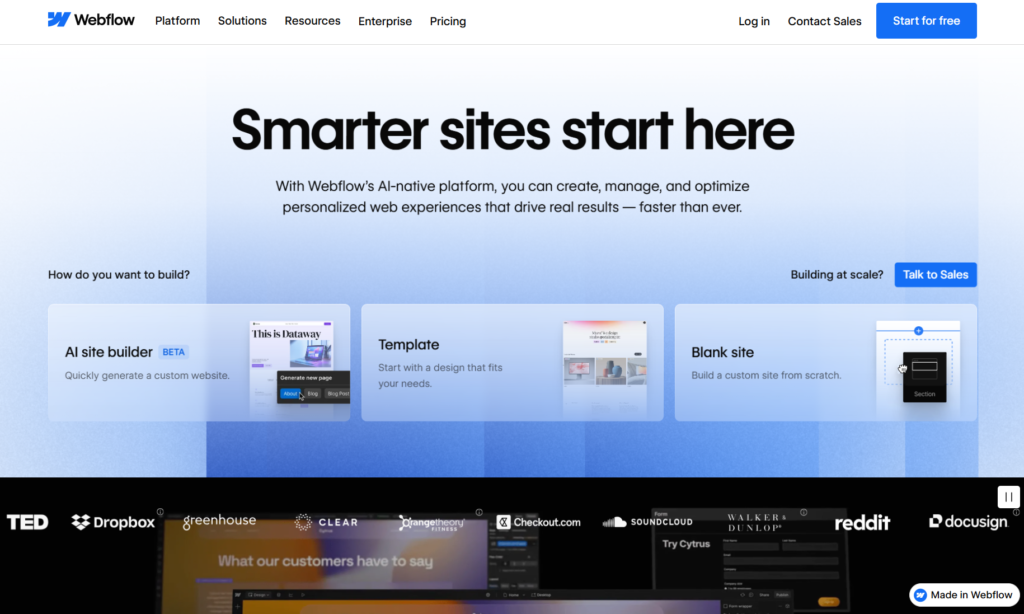
Think of Webflow as the designer’s playground. It gives you the power to create custom websites with pixel-perfect control over every element, animation, and interaction. The platform has become incredibly popular among web designers, creative agencies, and businesses that want complete design freedom without the limitations of traditional website builders.
What makes Webflow stand out:
- Visual development environment with full HTML/CSS control
- Integrated CMS for managing dynamic content
- Advanced animations and interactions
- E-commerce functionality with customizable checkout
- Responsive design tools for all device sizes
- SEO-friendly clean code output
- Hosting included with AWS infrastructure
- Reusable components and design systems
Webflow has powered over 3.5 million sites globally as of 2026, and it’s particularly beloved by designers who want the flexibility of custom code without actually having to write it. The learning curve is steeper than Instapage, but the creative possibilities are virtually limitless.
Instapage vs Webflow: Pricing Breakdown
Let’s talk money, because pricing is often the deciding factor for many businesses. Both platforms have restructured their pricing in recent years, and understanding what you’re actually paying for is crucial.
Instapage Pricing Structure
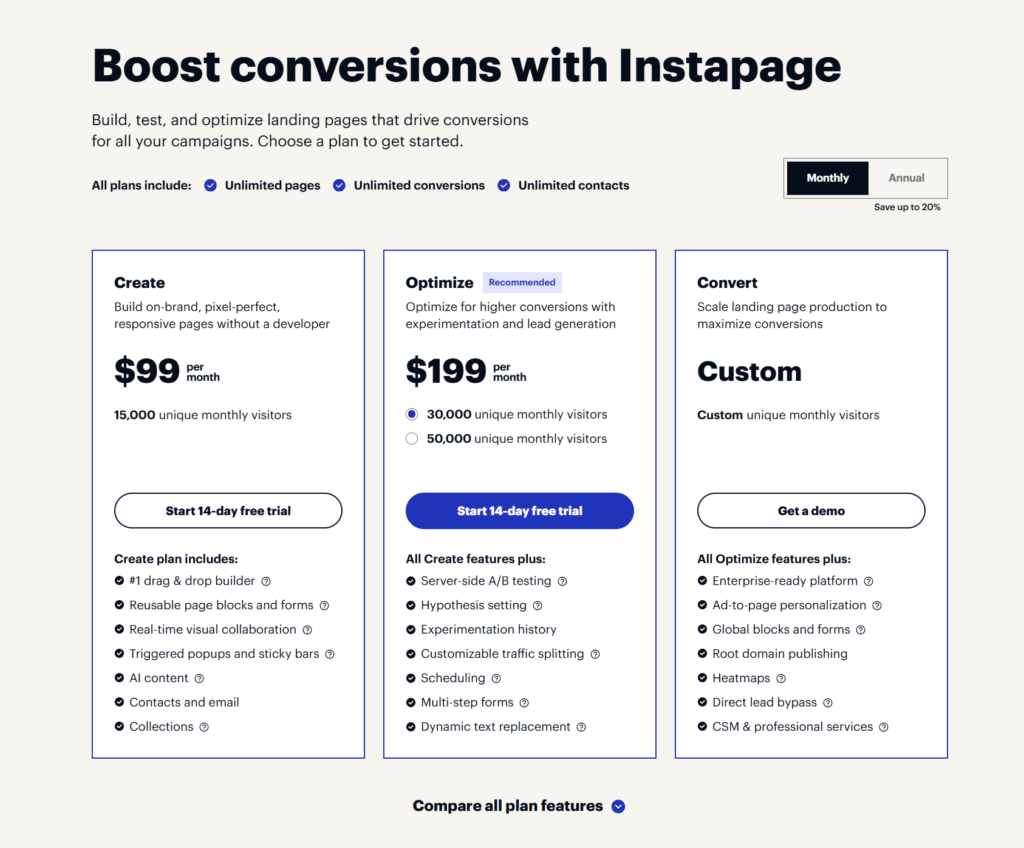
As of 2026, Instapage offers three main pricing tiers:
Create Plan: $99/month
- Unlimited landing pages
- 15,000 unique monthly visitors
- Drag-and-drop builder with AI content
- Reusable page blocks and forms
- Real-time visual collaboration
- Triggered popups and sticky bars
- Contacts and email management
- Collections
Optimize Plan: $199/month (Recommended)
- Everything in Create plan
- 30,000 or 50,000 unique monthly visitors (selectable)
- Server-side A/B testing
- Hypothesis setting
- Experimentation history
- Customizable traffic splitting
- Scheduling capabilities
- Multi-step forms
- Dynamic text replacement
Convert Plan: Custom pricing (requires contacting sales)
- Everything in Optimize plan
- Enterprise-ready platform
- Ad-to-page personalization
- Global blocks and forms
- Root domain publishing
- Heatmaps
- Direct lead bypass
- CSM & professional services
- Custom visitor limits
All plans include unlimited pages, unlimited conversions, and unlimited contacts. A 14-day free trial is available for all plans.
The hidden costs: Watch out for visitor limits. If you exceed your plan’s monthly visitor limit, you’ll need to upgrade to the next tier or the custom Convert plan. For agencies managing multiple client accounts, costs can add up quickly since each workspace requires its own subscription.
Webflow Pricing Structure
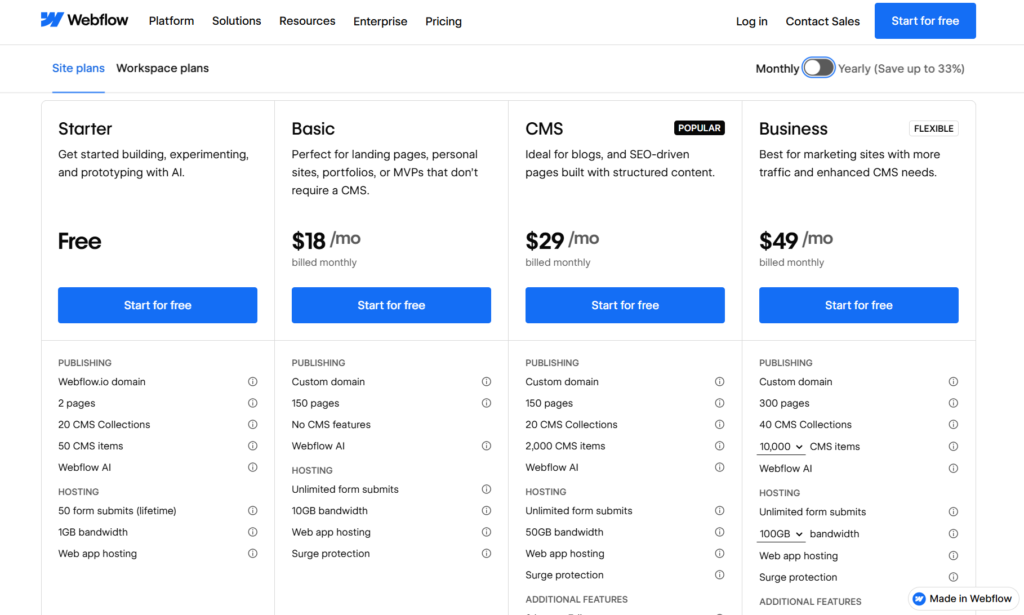
Webflow’s pricing is more complex because it separates site plans from workspace plans. Here’s what you need to know:
Site Plans (per site, per month):
- Starter: Free (Webflow.io subdomain only, cannot publish to custom domain)
- Basic: $14/month (ideal for simple static sites, no CMS)
- CMS: $23/month (for blogs and content-driven sites with up to 2,000 CMS items)
- Business: $39/month (for high-traffic sites with advanced features)
- Enterprise: Custom pricing (for large organizations needing SLA and SSO)
E-commerce Plans (if selling products):
- Standard: $29/month (up to 500 products, 2% transaction fee)
- Plus: $74/month (up to 1,000 products, 0% transaction fees)
- Advanced: $212/month (up to 3,000 products, advanced features)
Workspace Plans (for team collaboration):
- Starter: Free (limited features)
- Core: $19/month per seat (for small teams)
- Growth: $49/month per seat (enhanced staging and collaboration)
- Enterprise: Custom pricing
The complexity factor: With Webflow, you’re paying for both your site plan AND your workspace plan if you need team features. A typical marketing site with CMS capabilities and two team members would cost around $23/month (site plan) + $38/month (two Core workspace seats) = $61/month minimum.
Which Offers Better Value?
This depends entirely on what you’re building:
- For a dedicated landing page: Instapage starts at $99/month for basic needs (15,000 visitors) and $199/month for optimization features like A/B testing. While more expensive than basic website builders, it includes unlimited landing pages and conversion tools that would cost extra elsewhere. If you’re running multiple campaigns and need experimentation capabilities, the Optimize plan offers solid value.
- For complete websites: Webflow offers better value, with sites starting at just $14/month. However, costs escalate quickly when you add CMS functionality, e-commerce, and team collaboration.
- For agencies: Both platforms can get pricey. Webflow’s per-seat workspace pricing adds up with larger teams, while Instapage requires separate subscriptions for each client workspace. However, Instapage’s Create plan at $99/month makes it more accessible for smaller agencies or those just starting out.
The real question isn’t which is cheaper, but which gives you better ROI for your specific use case.
Ease of Use: Which Platform Has the Gentler Learning Curve?
When you’re investing time and money into a platform, you want to know: how quickly can I actually start creating?
Instapage Ease of Use
Winner for speed and simplicity
Instapage was built with marketers in mind, not developers. The interface is clean, intuitive, and you can have a landing page live within minutes—even if you’ve never built one before.
Why it’s easier:
- Pre-built templates designed for specific use cases (webinar registration, product launches, e-book downloads, etc.)
- Drag-and-drop builder with clear, marketing-focused elements
- AI content generation helps you write copy faster
- Instablocks let you save and reuse sections across pages
- Less overwhelming because it focuses solely on landing pages
Most users can create their first professional landing page within 30-60 minutes. The platform doesn’t try to do everything, which actually makes it less intimidating for beginners.
The catch: While it’s easy to use, the customization options are more limited compared to Webflow. You’re working within guardrails that keep things simple but may feel restrictive for designers who want pixel-perfect control.
Webflow Ease of Use
Powerful but with a significant learning curve
Webflow is like learning to drive a sports car instead of a standard sedan. Yes, it’s more powerful and can do amazing things, but you’ll need practice before you’re comfortable behind the wheel.
The challenges:
- Steeper learning curve, especially if you’re not familiar with web design concepts
- You need to understand how CSS works (flexbox, grid, positioning) to use it effectively
- Manually configuring responsive design for different screen sizes takes time
- More buttons, panels, and options can feel overwhelming initially
The payoff:
Once you invest time in learning Webflow, you unlock incredible design freedom. Many users report it takes 1-2 weeks of regular use before they feel truly comfortable. Webflow University (their free learning platform) has excellent tutorials that help flatten the learning curve.
Who finds it easier: If you have any background in graphic design, HTML/CSS, or have used tools like Adobe XD or Figma, you’ll pick up Webflow faster. Complete beginners should expect a few weeks of learning.
The Verdict
For getting a landing page up quickly: Instapage wins. For building a complete website with custom design: Webflow wins (but requires more initial learning).
Design Flexibility and Customization: Freedom vs. Guardrails
This is where the fundamental difference between these platforms becomes crystal clear.
Instapage: Optimized Templates with Guided Customization
Instapage offers hundreds of professionally designed templates that are specifically built for conversions. These aren’t just pretty designs, they’re based on conversion best practices and tested layouts.
What you can customize:
- Colors, fonts, and branding elements
- Images and background videos
- Form fields and buttons
- Section layouts using drag-and-drop
- Mobile responsiveness (automatic)
What you can’t easily do:
- Create completely custom layouts from scratch
- Add complex animations or interactions
- Build multi-page websites
- Significantly alter template structure
Instapage gives you guardrails. This is intentional. The platform wants to keep you focused on conversion optimization rather than spending hours tweaking pixel-perfect designs. For marketers who value speed over complete creative freedom, this approach works beautifully.
Webflow: Unlimited Design Possibilities
Webflow is the opposite. It’s a blank canvas where you have complete control over every aspect of your design.
What you can create:
- Completely custom layouts from scratch
- Complex animations and micro-interactions
- Custom hover effects and page transitions
- Parallax scrolling and advanced effects
- Responsive designs tailored for every device
- Multi-page websites with interconnected CMS content
The power of Webflow’s customization:
You can literally recreate any website you see on the internet. Award-winning agency websites, elaborate portfolio sites, complex SaaS homepages—if you can imagine it, Webflow can build it (without code).
The trade-off:
With great power comes great responsibility. You’re responsible for making sure your design actually converts, is accessible, loads quickly, and looks good on all devices. Webflow gives you the tools but doesn’t hold your hand.
Which Approach Is Better?
Choose Instapage if: You want proven, conversion-focused templates that you can customize with your branding and launch quickly. You value marketing effectiveness over design uniqueness.
Choose Webflow if: You want complete creative control and are willing to invest time into crafting custom designs. You need to build something that stands out visually and can’t be created with templates.
Conversion Optimization Tools: Where Instapage Truly Shines
This is Instapage’s bread and butter. The entire platform is built around one goal: helping you convert more visitors into leads and customers.
Built-in Conversion Features in Instapage
A/B Testing: Run experiments to test different headlines, images, calls-to-action, or entire page layouts. The platform includes server-side testing that doesn’t slow down your pages and provides statistically significant results.
Heatmaps: See exactly where visitors are clicking, how far they’re scrolling, and which elements are getting attention. This visual data helps you identify friction points and optimization opportunities.
Dynamic Text Replacement: Automatically change headlines and content based on the search keywords or ad copy that brought visitors to your page. If someone clicks an ad about “organic dog food,” the landing page headline can dynamically insert “organic dog food” for perfect message match.
Analytics Dashboard: Track conversion rates, form submissions, bounce rates, and other key metrics without needing Google Analytics. The built-in analytics are specifically designed for landing page performance.
AdMap: Visualize the connection between your ad campaigns and landing pages, making it easy to ensure message consistency and track which combinations perform best.
Form Analytics: See which form fields cause drop-offs, how long people spend on each field, and where they abandon the form. This granular data helps you optimize for higher form completion rates.
Conversion Tools in Webflow
Here’s where it gets interesting: Webflow doesn’t include built-in conversion optimization tools. It’s a website builder, not a conversion optimization platform.
What you need to add:
- A/B testing requires third-party tools like Google Optimize or VWO
- Heatmaps require tools like Hotjar or Crazy Egg
- Form analytics need separate integrations
- Advanced personalization requires custom code or external platforms
The SEO advantage:
Where Webflow does excel is SEO. The platform generates clean, semantic HTML that search engines love. You have complete control over meta tags, alt text, structured data, sitemaps, and 301 redirects. This makes Webflow excellent for long-term organic traffic growth, even if it lacks built-in conversion testing.
The Reality Check
If conversion rate optimization is a core part of your marketing strategy, Instapage’s built-in tools save you from subscribing to multiple additional services.
The Optimize plan ($199/month) includes A/B testing, multi-step forms, dynamic text replacement, and experimentation features, tools that would cost $100-300/month if purchased separately through third-party services. For serious conversion optimization work, you’ll likely need the Convert plan for heatmaps and advanced personalization features.
Webflow requires you to piece together conversion tools from different vendors, which can be both more complex and potentially more expensive once you add up all the subscriptions.
Use Cases: When to Choose Instapage vs Webflow
Let’s get practical. Which platform should you choose based on what you’re actually trying to build?
Choose Instapage When:
1. You’re Running Paid Advertising Campaigns If you’re spending money on Google Ads, Facebook Ads, LinkedIn Ads, or other PPC channels, Instapage is specifically built to maximize your ad spend ROI. The ability to create dedicated landing pages for each campaign, test different versions, and track performance makes it ideal for paid media.
2. You Need to Launch Landing Pages Quickly Marketing moves fast. When you need to create a webinar registration page, product launch landing page, or lead magnet opt-in within hours (not days), Instapage’s template library and simple builder get you there faster.
3. You’re Focused on Conversion Rate Optimization If A/B testing, personalization, and conversion analytics are critical to your marketing strategy, Instapage includes these tools out of the box. You won’t need to integrate multiple third-party services.
4. You’re a Marketing Team Without Design Resources Instapage was built for marketers, not designers. If your team doesn’t have dedicated web designers or developers, Instapage empowers you to create professional landing pages without technical help.
5. You Want Marketing Campaign Consistency Features like Instablocks and Collections make it easy to maintain brand consistency across dozens or hundreds of landing pages, which is essential for larger marketing operations.
Choose Webflow When:
1. You’re Building a Complete Website If you need a multi-page website with a homepage, about page, services pages, blog, and contact page, Webflow is the clear choice. Instapage simply isn’t designed for this purpose.
2. You Need Full Design Control Creative agencies, design studios, and businesses that want their website to be a visual showcase should choose Webflow. The design flexibility is unmatched among no-code platforms.
3. You’re Building an E-commerce Store While Instapage can’t handle product catalogs and checkouts, Webflow includes comprehensive e-commerce functionality. You can build custom product pages, shopping carts, and checkout experiences.
4. You Want to Manage Content Long-term Webflow’s CMS is perfect for blogs, portfolios, case studies, and any content that needs to be regularly updated. Editors can add new content without touching the design.
5. SEO Is Your Primary Growth Channel If you’re focused on organic search traffic rather than paid advertising, Webflow’s SEO capabilities and clean code output give you an advantage in ranking for competitive keywords.
6. You Have Design Skills or Resources If you or your team members have web design experience or are willing to invest time learning, Webflow’s power becomes a huge advantage rather than a hindrance.
The Hybrid Approach (Yes, You Can Use Both)
Some businesses actually use both platforms:
- Webflow for their main website (homepage, about, services, blog)
- Instapage for dedicated campaign landing pages and paid ad funnels
This gives you the design flexibility of Webflow for your evergreen site while leveraging Instapage’s conversion optimization for time-sensitive campaigns. It does mean managing two platforms and paying for both, but for some marketing operations, this combination provides the best of both worlds.
Performance and Speed: Which Loads Faster?
Page speed matters. Google uses it as a ranking factor, and more importantly, slow pages kill conversions. According to recent studies, a one-second delay in page load time can reduce conversions by 7%.
Instapage Performance
Built for speed:
- Optimized templates designed to load quickly
- Image compression and lazy loading
- Built on solid infrastructure with global CDN
- AMP (Accelerated Mobile Pages) support
- Average load time: 1.5-2.5 seconds
Instapage landing pages generally load fast because they’re single-page destinations without excessive bloat. The platform’s focus on conversion means performance optimization is baked in.
Webflow Performance
Speed depends on your design:
- Hosted on Amazon Web Services (AWS) with global CDN
- Clean, semantic code output
- Image optimization tools available
- Average load time: 2-4 seconds (highly dependent on your design choices)
Here’s the thing with Webflow: because you have complete control over your design, you also have complete responsibility for performance. Add too many large images, complex animations, or custom scripts, and your site can slow down significantly.
However, experienced Webflow developers can create blazingly fast sites by following best practices—proper image optimization, lazy loading, efficient CSS, and minimizing JavaScript.
Performance Verdict
Instapage: More consistent performance out of the box because templates are pre-optimized. Less risk of creating slow pages.
Webflow: Can achieve excellent performance with proper optimization, but requires more knowledge and attention. More risk if you don’t follow best practices.
For marketers who just want fast pages without thinking about it: Instapage wins. For developers who want control over every performance optimization: Webflow offers more power.
Integrations and Marketing Stack Compatibility
No platform exists in isolation. You need your landing page or website to connect with your email marketing, CRM, analytics, and other tools.
Instapage Integrations
Instapage focuses on marketing integrations:
Popular connections include:
- CRM systems: Salesforce, HubSpot, Marketo, Pardot
- Email marketing: Mailchimp, ActiveCampaign, Constant Contact
- Advertising platforms: Google Ads, Facebook Pixel, LinkedIn Insight Tag
- Analytics: Google Analytics, Adobe Analytics
- Webinar platforms: GoToWebinar, Zoom, WebinarJam
- Payment processing: Stripe, PayPal
The platform offers 120+ integrations specifically chosen to support digital advertising and marketing workflows. Most integrations are straightforward—connect your account, map your form fields, and data flows automatically.
Webflow Integrations
Webflow takes a broader approach:
Integration categories:
- CMS: WordPress import, content migration tools
- E-commerce: Shopify integrations, payment gateways (Stripe, PayPal)
- Marketing automation: Zapier for connecting virtually any tool
- Analytics: Google Analytics, Facebook Pixel, custom tracking codes
- Forms: Airtable, Google Sheets, email platforms
- Chat: Intercom, Drift, other live chat tools
Webflow’s strength is flexibility through custom code. You can add virtually any third-party JavaScript snippet or tracking code. The Zapier integration opens up thousands of additional connection possibilities.
Integration Comparison
Instapage: Fewer total integrations, but they’re specifically chosen and optimized for marketing use cases. Setup is generally simpler.
Webflow: Broader integration possibilities through custom code and Zapier. More flexibility but sometimes requires more technical setup.
For most marketing teams using standard tools (Google Analytics, Mailchimp, HubSpot), both platforms will connect easily. Webflow has an edge if you need unusual or custom integrations.
Team Collaboration and Workflow Features
If you’re working with a team, collaboration features matter a lot.
Instapage Collaboration
Built for marketing teams:
- Slack-style commenting directly on page elements
- Approval workflows for campaigns
- Multiple user roles and permissions
- Client access for feedback without editing rights
- Revision history to track changes
- Workspace management for agencies handling multiple clients
The commenting feature is particularly useful—team members can leave feedback directly on specific page elements, making revision rounds much clearer than email chains.
Webflow Collaboration
Designed for design teams:
- Multiple workspace seats (paid add-on)
- Role-based permissions
- Staging environments for testing changes
- Site transfer capabilities
- Client billing for hand-off
- Legacy Editor mode for client content updates
Webflow’s collaboration is strong but can get expensive. Each team member needs a workspace seat ($19-49/month per person depending on the plan), which adds up quickly for larger teams.
The Editor mode dilemma: Webflow is deprecating its legacy Editor (client-friendly content management mode) in favor of their new edit mode, which requires users to be more technically savvy. This is causing some frustration in the community.
Collaboration Verdict
For marketing teams: Instapage’s collaboration features are more intuitive and marketing-focused. The commenting system and approval workflows are excellent.
For design agencies: Webflow offers more sophisticated version control and staging environments, but the per-seat pricing can become expensive.
Support and Learning Resources
When you run into problems or need to learn a new feature, quality support matters.
Instapage Support
What’s included:
- Email and chat support (response times vary by plan)
- Extensive knowledge base
- Video tutorials and guides
- Dedicated customer success manager (on higher-tier plans)
- Regular webinars and training sessions
User feedback: Support quality is generally rated well (8.6/10 on G2), with users praising helpful responses. However, some users report slower response times on basic plans and occasional difficulties getting complex issues resolved.
Webflow Support
What’s included:
- Community forum (very active and helpful)
- Webflow University (comprehensive free video courses)
- Email support (paid plans)
- Priority support (Enterprise plans)
- Extensive documentation
The community advantage: Webflow has an incredibly active community. The forum, YouTube tutorials from community members, and third-party courses mean you can usually find answers to questions quickly—often faster than waiting for official support.
User feedback: Enterprise customers with dedicated support are very satisfied, but basic plan users sometimes feel support is limited. The trade-off is that the community resources are exceptional.
Support Verdict
Instapage: More hands-on support included, especially on higher tiers. Better if you want direct help from the company.
Webflow: Stronger community and learning resources. Better if you prefer self-service learning with peer support.
Real User Experiences and Reviews (2026)
Let’s look at what actual users are saying about both platforms:
Instapage User Sentiment
What users love:
- “Fast landing page creation without developers” (mentioned repeatedly)
- “Built-in A/B testing is worth the price”
- “Templates actually convert well”
- “Perfect for PPC campaigns”
Common complaints:
- “Expensive, especially for small businesses” (38% of cost-related reviews)
- “Visitor limits feel restrictive on lower tiers”
- “Need to upgrade to Optimize plan for A/B testing”
- “Limited design flexibility compared to custom code”
- “Costs add up quickly for agencies with multiple clients”
Average ratings (2026):
- G2: 4.5/5 stars
- Capterra: 4.7/5 stars
- GetApp: 4.5/5 stars
Value-for-money rating: 4.0/5 (lower than category average of 4.5)
Webflow User Sentiment
What users love:
- “Complete design freedom”
- “Clean code export”
- “Powerful CMS for dynamic content”
- “Fast hosting on AWS”
- “Webflow University is incredible”
Common complaints:
- “Steep learning curve for beginners”
- “Pricing increased significantly (70% for some plans)”
- “Workspace seat pricing adds up quickly”
- “No built-in A/B testing or conversion tools”
Average ratings (2026):
- G2: 4.5/5 stars
- Capterra: 4.5/5 stars
Controversy: Webflow’s December 2024 pricing restructure (taking effect through early 2026) caused significant community backlash. The shift from $35 to $60/month for pro users represented a 70% increase, and many freelancers felt forced into plans designed for agencies.
What This Tells Us
Both platforms are well-rated, but user satisfaction depends heavily on use case. Instapage users who need conversion tools are happy despite high costs. Webflow users who invested in learning the platform love the creative freedom but are frustrated by rising prices.
The Bottom Line: Which One Should You Choose?
After examining every angle, pricing, features, ease of use, performance, and real user experiences, here’s the straight answer:
Choose Instapage If:
Best for: Digital marketers, PPC specialists, marketing agencies, growth teams, and businesses running active paid advertising campaigns.
Choose Webflow If:
Best for: Web designers, creative agencies, SaaS companies, businesses prioritizing SEO, portfolio sites, and anyone building a full website rather than campaign-specific landing pages.
The Hybrid Strategy
For businesses with both needs:
- Use Webflow for your main website (homepage, about, services, blog, etc.)
- Use Instapage for campaign-specific landing pages (ad campaigns, lead magnets, webinar registrations)
This approach maximizes the strengths of both platforms but requires managing two subscriptions and learning two tools.
Final Thoughts: Which Platform Is Worth Your Money?
The answer to “which is worth your money” isn’t universal, it’s personal to your specific situation.
Instapage is worth it when: You’re spending significant money on paid advertising and need to maximize ROI through conversion optimization. A 5% increase in conversion rate on a campaign spending $10,000/month yields $500 more in monthly value—easily justifying the $99-199/month cost depending on your needs. The Create plan offers an accessible entry point, while the Optimize plan provides serious conversion testing tools for growing campaigns.
Webflow is worth it when: You’re building a website that needs to exist long-term, serve multiple purposes, and represent your brand with a unique design. The investment of time to learn the platform pays dividends in creative control and flexibility.
Neither is worth it when you just need a simple one-page site with no special requirements. In that case, more affordable alternatives like Leadpages ($37/month), Unbounce ($99/month), or even Carrd ($19/year) might better suit your needs. Instapage’s Create plan at $99/month could work for basic landing pages, but simpler tools may be sufficient if you don’t need advanced features.
The real question isn’t which platform is better—they’re both excellent at what they do. The question is: what are you actually trying to build, and which tool is designed for that specific job?
Make your choice based on your primary use case, not on what might be useful “someday.” Start with the platform that solves your biggest problem today, and if your needs expand later, you can always add the other tool to your stack.
Frequently Asked Questions About Instapage vs Webflow
What is the main difference between Instapage and Webflow?
The main difference is their core purpose: Instapage is a specialized landing page platform designed exclusively for creating high-converting landing pages for marketing campaigns, while Webflow is a comprehensive website builder for creating complete multi-page websites. Instapage focuses on conversion optimization with built-in A/B testing, heatmaps, and dynamic text replacement.
Webflow provides full design freedom and website-building capabilities, including CMS, e-commerce, and blog functionality. If you need dedicated landing pages for paid ads, choose Instapage. If you’re building a complete website, choose Webflow.
How much does Instapage cost compared to Webflow?
Instapage pricing starts at $99/month for the Create plan (15,000 monthly visitors), $199/month for the Optimize plan with A/B testing (30,000-50,000 visitors), and custom pricing for the Convert plan.
Webflow’s site plans start at $14/month for basic sites, $23/month for CMS sites, and $39/month for business sites. However, Webflow also requires workspace plans ($19-49/month per team member) for collaboration.
While Webflow appears cheaper initially, Instapage includes conversion optimization tools that would cost extra with Webflow through third-party integrations.
Can you build a full website with Instapage?
No, you cannot build a full multi-page website with Instapage. The platform is specifically designed for creating individual landing pages, not complete websites with navigation menus, multiple interconnected pages, and site-wide content management.
Instapage doesn’t offer features like multi-page architecture, blog functionality, or website navigation systems.
If you need a complete website, Webflow is the appropriate choice. Some businesses use both platforms together, Webflow for their main website and Instapage for campaign-specific landing pages.
Which platform is better for SEO: Instapage or Webflow?
Webflow is significantly better for SEO than Instapage. Webflow generates clean, semantic HTML code, provides complete control over meta tags, allows custom structured data, offers built-in XML sitemaps, and supports 301 redirects for proper URL management.
The platform is designed for building content-rich websites that rank organically in search engines. Instapage has basic SEO features suitable for landing pages but lacks the comprehensive SEO tools needed for long-term organic growth. If SEO is your primary traffic strategy, choose Webflow.
If you’re focused on paid advertising campaigns, Instapage’s conversion tools are more valuable.
Does Instapage have A/B testing built-in?
Yes, Instapage includes built-in A/B testing, but only on the Optimize plan ($199/month) and higher. The Create plan ($99/month) does not include A/B testing capabilities.
The testing features include server-side split testing, hypothesis setting, experimentation history, customizable traffic splitting, and scheduling. Webflow does not include built-in A/B testing, you’ll need to integrate third-party tools like Google Optimize, VWO, or Optimizely.
If conversion rate optimization through testing is essential to your strategy, Instapage’s Optimize or Convert plans provide these tools in one platform without requiring additional subscriptions.
Which is easier to learn: Instapage or Webflow?
Instapage is significantly easier to learn than Webflow. Most users can create their first professional landing page in Instapage within 30-60 minutes using the drag-and-drop builder and pre-designed templates.
The interface is straightforward and designed for marketers without technical backgrounds. Webflow has a much steeper learning curve, typically requiring 1-2 weeks of regular practice before users feel comfortable.
Webflow requires understanding web design concepts like CSS flexbox, grid layouts, and responsive design. However, this complexity gives you far more design control. Choose Instapage if you need to launch quickly without design expertise, or Webflow if you’re willing to invest learning time for complete creative freedom.
Read more related articles:
Unbounce Coupon Code: Get Upto 35% OFF